Repository navigation
Getting Started
Atom Rendering Engine is two crates, added by path (they are not on crates.io):
[dependencies]
pmre-kit = { path = "../atom-rendering-engine/pmre-kit" }
pmre-orchestrator = { path = "../atom-rendering-engine/pmre-orchestrator" }
The crate names are still
pmre-*(the engine's earlier name); only the project/repo is named Atom Rendering Engine. This has no effect on behaviour.
use pmre_kit::{Dim, Edges, Rgba, Style, UxNode};
use pmre_orchestrator::render_uxi;

fn main() {
    let ui = UxNode::boxed(
        Style::col()
            .w(Dim::Flex(1.0))
            .h(Dim::Flex(1.0))
            .pad(Edges::all(24.0))
            .gap(12.0)
            .bg(Rgba::rgb8(24, 24, 27)),
        vec![
            UxNode::text("Hello from Atom Rendering Engine", 24.0, Rgba::rgb8(250, 250, 250)),
            UxNode::text("laid out, rasterized, and composited on the CPU",
                         14.0, Rgba::rgb8(161, 161, 170)),
        ],
    );
    let fb = render_uxi(&ui, 640, 360, Rgba::rgb8(9, 9, 11));
    std::fs::write("hello.bmp", fb.to_bmp(Rgba::rgb8(9, 9, 11))).unwrap();
}
Framebuffer::to_bmp needs no image crate — the BMP encoder is built in. Framebuffer::to_u32
produces 0x00RRGGBB pixels ready for any OS blit (StretchDIBits, softbuffer-style surfaces).
Each headless example writes a .bmp to the working directory:
cargo run -p pmre-orchestrator --example demo        # SDF shapes
cargo run -p pmre-orchestrator --example paths       # fills: star, donut (hole), Bézier blob
cargo run -p pmre-orchestrator --example stroke      # strokes: outlined star, polyline, curve
cargo run -p pmre-orchestrator --example gradients   # linear + radial gradients
cargo run -p pmre-orchestrator --example html        # HTML/CSS reduced to primitives
cargo run -p pmre-orchestrator --example calc        # a working calculator (real app)
cargo run -p pmre-orchestrator --example todo        # a todo app (real app)
The todo example, rendered by the engine:
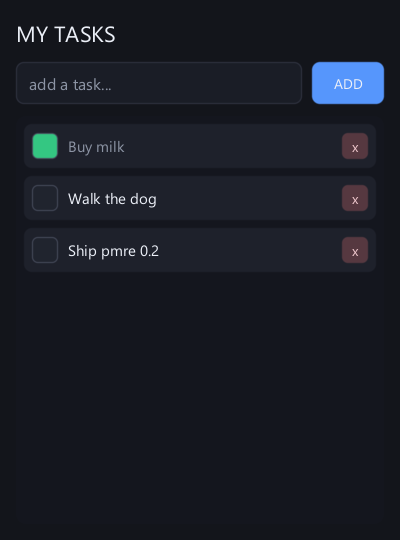
cargo run -p pmre-orchestrator --example appA real, DPI-aware OS window driven by raw Win32/GDI FFI — no winit, no softbuffer, no crates.
Type tasks, press Enter to add, click a circle to check one off, x to delete, and scroll
with the wheel or by dragging the scrollbar. Keys 1–9 switch the post-processing quality tiers;
the title bar shows the frame time and FPS.
The CPU path needs nothing and is fast (well past 60 fps for typical UI). If you want the
GPU-accelerated bloom tier, enable the feature — it is the only thing that pulls wgpu:
pmre-orchestrator = { path = "...", features = ["gpu"] }Without the feature, Quality::Gpu* transparently falls back to the CPU bloom (identical output),
so your code compiles and runs either way.
The vector text tier finds a system .ttf automatically (Segoe UI → Arial → Tahoma → Calibri →
Verdana on Windows; DejaVu/Liberation on Linux; Arial/Helvetica on macOS). Override it with the
PMRE_FONT / PMRE_FONT_BOLD environment variables pointing at explicit .ttf/.ttc paths.
With no font file present (bare containers, CI), a built-in 5×7 bitmap font keeps everything
rendering.
cargo test --workspace
cargo clippy --workspace --all-targets -- -D warnings
Created by Jesse G. Alicea, a Lucerna Labs project.