

A binary Zsh module that compiles every script you source. Load it with zmodload, and it replaces the source and
. builtins. Each sourced script gets compiled to a .zwc file, and later loads read the compiled file. The module
also records how long each source call takes. It works with Zinit or any other plugin manager.
Many plugin managers do not compile plugins. Zinit compiles the main file of a plugin, but that file often sources
helper scripts or libraries. The geometry-zsh/geometry prompt is one example. Without the module, you must list each
helper file in a compile ice to get it compiled.
- Zsh with dynamic module support.
- A C compiler (
clangorgcc),make,git,curlorwget, andtarwith xz support. - Access to zsh.org. For a build without network access, see Choose the Zsh to match.
Tests cover Zsh 5.8, 5.9, and 5.9.2 on macOS. The module also compiles against Zsh 5.5.1, 5.6.2, 5.7.1, 5.8.1, and 5.9.1.
A module must match the internals of the Zsh that loads it. ./configure asks the zsh on your PATH for its version.
Then it downloads that Zsh release from zsh.org into .build/ and compiles the module against it. After a Zsh upgrade,
rebuild the module. A new Zsh release needs no change in this repository.
Some Zsh versions have no release tarball, such as a git build that reports 5.9.2-dev-0. For these, ./configure uses
the newest older release and prints a warning.
zinit module buildThe command clones or updates the module in ${ZINIT[MODULE_DIR]}, which defaults to ${ZINIT[HOME_DIR]}/module. Then
it runs ./configure and make for the zsh on your PATH, and prints the two lines to add to ~/.zshrc. Run
zinit module info to print them again. Add --clean to run make distclean before the build.
The build runs git clean and git reset --hard in the module directory. Do not keep local changes there.
sh -c "$(curl -fsSL https://raw.githubusercontent.com/zdharma-continuum/zinit-module/HEAD/scripts/mod-install.sh)"The script clones the repository to ${ZDOTDIR:-$HOME}/.zinit/mod-bin and builds it. Run it again to update and
rebuild.
The script prints zdharma-continuum/zinit as the module name. The correct name has an underscore:
zdharma_continuum/zinit. Use the lines in Load the module.
git clone https://github.com/zdharma-continuum/zinit-module.git
cd zinit-module
./configure
make
The build writes the module to Src/zdharma_continuum/zinit.so. On macOS, it also writes zinit.bundle. Homebrew Zsh
loads .bundle files, and the system Zsh (/bin/zsh) loads .so files.
| Option | Effect |
|---|---|
--with-zsh=PATH |
Match this Zsh binary instead of the zsh on your PATH. |
--with-zsh-version=X.Y.Z |
Build against this Zsh version. No Zsh binary is necessary. |
--with-zsh-source=FILE |
Use a Zsh release tarball that you downloaded. No network access. |
For example, if you load the module into the macOS system Zsh but have Homebrew Zsh first on your PATH, run:
./configure --with-zsh=/bin/zsh
makeAdd these lines at the top of ~/.zshrc, before Zinit and any plugins. Replace the path with the Src directory of
your module checkout. zinit module build prints the exact path.
module_path+=( "$HOME/.local/share/zinit/module/Src" )
zmodload zdharma_continuum/zinit
Check that the module loaded:
zmodload | grep zdharma_continuum/zinit
zpmod -h
To unload the module and restore the original source and . builtins, run:
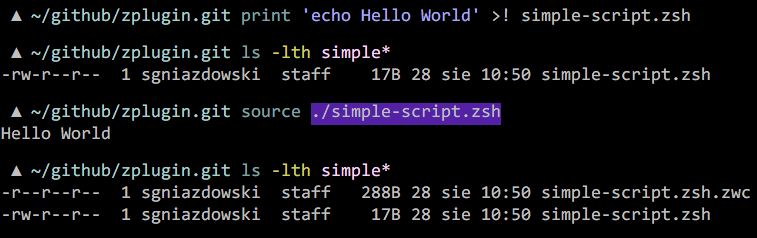
zmodload -u zdharma_continuum/zinitWhen you source a file, the module compiles it to file.zwc if the .zwc file is missing or not newer than the script.
It compares modification times to the nanosecond where the system supports it. It compiles only when it can write to the
directory of the script. Then it loads the .zwc file. If no current .zwc file exists, the module sources the plain
script.
Aliases that exist when you run source expand in the compiled script, as they do in a plain source. The .zwc file
keeps those aliases until the script changes. Zsh compiles the whole file before it runs any line. An alias that the
script defines therefore does not apply to later lines of the same script. Compiled scripts see file at the end of
$ZSH_EVAL_CONTEXT, as plain scripts do.
zpmod source-study
zpmod source-study -l
zpmod source-study lists every file loaded with source or ., with the load time in milliseconds. The -l option
shows full paths. Load the module at the top of ~/.zshrc to profile the whole shell startup.
zpmod report-append {plugin-ID} {text}This command appends text to ZINIT_REPORTS[{plugin-ID}]. It fails if Zinit is not loaded or if the plugin has no
report entry.
typeset -g ZINIT_MOD_DEBUG=1With this variable set to 1, the module tries to compile scripts in directories that it cannot write to. It also warns
when it cannot read a script.
If zmodload fails after a Zsh upgrade, rebuild the module.
See CONTRIBUTING.md.