


A curated collection of PowerShell scripts for everyday tasks: Azure management, development tooling, container management, RSS reading, system administration, and more.
Scripts are organized into folders by topic. Add the root folder (and all subfolders) to your system PATH using the provided Add-DirToSystemEnv.ps1 script so you can call any script by name from any directory.
| Folder | Description | README |
|---|---|---|
| Azure | Azure management scripts (VMs, networking, App Insights, email) | Azure/README.md |
| Codez | Development tools (build cleanup, Git pull, cheat sheets, containers) | Codez/README.md |
| Containers | Docker container management (SQL Server in containers) | Containers/README.md |
| Kubernetes | Kubernetes command references | Kubernetes/README.md |
| Office | Office document automation (extract images from Word) | Office/README.md |
| Profiles | PowerShell profile configuration | Profiles/README.md |
| Random | Miscellaneous utilities (weather, text-to-speech) | Random/README.md |
| RSS | RSS feed reader for the terminal | RSS/README.md |
| System | System administration (PATH, env vars, software management) | System/README.md |
Use the launcher to search scripts, preview docs, and run them from one place:
.\System\Invoke-ScriptLauncher.ps1Optional examples:
# Start with a filter
.\System\Invoke-ScriptLauncher.ps1 -Search "azure"

# Preview docs only (no execution prompt)
.\System\Invoke-ScriptLauncher.ps1 -PreviewOnly| Script | Category | Summary |
|---|---|---|
| Connect-RemoteToVM.ps1 | Azure | Connect via PS remote to VM in Azure |
| Create-AzureAdApplication.ps1 | Azure | Create Azure Ad application interactievly inside Azure Ad tenant |
| Enable-PSRemote.ps1 | Azure | Enable PS remote on VM in Azure |
| Get-Admins.ps1 | Azure | Getting administrators, owners, coadmins of Azure Subscription |
| Get-AppInsightsTypes.ps1 | Azure | Identify the Application Insights type by ingestion type |
| Get-AppSecurityKeyExpiration.ps1 | Azure | Check if there are any applications with security key expiration in the next days |
| Get-IpAddressesFromServiceTag.ps1 | Azure | Getting back IP address ranges for specific Azure service |
| Get-VmNSG.ps1 | Azure | get NSG associated with VM and details of the NSG |
| Install-AZCLI.ps1 | Azure | install oz cli if you don't have it installed locally |
| Send-Email.ps1 | Azure | Send email via Microsoft Graph from current signed in user |
| Set-ApplicationInsightRetention.ps1 | Azure | change retention for application insights |
| Start-Machine.ps1 | Azure | Start virtual machine in Azure |
| Compile-Containers.ps1 | Codez | Compile containers inside the folder containers with az cli |
| Create-IISExpressCert.ps1 | Codez | Create IIS Express Development Certificate |
| executecs.bat | Codez | executecs.bat is a batch script to execute a C# script file using .NET |
| Get-PullFromGH.ps1 | Codez | Do Git Pull every folder inside root folder from GitHub |
| Remove-ObjBin.ps1 | Codez | Removes bin,obj folders from provided directory |
| Search-CheatSheet.ps1 | Codez | Search the cheat sheet website cheat.sh and give back the result in pwsh |
| New-Database.ps1 | Containers | Create new database in a docker container and stores the connection string in environment variable / clipboard |
| useful-commands.info | Kubernetes | copied from https://dev.to/zenika/kubernetes-a-pragmatic-kubectl-aliases-collection-17oc |
| Export-ImagesFromWord.ps1 | Office | Extracts images from a Word document and copies them to a new location |
| default-profile.ps1 | Profiles | Default PowerShell profile template for this scripts repository. |
| Get-WeatherInfo.ps1 | Random | Get weather from wttr.in and show it in RSS |
| Speak-Text.ps1 | Random | Speaks provided text |
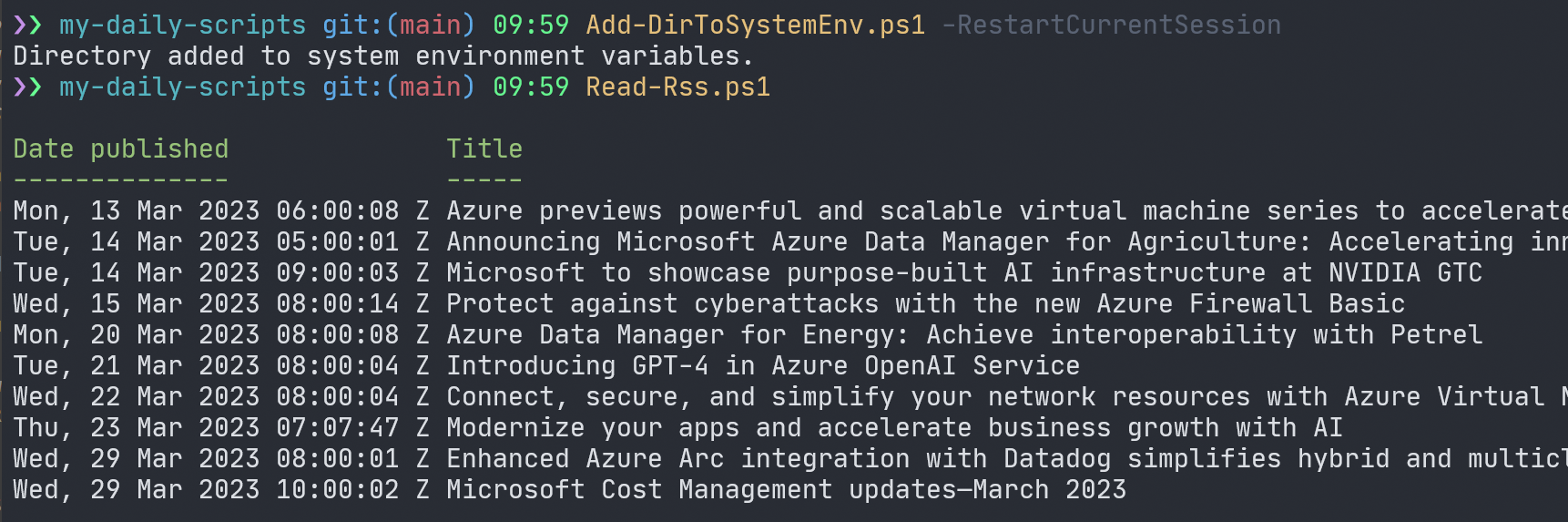
| Read-Rss.ps1 | RSS | Read last specific number of RSS item feed and shows it in a terminal |
| Add-DirToSystemEnv.ps1 | System | Add path to system environment variables |
| Change-PowershellFolder.ps1 | System | Change the current PowerShell folder to a specified path (does both for PowerShell core and PowerShell Windows). |
| Count-FilePages.ps1 | System | Read pdf and docx files in a folder and its subfolders to get page counts. |
| Get-EnvFromFile.ps1 | System | Get values from .env file and store them to environment variables |
| Get-EnvVars.ps1 | System | Get and set env files from env file |
| Get-FolderFilesCount.ps1 | System | Get directories and files count |
| Get-InstalledSoftware.ps1 | System | Get installed software list |
| Get-MyFolderItem.ps1 | System | use the function to get a list of files and directories in a folder, sorted by last write time |
| Get-ScriptCatalog.ps1 | System | Builds a script catalog for this repository. |
| Get-UpTime.ps1 | System | Get uptime for the system |
| Get-WifiPassword.ps1 | System | This function displays all stored WIFI passwords on the client |
| Initialize-ScriptPrerequisites.ps1 | System | Checks and optionally installs prerequisites for this scripts repository. |
| Invoke-ScriptLauncher.ps1 | System | Interactive script launcher with search, docs preview, and execution. |
| Max-Window.ps1 | System | maximizes the window of the process |
| Search-StartMenu.ps1 | System | Search the Start Menu for items that match the provided text. This script |
| Sync-TimeWithWindows.ps1 | System | This function synchronizes the system time with the Windows time service. |
| Update-Modules.ps1 | System | Updates all the modules on the system |
| Update-Software.ps1 | System | Updates all the software on the system with chocolatey and winget with one command. |
- PowerShell 7+ — download and install for your platform
- Windows Terminal — recommended terminal (Windows)
- PowerToys — optional but recommended on Windows
Validate (and optionally install) key repository prerequisites:
# Check only
.\System\Initialize-ScriptPrerequisites.ps1

# Check + install missing modules + Azure CLI (if missing)
.\System\Initialize-ScriptPrerequisites.ps1 -InstallMissingModules -InstallAzureCliTo call scripts from anywhere without specifying the full path, add the repository root and all subfolders to your PATH:
.\System\Add-DirToSystemEnv.ps1 -PathToAdd "C:\path\to\scripts" -RestartCurrentSessionAfter running this, you can call any script by name:
Read-Rss.ps1
Get-WeatherInfo.ps1
Remove-ObjBin.ps1
Before:

After:
Azure scripts require the Azure PowerShell module:
Install-Module -Name Az -Scope CurrentUser -Force
Connect-AzAccountImplemented in this pass:
- Added a catalog-driven script discovery flow (
Get-ScriptCatalog.ps1+Invoke-ScriptLauncher.ps1). - Added prerequisites bootstrap (
Initialize-ScriptPrerequisites.ps1). - Modernized
Profiles/default-profile.ps1to remove hardcoded repo paths and add safer module loading.
Proposed follow-up optimizations:
- Normalize help text quality in legacy scripts (fix typos, line wraps, and terse synopsis text).
- Add
#requiresmetadata where platform/runtime assumptions are strict. - Reduce script overlap (
Get-EnvFromFile.ps1vsGet-EnvVars.ps1) by consolidating shared logic.
Each folder that contains scripts has a tests/ subfolder with Pester tests.
# Run tests for a single folder
Invoke-Pester -Path .\Azure\tests\Azure.Tests.ps1 -Output Detailed

# Run all tests
Invoke-Pester -Path .\Azure\tests, .\Codez\tests, .\Containers\tests, .\Office\tests, .\RSS\tests, .\Random\tests, .\System\tests -Output Normal
Tests validate script syntax, parameter definitions, help content, and (where possible) functional behavior — without requiring Azure credentials or external services.
| Resource | Link |
|---|---|
| PowerShell documentation | learn.microsoft.com/powershell |
| PowerShell GitHub repository | github.com/PowerShell/PowerShell |
| Windows Terminal | learn.microsoft.com/windows/terminal |
| Windows Terminal GitHub | github.com/microsoft/terminal |
| PowerShell module authoring tips | Module authoring considerations |
| Azure PowerShell | learn.microsoft.com/powershell/azure |
| Pester testing framework | pester.dev |
This project welcomes contributions and suggestions. Most contributions require you to agree to a Contributor License Agreement (CLA) declaring that you have the right to, and actually do, grant us the rights to use your contribution. For details, visit https://cla.opensource.microsoft.com.
When you submit a pull request, a CLA bot will automatically determine whether you need to provide a CLA and decorate the PR appropriately (e.g., status check, comment). Simply follow the instructions provided by the bot. You will only need to do this once across all repos using our CLA.
This project has adopted the Microsoft Open Source Code of Conduct. For more information see the Code of Conduct FAQ or contact opencode@microsoft.com with any additional questions or comments.