added keyword argument to UARTDevice to set power on one of the power…#468
added keyword argument to UARTDevice to set power on one of the power…#468ste7anste7an wants to merge 1 commit into
Conversation


|
The tricky part about allowing this is that we won't have a way to automatically turn off the power when a custom device is unplugged. We could turn power off at the end of the program for safety reasons, but I imagine you'd want to keep it on between runs just like the Ultrasonic Sensor. A few ideas:
|
|
I have pushed an alternative branch here to implement the second option discussed above. The ready made firmware files can be download here. The I do not currently have the equipment to test this. @ste7anste7an, could you please test the following on all hubs? Please confirm the polarity for I think we can include this in the next release after full testing. |
|
Thank you for looking a this pull request. The warning is a good option. I have a Spike prime, a Lego technic hub and an EV3 hub. I will try it for all these hubs and do some tests with polarity and switching external power on and off (will do within a few days). |

People don't always have an interactive terminal, e.g. when running with Maybe we could just add another argument for controlling if power stays on after the program exits/device is disconnected? |
|
It's a one-off safety confirmation that persists, so Pybricksdev users won't have to deal with this at runtime. It's not really a convenience/technical issue, more of an awareness issue. I think that the stock sensors are all protected against this, but other third-party sensors might not be. |
|
I checked the For both primehub and technichub the keyword works as expected.
When the programs stops, power is also turned off on any of the pins two poiwer pins. For EV3, the keyword is not supported, as expected, because the EV3 has seperate ports (A..D) for motor output. Thanks for building the firmwares. This feature allows for raw UART communicartion while not being dependent on the PUP protocol to feed power to a sensor. |
|
Thanks for testing!
It should provide battery voltage on P1 of the sensor ports when enabled. Does this not work?
Correct. We could potentially allow this in the future, but it sounds like your sensors work fine as proposed? |
|
I tested it with EV3 and I noticed that I got an error because the keyworkd 'power_pin' was not imlemented. I will double check to see that I flahed the EV3 with the correct firmware. |
|
Tested again on EV3. Now loaded correct firmware. These are the voltages measured on P1 and P2: I want to do some tests under load. I think, looking at the schematics, that these pins can not really deliver significant amounts of current and are merely be meant for probing sensors. |
|
In your script, was your third test really with It is supposed to give battery voltage: 
So it looks like this feature needs some more work. Although maybe your battery was just that low? It did increase for Maybe we can get @JorgePe to test ev3dev/ev3dev#913 but on the new firmware with the And if we are very lucky, we can even reproduce the following:
|
|
This is the schematic of the sensor port of the EV3. As you can see, R123 limits the current when I_ONA is high, and 9V gets put on the right side of R123. The current that can be drawn is very limited, in the order of 10-20 mA. But measuring the voltage while drawing a current is the best way to find out. Will do later. |

|
I connected a device via a 3v3 voltage regulator to pin 1, while applying |
|
What was the battery voltage before and after that, perhaps as measured or reported by hub.battery.voltage? |
|
Before the hub voltage is 7.114V. While powering via power_pin=1, almost the same: 7.104V |
|
Did a small additional test. Configured the UART: Conclusion: on EV3, the sensor ports can not deliver significant power through pin P1. All sensors are powered by the 4.7V power pin 4. This pin can deliver 100's of mA. |
Actually, it is for the NXT Ultrasonic sensor. You can read about this in the NXT hardware docs. You are right, clearly it wasn't designed to be used as a power supply.
This should nominally be 5V. Internally, it is the same power supply as the USB VBUS. |
|
But not only the NXT Ultrasonic, right? Like ev3dev/ev3dev#913 Just so we can make some decisions here then --- I was hoping to unify these APIs, but maybe we shouldn't apply it to EV3 then? We'll still want to keep it on the |
|
Since the Powered Up portion of this works as intended and has been tested, I would be OK to merge the power-pin branch. We can still refine the API for EV3 if we want to change this since it won't be part of the upcoming stable release. Any objections? |

|
Great work. I tested it too on SPIKE. It asked confirmation once and then kept working. No objections. |
Ah yes, I forgot about that one. And maybe it is also used for RCX sensors on NXT (RCX doesn't work on EV3 since pin 2 is not GND) |
|
@antonvh and @ste7anste7an Thanks for testing. Can you help shed some more light on the use cases for this so we can better understand it? I'm assuming that this feature is primarily useful for boards such as servo drivers. Am I right in assuming that their VCC power is fed from the hub port VCC and battery power is only used for the motors? In other words, is it not an inconvenience but in fact a good thing that we turn the power off at the end of a program? If so, we should probably leave it at this and call it good 😄 Or are there also cases where the power should ideally kept on in between runs, to keep powering a more power hungry processor for example? |
|
While we are all here, let's document it once and for all. Does anyone want to review this draft? Please quadruple check the orientation of the Powered Up connector 😄 I suppose we should also add the voltages for the data pins. Are they 3.3V on Powered UP? And is it 3.3V for EV3 despite the 5V vcc? 
|

|
We should mention the following regarding the EV3: “The output voltage is limited by the 330-ohm source resistor.” Otherwise, questions will arise due to the current-dependent output voltage. |
|
I can confirm. I wired OpenMV clock/p4/tx to PUP wire 6 (hub RX/sensor TX) For I2C, the OpenMV wires have to be switched around then :/ https://docs.openmv.io/_images/pinout-openmv-ae3-pag7936.png |
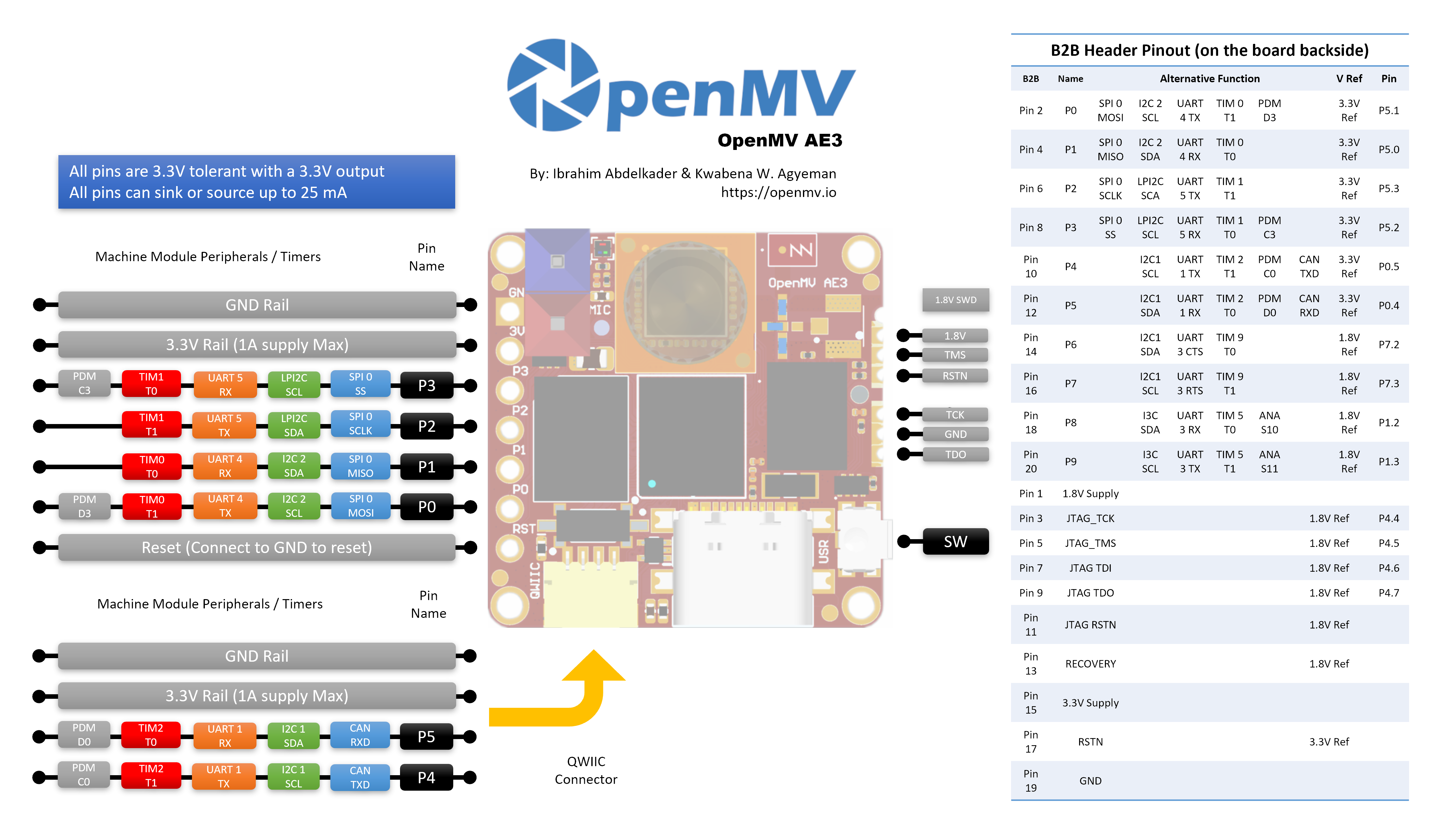
|
The main use case for enabling power on the motor pins (Pin 1 and Pin 2) is to provide proprietary sensors or boards connected to a LEGO hub with a suitable power source. The VCC pin (Pin 4) on the LEGO SPIKE Prime and Technic Hub only provides 3.3 V and is limited in the amount of current it can supply. For applications that require higher voltages or higher currents, the motor outputs can provide sufficient power. Examples include servo motors and NeoPixels (e.g. WS2812 LEDs). In one application, we use a buck converter to regulate the 8 V motor output voltage to a stable 5 V. Until now, power on the motor pins could only be enabled by emulating a PUP sensor and requesting power on one of the pins through the PUP protocol. This requires the connected proprietary equipment to emulate the PUP protocol when interfacing with the SPIKE hub. With the addition of the For some devices (e.g. NeoPixels), it would be beneficial if power remained enabled between runs. This also prevents connected processors (for example, in cameras) from having to restart every time a Pybricks program starts. Therefore, I would prefer power to remain enabled once it has been turned on. If this behavior could cause issues for other applications, perhaps an additional keyword such as |
Checked the numbering of pins, and they are correct. Maybe you can add also the pinout for EV3? Furthermore, you could add a desciption of wthat the keyword 'power_pin' actually does: The 0 – No power is supplied on either Pin 1 or Pin 2. When power is enabled on either pin, the selected pin becomes the positive power output and can be used to supply external devices connected to the port. The voltage provided is the hub's motor supply voltage. |
|
Right, something like that has been added (just not in the screenshot). Could you add some discussion about GND in this case? I.e. the implications and/or mistakes for using the other P1/P2 pin vs. the dedicated ground pin. |
|
In our application, we use only P2 to power the external device and connect the GND of the device to GND Pin 3 of the Spike prime. I assume this will not cause any problems. The Spike prime uses LB1836 (https://www.onsemi.com/pub/Collateral/LB1836M-D.PDF) dual motor drivers, and the motors are conected between P1 and P2. I assume that when either P1 and P2 is not driven, they are effectively connected to ground. Furthermore I assume that Pin 3 can handle the current flowing back when a device is connected between P2 and GND. |
Actually, that's something we could verify tomorrow in our current and voltage tests. |
|
A new full beta release at https://beta.pybricks.com/ is out. For you it contains:
🎉 |
5 participants


The UARTDevice iodevice is a nice generic way to communicate with external devices using plain uart communciation. When external devices have more power needs than the 3v3 line can deliver (e.g. when driving NeoPixels or Servo motors), it would be nice when such a device can use 8V power coming from one of the power lines P1 or P2.
The PUPDevice iodevice allows for setting power on either P1 or P2 depending how that is negotiatied in the PUP protocol. For I2CDevices, there is a keyword argument powered that allows for powering P1 (not P2). Unfortunately, I2Cdevice is not present for prime hub or technic hub, only for EV3 hub (and there the powered does work, but is not effective, as the P1 pin is connected through a 330Ohm resistor, and the voltage drops sharply when connecting a device that draws some current.)
Proposed solution
I propose to add a keyword argument power_pin to the UARTDevice init method where the argument can be 0 (no power), 1 (P1 powered) or 2 (P2 powered).
In a pybricks program that would look like:
resulting in P1 powered and
resulting in P1 nor P2 powered.
Fixes pybricks/support#2655