Vue 3 image editor component for Nextcloud apps. Replacement for the unmaintained Filerobot editor.
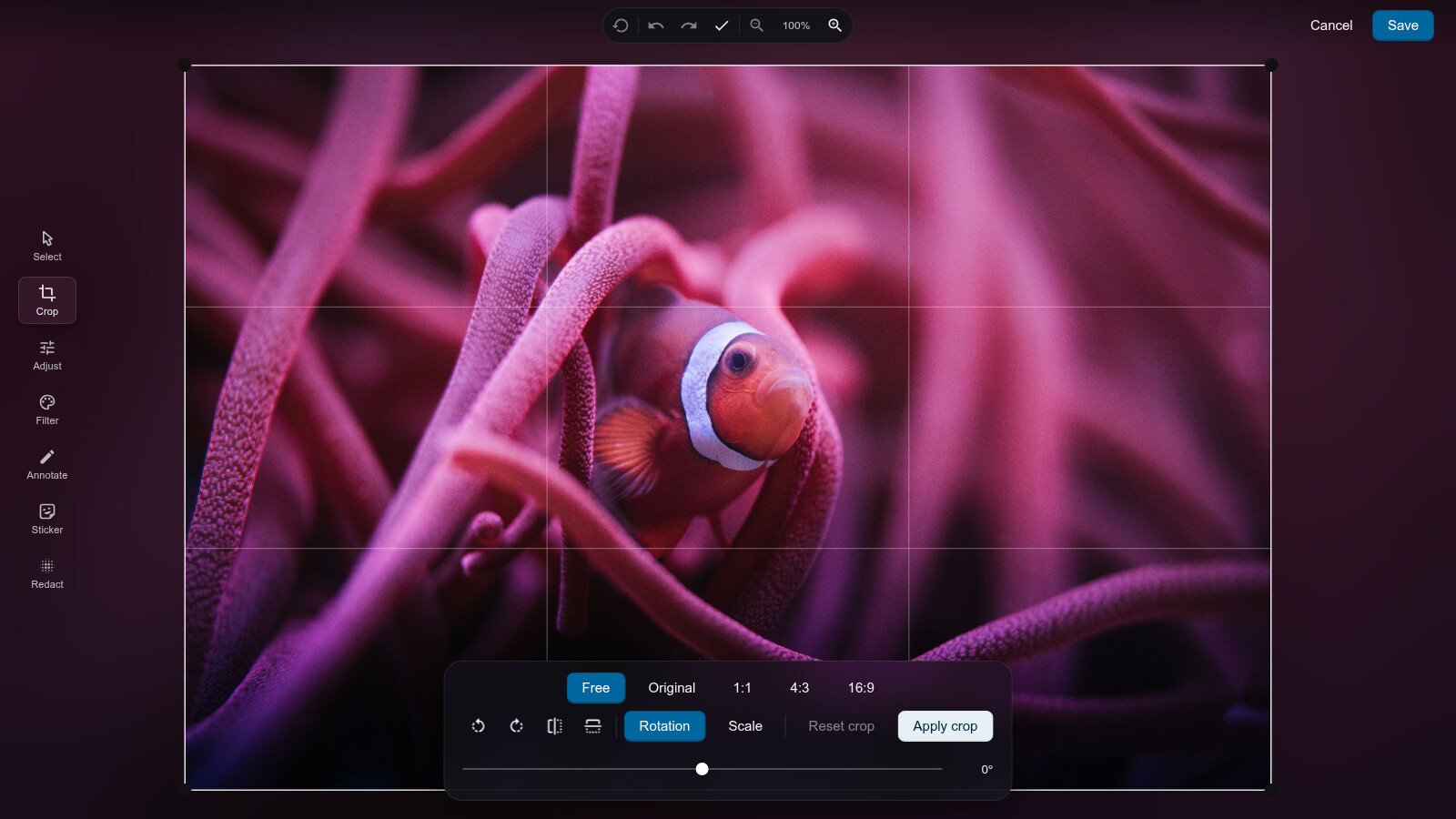
- Crop with rule-of-thirds guides, aspect presets (free, original, 1:1, 4:3, 16:9), 90° rotation, flips, fine rotation (±45°) and scale; the frame stays stable thanks to cover scaling
- Brightness, contrast and saturation adjustments; sixteen filter presets with live preview chips, from photographic grades (pop, golden, coast, cinema, berry, mist, warm, cool, fade) over monochromes (grayscale, noir, luna, sepia) to effects (invert, solarize, posterize)
- Annotations: freehand drawing, rectangles, ellipses, lines and arrows (held to 45° steps with Shift or Ctrl), text and emoji stickers (the user's frequently used Nextcloud emojis plus the full picker): movable, resizable, rotatable, recolorable, duplicatable and deletable
- Redaction that destroys pixels (block averaging or strong blur), never just an overlay
- Full undo/redo with Ctrl+Z/Y, a named history list to jump back to any step, revert-all behind a confirmation, arrow-key nudging, cursor-anchored wheel zoom, drag panning, pinch zoom on touch and a click-to-reset zoom readout
- Ambient glass UI tinted by the image itself, responsive down to phone-sized containers (container queries, not viewport media queries)
- Keyboard accessible, pointer-event based canvas (mouse and touch),
prefers-reduced-motionrespected - Exports a
Blobat natural resolution in PNG, JPEG or WebP, optionally bounded bymaxSize; an unedited image is handed back untouched
- Maintainability first. Konva is the only canvas dependency, pinned to a minor version and only bumped after a changelog review. No wrapped third-party editor, no framework interop layers.
- One declarative state. Every edit lives in a single
EditorState; the Konva scene is a pure render of it, and the export runs through the same code path as the interactive view: what you save is what you saw. - The library never persists. It accepts an image (
Blob,Fileor URL) and emits an editedBlob. WebDAV, versioning and file naming belong to the consuming app. - Every behavior is covered by tests: unit tests for math and state, Playwright tests in a real browser for everything touching canvas.
Install the peer dependencies alongside it:
npm install @nextcloud/image-editor @nextcloud/vue @nextcloud/dialogsThe component's styles come with it: the built module imports its own
stylesheet, so any bundler that handles CSS imports from dependencies
picks them up. Where yours does not, load them yourself from the
@nextcloud/image-editor/style export.
That import is also why the package has to go through a bundler. Loading
it in a plain Node process, for server-side rendering or a script, fails
with a syntax error as Node tries to parse the stylesheet as JavaScript.
This matches @nextcloud/vue, which imports its own CSS the same way,
and every Nextcloud app bundles with vite or webpack. See #5.
<script setup lang="ts">
import type { ExportResult } from '@nextcloud/image-editor'
import { ref } from 'vue'
import { ImageEditor } from '@nextcloud/image-editor'

const saving = ref(false)

async function onSave({ blob, mimeType }: ExportResult) {
	// The editor knows when it handed the blob over, not when the
	// upload finished, so tell it: on a photo the upload is the larger
	// half of the wait
	saving.value = true
	try {
		// persist the blob, e.g. via @nextcloud/upload or WebDAV PUT
	} finally {
		saving.value = false
	}
}
</script>

<template>
	<ImageEditor
		:src="file"
		:saving="saving"
		@save="onSave"
		@cancel="close"
		@error="showError" />
</template>| Prop | Type | Description |
|---|---|---|
src |
Blob | string |
Image to edit (Blob, File or URL). Required. |
label |
string |
Accessible label of the canvas area. |
exportOptions |
ExportOptions |
format, quality and maxSize for the save button. Defaults to the source's format, PNG when it is unknown, at natural resolution. A JPEG is written at the quality its source was written at, held between 0.75 and 0.97, and at 0.92 when that cannot be read. |
initialState |
EditorState |
State to open with, as emitted by change, for resuming an unfinished edit. Read when the source loads. |
saving |
boolean |
Raise while your app stores the saved image. The editor shows the same progress it shows for its own export, so one indicator covers the whole wait. |
| Event | Payload | Description |
|---|---|---|
save |
ExportResult |
Edited image rendered at natural resolution. |
cancel |
– | User dismissed the editor. |
error |
Error |
Loading or export failed. |
change |
EditorState |
Fired when an edit is committed, e.g. for dirty tracking. A slider being dragged previews without emitting; releasing it emits once. |
Exposed methods:
exportImage(options?: ExportOptions): Promise<ExportResult>withformat,qualityandmaxSize(longest edge bound) options.reset(state?: EditorState)to start over, optionally from a given state.
Pair change with initialState to resume an edit across a reload: store
what change reports, hand it back as initialState, and the editor opens
where the user left off.
Saving an image that was not edited hands back the source bytes
untouched, rather than re-encoding them. That keeps the file's quality
and its metadata, and it only applies when src was given as a Blob
or File, nothing was asked of the encoder, and the state is pristine.
isPristine(state) is exported for the same check, e.g. to disable a
save button.
Linear undo/redo history of immutable snapshots, used by the editor and
exported for standalone use. Each step carries an optional label, and
entries, index and jumpTo() let a consumer render a history list
and move to any step in it. Snapshots are held by reference: whatever
is pushed must not be mutated afterwards.
import { readJpegOrientation, rotateOrientation, setJpegOrientation } from '@nextcloud/image-editor/jpeg'

const bytes = new Uint8Array(await file.arrayBuffer())
const turned = setJpegOrientation(bytes, rotateOrientation(readJpegOrientation(bytes), 'left'))
setJpegOrientation(bytes, orientation) rewrites the Exif orientation tag
and copies the scan across byte for byte, so the picture is never decoded
and nothing is lost however many times it is called. Where the file already
names an orientation it is a two-byte write and the length does not change;
where it does not, a block is added. It returns null for anything that is
not a JPEG, for a value outside 1–8, and for a block already too close to
the 64KB segment limit to grow.
readJpegOrientation(bytes) reads the tag back, returning
DEFAULT_ORIENTATION (1) where there is none or where the file names a
value no reader would understand.
rotateOrientation(orientation, 'left' | 'right') composes a quarter turn
with what the file already says. The eight Exif values are the four turns
each also available mirrored, so this is a lookup and not an addition: a
mirrored picture stays mirrored, and four turns the same way come back to
the start.
These live behind their own entry point. The package's main entry carries
the editor component, and with it Konva and a stylesheet, which a host that
only wants to turn a picture should not have to load, and which cannot be
loaded at all outside a browser. @nextcloud/image-editor/jpeg is 14 kB
against the main entry's 259 kB, imports nothing else, and shares its chunk
with the main entry so a host using both loads it once.
Only JPEG. PNG and WebP carry no orientation that browsers and Nextcloud's
preview generator honour, so turning one of those means a hard rotation
through <ImageEditor> and a re-encode.
npm ci
npm run test           # unit tests (vitest)
npm run test:e2e       # Playwright tests (real browser, canvas)
npm run playground     # dev playground at http://localhost:5173
npm run lint
npm run typecheck     # vue-tsc over lib/ and __tests__/
npm run build
npm run build:doc      # typedoc API documentation
npm run build:demo # static demo page buildRegressions are the primary risk for a long-lived canvas library:
- Coordinate math (fit, crop, rotation/flip remapping) is implemented as pure functions and unit-tested exhaustively.
- Editor state (history, tool state, annotations) is unit-tested without a canvas.
- Rendering and interaction run as Playwright tests in a real browser (chromium and firefox) against the playground app, asserting exported pixels, not just DOM state; jsdom has no real canvas and is never used to test Konva code.
- New tools ship with their tests in the same pull request, no exceptions.
- Current spread: 90+ unit tests over the pure state, geometry, filter and interaction math; over 100 browser scenarios (twice, chromium and firefox) asserting exported pixels and end-to-end behavior.