

A lightweight, provider-agnostic agentic harness for VS Code.
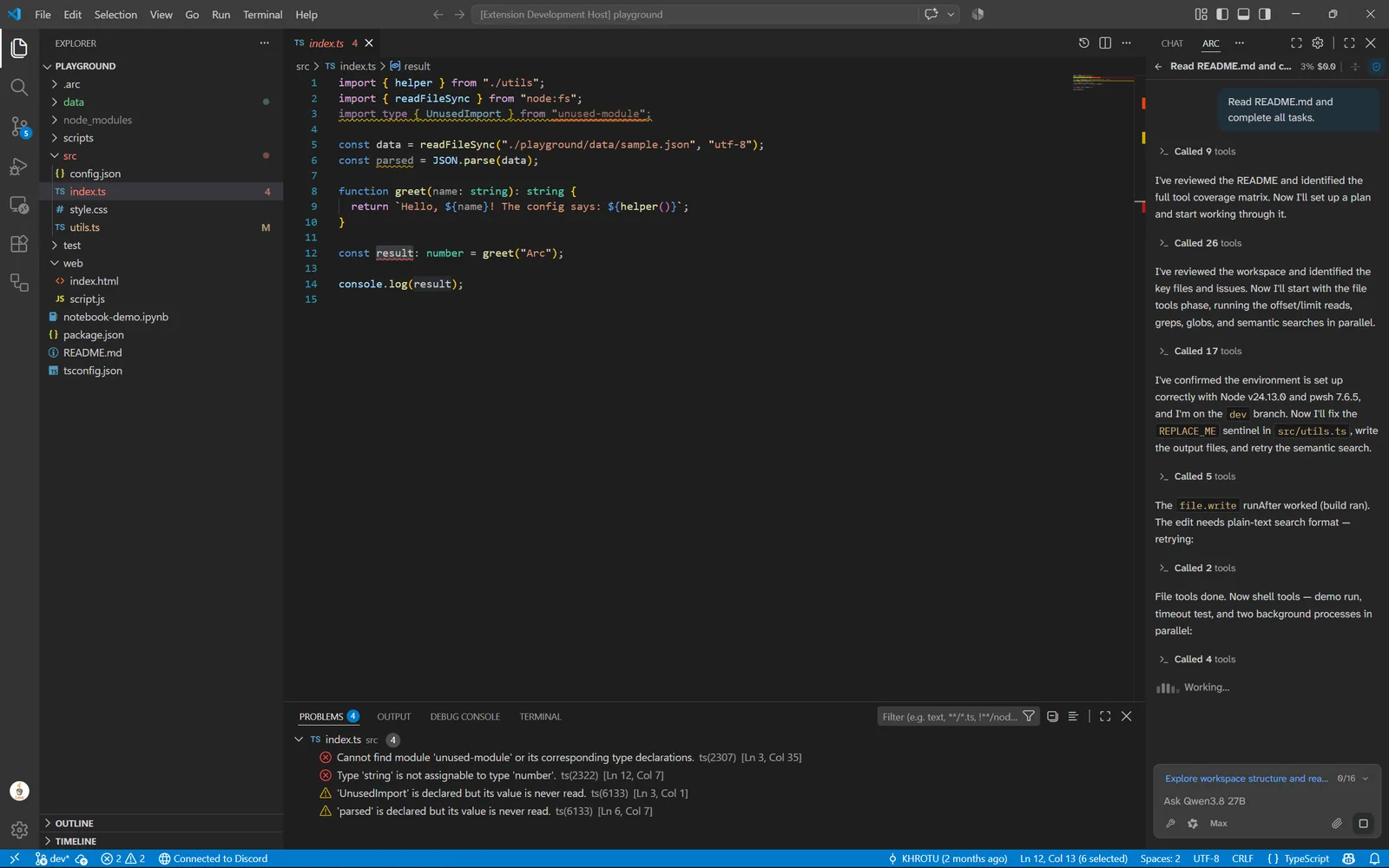
Arc is built for speed and precision. It combines a sophisticated multi-model orchestration layer with a deep toolset, including browser automation, MCP support, and subagents, all within a sub-1MB footprint.



Note
Limited Time Offer: For a limited time, Arc is offering free access to the MiMo-V2.6-Pro model for all users with some caveats (responses may be slower and connectivity may be less reliable). See Settings > Providers inside the extension for more details.
Note
Early Beta: Arc is evolving rapidly. We are actively refining APIs and features; expect frequent updates as we move toward a stable 1.0.
| Extension | VSIX Size (as of October 9th, 2026) |
|---|---|
| Arc | 0.27 MB* |
| Cline | 9.08 MB |
| Roo Code | 30.84 MB |
| Continue | 114.16 MB |
| Claude Code | 120.01 MB |
| Kilo Code | 135.78 MB |
| Codex | 524.93 MB |
Here are the sizes visualized:
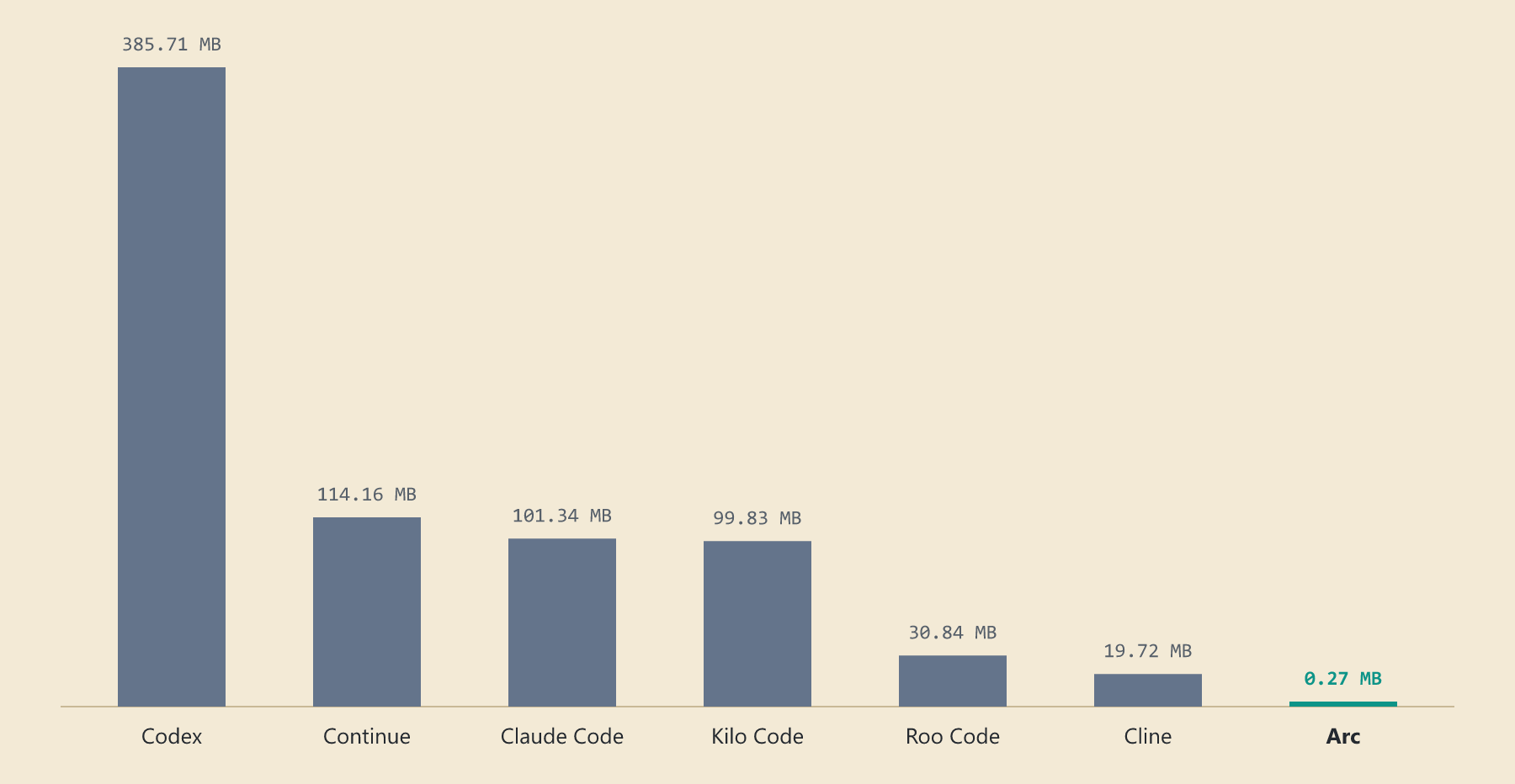
By optimizing our dependency tree and focusing on native VS Code APIs, Arc stays fast and portable.
- One-click migration from the tools you already use. Arc can automatically import chat histories and keys from Cline, Kilo Code, OpenCode, ZCode, and Continue, with support for more tools and data (memory, MCP, etc.) coming soon.
- Tiered model registry (free/light/default/heavy). Start a task with a default model, and Arc intelligently starts subagents using free models for simple tasks, or hand off the entire chat to a heavy model for difficult ones.
- Auto mode (Beta). Auto mode automatically routes prompts to the cheapest model that can handle the task. Relying on an in-house fine-tuned model, Auto mode makes sub-10ms decisions at 0.757 AUC based on internal testing.
- Provider-agnostic model aliases. One model alias can point to multiple providers, including 261 built-ins and custom providers, with multiple API keys per provider. Arc handles automatic failover, weighted load balancing, key rotation, and transparent switching on stall/error.
Code & workspace
- File Operations: Read, write, edit, grep, and glob.
- Symbol Context: Ranks the symbols in a workspace by following their callers and callees, allowing Arc to quickly adapt to your codebase while saving time and cost.
- LSP Integration: Check workspace diagnostics and identify file-specific problems.
- Notebook Support: Read, write, and execute Jupyter notebook cells with workspace kernel integration.
Execution & automation
- Shell Execution: Run (background) commands, manage processes, write to shells, configure custom execution commands, and wait for a fixed delay, a specific time, a background process to finish, or a condition to become true. Arc can also be configured to use your terminal of choice, or integrated directly into VS Code's terminal.
- Lifecycle Hooks: Run shell commands automatically on agent events such as session start, message submission, tool calls, compaction, model handoffs, notifications, task completion, and subagent spawns. Hooks can gate or veto tool calls before they run, inject context, sync external systems, or trigger follow-up automation.
- Web Capabilities: Fetch web page content and search the web with Arc's free built-in search provider. Can be optionally configured with Exa, Firecrawl, Parallel, or Tavily.
Agent orchestration
- Subagents & Handoff: Spawn child agents, query parent agents, and hand off control between instances, with per-file locking to prevent concurrent edit conflicts.
- Testing & Session Management: Run automatically detected test suites, manage custom skills, track session history/traces, and update task progress.
- Checkpoint Management: List, compare, and revert to previous session checkpoints.
- Memory & Rules: Read, list, create, and modify persistent memories and behavioral rules. Optional team stores extend this with shared memory locations.
- User Clarification: Ask clarifying questions.
Integrations
- Model Context Protocol: Add MCP servers to call custom tools, resources, and prompts with sampling and roots capabilities, or browse and install servers from the official MCP registry in the built-in Marketplace.
- Playwright Integration: Navigate, click, drag, type, hover, scroll, evaluate scripts, run raw Playwright code, capture screenshots, read page content, read DOM/console/network activity, handle dialogs, manage multiple tabs, intercept network requests, and wait for specific page states.
- Editor Integration: Open inline chats at the cursor (Ctrl+L) to work with Arc from the file.
Chat experience
- Prompt Polishing: Optionally polish prompts before sending, allowing grammar/spelling-only fixes or full rewriting.
- Attention sounds and notifications: Optional sounds and system notifications for task completion, approval requests, and errors.
- Message rewind: Revert to any earlier message to restore the files it changed, or edit a message to re-run the turn from that point.
- Conversation search: Search past chats by content and reopen a result where it left off.
- Cost tracking: Context and cost totals for the current chat, broken down by cache hits, cache misses, and output.
- Token-optimization: Arc detects tools, MCP servers, skills, rules, and memories that haven't been used for a long time, and suggests unloading them to optimize token usage.
Safety & security
- Prompt-injection protection. Arc detects, optionally quarantines, and stops tool results, remote output, and high-confidence injections from reaching the model in the first place. Memory writes, skill files, and repository instructions are scanned on write to stop memory poisoning.
- Secret scanning at write time. Every file modification runs through a pre-write hook that scans for keys and secrets before anything is ever written.
- Protected config writes. Writes to config files always require explicit user approval, even with auto-approve enabled.
- OS sandboxing for shell commands. Shell execution supports
sandbox-execon macOS,bwrapon Linux, and on Windows a custom, restricted-token sandbox (all privileges dropped, Low mandatory integrity, Job Object cleanup and UI limits). - Authenticated audit log. Session traces use an HMAC-SHA-256 chain whose head is anchored in VS Code SecretStorage. Arc: Verify Audit Log in the command palette detects anomalous logs, and Arc: Export Audit Log produces a copy for sharing.
- Encrypted chat history. Chat history is stored in Arc's own encrypted, compact
ARCXbinary format by default, providing better storage efficiency and security than JSON or SQLite. - Delete user data. Settings can clear chat history, provider keys, checkpoints, and agent state in one step.
Context management
- Structured context compression. Arc compresses oversized tool outputs before the model reads them. Search results are ranked by relevance and deduplicated, diffs have their index headers and repeated context lines removed, and logs and JSON have escape codes and blank lines removed. Original outputs are stored locally by content hash and can be restored on demand.
- Cost-aware compaction. Arc keeps an exponential moving average of prompt and completion tokens per model, then picks the compaction boundary from cost rather than token count alone, weighing cache hit and miss pricing, output pricing, summary size, and a configurable penalty for lost context. When it triggers, Arc summarizes the conversation midsection, replaces it with a single system message, and keeps the system prompt plus the last six messages intact. The safety margin is configurable per workspace.
Reliability & recovery
- Content-addressed checkpoints. Reverts stay fast by only storing the files that actually changed. Restoring writes blobs back, deletes newer metadata, and garbage-collects unreferenced blobs.
- Full agent resume. Snapshots preserve browser tabs, MCP connections, and background processes, so sessions resume after VS Code restarts.
- Post-edit verification loop. After each edit, lint and typecheck are automatically run via the LSP, and the agent autonomously fixes up to N times.
Efficiency
- Prompt caching. System prompts and conversation prefixes are structured with
cache_controlbreakpoints to maximize Anthropic and OpenAI cache hits, reducing cost and latency for long-running sessions. - Granular proxy fallback. Set a proxy per category (provider API calls, web tools, or shell commands) or one global configuration.
Orchestration
- Subagent tier delegation. Subagents spawn one tier below the parent by default so cheap models handle basic work, but can be chosen differently if needed by Arc. Handoffs run in both directions and across all four tiers, bounded by cost ceilings, an escalation limit, and ping-pong protection, and the agent preserves the to-do plan across them so the new model picks up where the last left off.
- Custom modes. Create and edit mode definitions, update the default modes, and configure model binding from the settings panel, without touching config files.
- TUI/CLI/Remote access? We believe agents are tools, not replacements. Working with agents and being responsible for quality is the most accountable way to use them while staying in the same window as your code editor. (Using any of the three methods mentioned makes it harder to track what changed; alternatively, doing so requires you to constantly switch between apps, which defeats the purpose of boosting productivity.)
- Slash commands/@-commands? You're using a GUI. Use the buttons. If you prefer terminal-style inputs, go try OpenCode; it's really cool.
- Cloud model routing? We broke.
- Autocomplete? Inline LLM suggestions tend to be sluggish and (usually) mediocre. You’ll get faster and better results by writing the code yourself or by using and reviewing the work of agents.
- Semantic search? We're at a point where LLMs are capable of understanding your codebase faster and more accurate than using semantic searches. Arc's Symbol Context system also speeds things up dramatically.
Why is the installed size of Arc, according to VS Code, much larger than what you claim?
The sizes in the Efficiency section refer to the VSIX size of the extensions, which is the size of the file you download, while the size shown on Arc's extension page is the decompressed size. As Arc improves, the raw size does inevitably increase, but through careful planning and aggressive optimization, we keep the size of what you actually download small.
Does Arc support VSCodium, Cursor, or Remote SSH / Dev Containers?
To some extent. Arc doesn't use proprietary VS Code APIs or platform-specific binaries, so it should work with VS Code forks like VSCodium and Cursor just fine. However, due to VS Code's safety restrictions, Arc may not work in Remote SSH, WSL, or Dev Containers. If you wish to use Arc in these environments, install Arc on the remote when VS Code offers "Install in SSH: ...".
How does the free MiMo-V2.6-Pro access work? Is my code being trained on?
To make sure the limited free resources are available to everyone, we don't disclose our upstream provider, but they promise no data training and zero data retention. However, as free resources are limited, we recommend not relying on the internal provider for long workflows.
What are ARCX files, and where are my API keys stored?
ARCX is our custom binary format, used to store chat histories and checkpoint data, optimized for each use case. It's fast, secure, and acts as a deterrent for bad actors by looking weird. Your API keys (as well as encryption keys for ARCX files) are stored in VS Code's SecretStorage, which then uses your OS's secret manager.
Install from the VS Code Marketplace, or build and install from source:
pnpm install
node scripts/package-ext.mjs
code --install-extension packages/arc/arc-code-0.7.4.vsixTo run Arc from source:
- Clone the repository.
- Run
pnpm installandpnpm build:ext. - Press
F5orRun > Start Debuggingin VS Code to launch the Extension Development Host.
Apache-2.0. See LICENSE for details.