Repository navigation
ER: Fix layout shift bug with Filters column in Projects page #8843
Description

Emergent Requirement - Problem
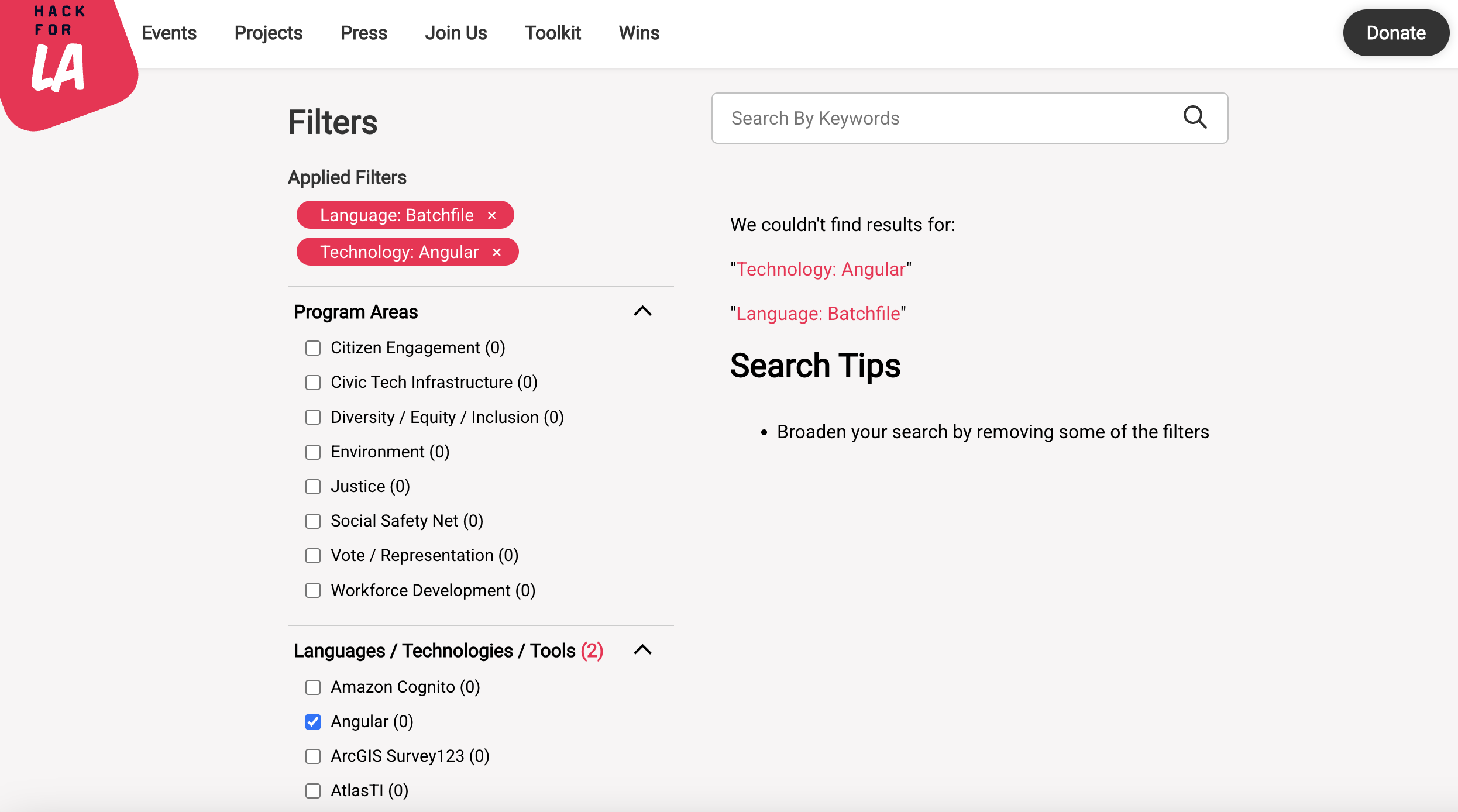
We need to update the styling for the Projects page layout to prevent the Filters column from shifting inward when no results are returned.
Currently, the Toolkits page contains the correct behavior. We can resolve this by refactoring the styling rule in the Toolkits SCSS, and moving that rule into a shared file so that the fix applies for both Projects and Toolkits pages at once.
How to replicate
- Navigate to the Hack for LA Projects page
- Select filters that return zero results:
a. Under "Program Areas" select "Citizen Engagement" and "Civic Tech Infrastructure" (link to selected filters) - Observe the layout shift, the Filters column should shift right. This is unexpected behavior.
- Note the expected behavior in the Toolkits page when no results return
Screenshots of bug & expected behavior
Layout shift bug in Projects page
Expected behavior in Toolkits page, no layout shift.
We are trying to replicate this behavior: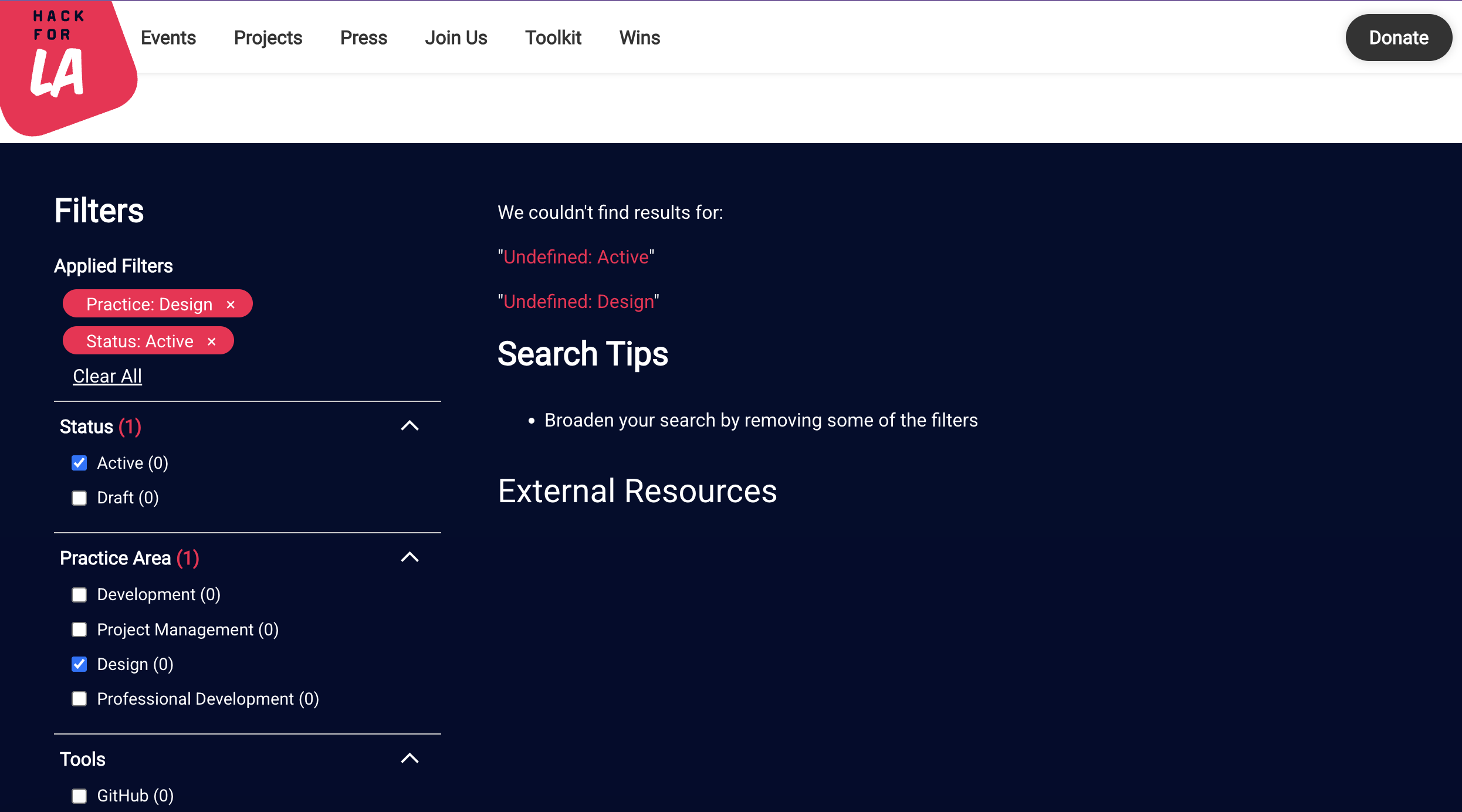
Issue you discovered this emergent requirement in
Date discovered
10-8-2026
Did you have to do something temporarily
- YES
- NO
Who was involved
What happens if this is not addressed
If this is not addressed, it may disrupt the overall user experience of the Projects page. We also want to migrate any SCSS rules into a single shared rule to reduce any redundant code.
Resources
Hack for LA Projects Page: https://www.hackforla.org/projects/
Recommended Action Items
- Make a new issue
- Discuss with team
- Let a Team Lead know
Potential solutions [draft]
We will split the solution into two issues. One issue will involve creating a generic .filter-container class to create a single shared SCSS rule, and apply it to the Toolkit page. The other issue will implement the shared rule in the Projects page to resolve the layout shift bug.
Issue 1: Create the shared SCSS rule and update the Toolkit page
- Complexity: Small
- Relationships: Blocks issue 2 (We cannot implement the projects page fix without the shared rule)
- Size: 0.25pt
Issue 1 Solution
- Create a small issue that creates a shared filter container class & refactors the Toolkit page using a Blank Issue Template. Title the issue to briefly capture the scope of the problem.
- At the top of the issue above the
Overviewsection, add the followingPrerequisitesection:### Prerequisite 1. Be a member of Hack for LA. (There are no fees to join.) If you have not joined yet, please follow the steps on our [Getting Started page](https://www.hackforla.org/getting-started) and attend an onboarding session. 2. Before you claim or start working on an issue, please make sure you have read our [How to Contribute to Hack for LA Guide](https://github.com/hackforla/website/blob/7f0c132c96f71230b8935759e1f8711ccb340c0f/CONTRIBUTING.md). - Under Action Items section, create checklist items that address the following changes. Feel free to change the wording of the following and group them in the issue as you see fit.
- In
_sass/components/_toolkit.scss, remove the.toolkit-content-filter-containerclass - Navigate to
_sass/elements/_dropdown_filters.scss, and reuse.toolkit-content-filter-containeras a generic.filter-containerclass above the existing.filter-toolbarclass:.filter-container { flex: 0 1 392px; } - In
_includes/current-guides.html, replace the.toolkit-content-filter-containerclass, changing it from:to:<section class="toolkit-content-container filter-content-container content-section"> <div class="toolkit-content-filter-container"> <nav class="filter-toolbar toolkit-filters" aria-label="Filter Navbar"> <div class="filtersDiv filtersDiv-background"> <h3 class="filters-title"><section class="toolkit-content-container filter-content-container content-section"> <div class="filter-container"> <nav class="filter-toolbar toolkit-filters" aria-label="Filter Navbar"> <div class="filtersDiv filtersDiv-background"> <h3 class="filters-title"> - In your local environment, verify that the Toolkit page still functions as expected after the refactor and no layout shift bugs occur: Toolkits
- In
Issue 2: Update Projects page to prevent a layout shift bug
- Complexity: Medium
- Relationships: Blocked by issue 1
- Note: Once both issues are created, mark issue 2 as blocked by issue 1
- Size: 0.25pt
Issue 2 Solution
- Create a medium issue that implements a fix for the Projects page UI bug using a Blank Issue Template. Title the issue to briefly capture the scope of the problem.
- At the top of the issue above the
Overviewsection, add the followingPrerequisitesection:### Prerequisite 1. Be a member of Hack for LA. (There are no fees to join.) If you have not joined yet, please follow the steps on our [Getting Started page](https://www.hackforla.org/getting-started) and attend an onboarding session. 2. Before you claim or start working on an issue, please make sure you have read our [How to Contribute to Hack for LA Guide](https://github.com/hackforla/website/blob/7f0c132c96f71230b8935759e1f8711ccb340c0f/CONTRIBUTING.md). - Under Action Items section, create checklist items that address the following changes. Feel free to change the wording of the following and group them in the issue as you see fit.
- In
_sass/components/_projects-page.scssfind the.projectsclass. Adddisplay: flexandalign-items: flex-start:.projects { background: $color-pink; padding: 32px 16px; display: flex; align-items: flex-start; } - In the same file, define the
.projects-and-filtersclass above the.search-tip-linkclass. This will allow the project cards container to maintain its width and prevent filter column shifting. (Note:.projects-and-filtersalready exists in HTML but it has not yet been defined in any SCSS file):.projects-and-filters { flex: 1 1 auto; width: 100%; max-width: 800px; } - In
_includes/current-projects.html, locate<nav class="filter-toolbar" aria-label="Filter Navbar">near the top of the file:<section class="content-section projects filter-content-container"> <nav class="filter-toolbar" aria-label="Filter Navbar"> - Then implement the fix by nesting the entire
navtag with a filter container div,<div class="filter-container">:<section class="content-section projects filter-content-container"> <div class="filter-container"> <nav class="filter-toolbar" aria-label="Filter Navbar"> - Ensure proper indentation and closing tags. The
.filter-containerdiv should be siblings with the.projects-and-filtersdiv:... </nav> </div> <!-- Projects and Filters container --> <div class="projects-and-filters"> - In your local environment, verify the layout shift bugs no longer occur on the Projects pages: Projects, Projects-Check
- In
Activity
castillios commentedon Nov 10, 2026
Please let me know if I should alter the proposed solution, thanks!
daras-cu commentedon Nov 14, 2026
@castillios Great job with the proposed solution! I think we should break this up into two different issues since it involves editing multiple pages. The first step can be adding the generic
.filter-containerand applying it to the Toolkit page, which is probably a small issue. Then the next issue can be all the Project page fixes, which I think should be a Medium. Let me know what you think.castillios commentedon Nov 17, 2026
Hi @daras-cu, thanks for your feedback. I agree, splitting the solution into two issues would make this much more digestible. I've updated the ER accordingly.