A MicroPython fork with real source-level debugging support. Breakpoints, step, call stack, live variables — driven from VS Code, over USB CDC or UART, on real microcontroller hardware.
Pairs with the MicroPython Debugger extension for VS Code.
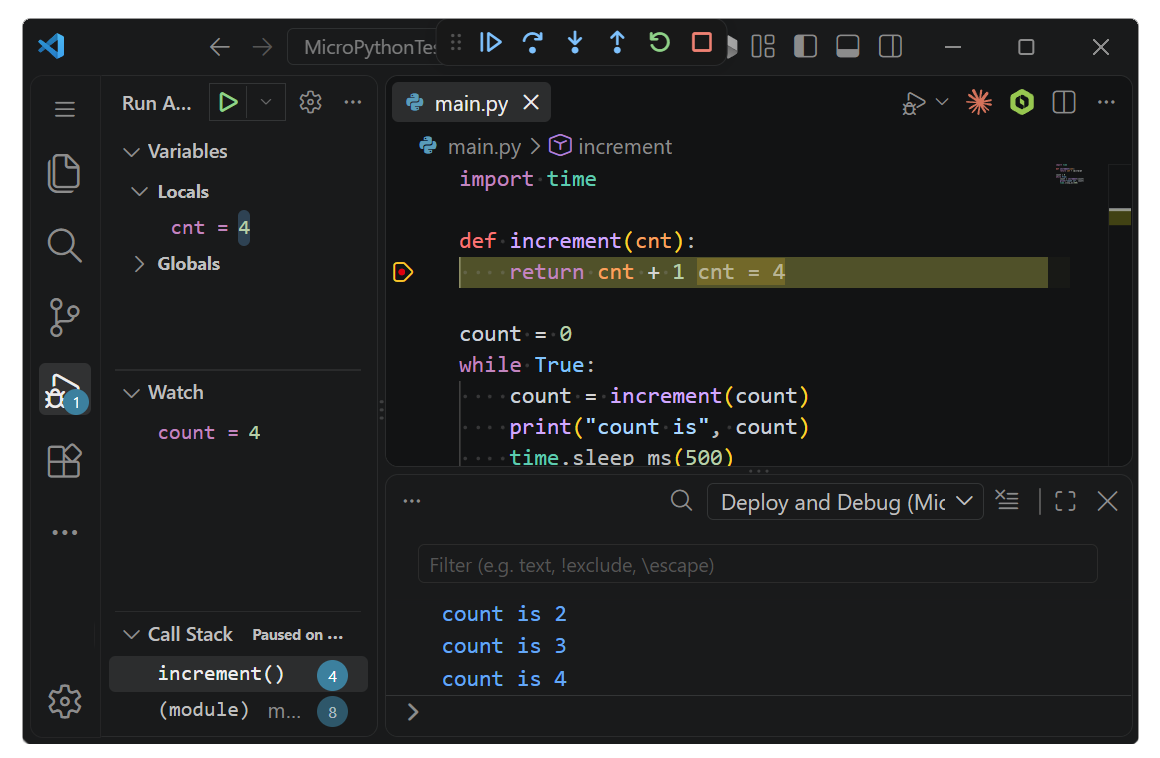
This fork adds:
- The
mpdebugengine (shared/mpdebug/) — a debug protocol embedded in MicroPython. - Three transport shapes so the same debug engine reaches any board:
- Dual-CDC USB (Pico, Pico 2, ESP32-S2, ESP32-S3) — one CDC keeps the standard REPL, the other carries the debug protocol.
- Single-CDC USB (STM32C071) — one CDC carries a boot-time
.mpyupload window and then the debug protocol; no REPL, for MCUs where 24 KB RAM cannot fit both. - UART (original ESP32 through a USB-to-serial bridge) — the debug protocol travels over UART0 at 115200 baud, alongside program output.
- Board configurations for every board we officially support (Raspberry Pi Pico, Pico 2, ESP32-S2, ESP32-S3, ESP32 UART0, STM32C071).
Most users don't need to build from source. Install the VS Code extension — pre-built firmware for common boards is shipped with it, installed on F5. See the extension's README for the current supported-board list.
This repository is for people who want to build the firmware themselves for a board that isn't in that list, or contribute changes to the debug engine.
Prerequisites — the standard MicroPython toolchain for your target port. See MicroPython's Getting Started:
| Port | Toolchain |
|---|---|
| rp2 | CMake ≥ 3.13, GNU Make, arm-none-eabi-gcc 12 or newer, picotool 2.3.0, Python 3 |
| esp32 | ESP-IDF v5.5, Python 3 (installed with ESP-IDF) |
| stm32 | GNU Make, arm-none-eabi-gcc 12 or newer, Python 3 (no picotool) |
This fork is based on MicroPython v1.29.0 — the same version listed in git describe on the dev branch. Submodule pointers are pinned to what v1.29.0 references, so builds produce the tested toolchain output.
arm-none-eabi-gcc— install the Arm GNU Toolchain 12.2 or newer. Older GCC (8.3, common on some machines underC:\gcc) fails at the link step because itslddoesn't parse the--defsymexpressions the pico-sdk emits.arm-none-eabi-gcc --versionshould print 12.x or later.picotool2.3.0 — pico-sdk needs this to post-process the firmware. Grab a prebuilt binary from pico-sdk-tools releases and either put its folder onPATH, or set thepicotool_DIRenvironment variable to the folder containingpicotoolConfig.cmake. Without it, pico-sdk tries to build picotool from source, which is a fragile Windows path.
ESP32 builds need ESP-IDF v5.5 installed and its environment sourced in every terminal session used for a build. Install it once via Espressif's installer on Windows or the Linux / macOS instructions, then load it before you build:
-
Windows — launch the "ESP-IDF 5.5 PowerShell" (or "ESP-IDF 5.5 CMD") shortcut from your Start menu. It opens a shell with the env pre-loaded.
-
Linux / macOS — source the export script in your shell:
. $IDF_PATH/export.sh
After sourcing, verify with Get-Command idf.py on Windows PowerShell (should print a path) or idf.py --version on Linux / macOS. Only ESP32 builds need this; rp2 builds run from any regular shell.
1. Clone this fork.
git clone https://github.com/ghi-electronics/micropython-firmware-debugger.git
cd micropython-firmware-debugger
2. Fetch the submodules for your port (once):
make -C ports/<port> BOARD=<your-board> submodules3. Choose your board.
If your hardware matches an upstream board in the tree (RPI_PICO, RPI_PICO2, ESP32_GENERIC_S2, ESP32_GENERIC_S3, etc.), just use that name — no board-file edits needed. The debugger engine and dual-CDC USB config live in the fork's shared code (shared/mpdebug/, shared/tinyusb/, ports/<port>/mpdebug_port.c), so every board built from this fork gets debug capability automatically.
If your hardware isn't in the tree, follow MicroPython's board-adding guide to create your own directory under ports/<port>/boards/YOUR_BOARD/. Copy the closest existing board and adjust pins.
GHI's own release-build board configurations live in a separate repository, micropython-firmware-debugger-ghiboards, which is mounted here as a git submodule at ghiboards/. You do not need to init it — building any upstream board directly gives you working debug (breakpoints, step, stack, variables, deploy) with no auto-update prompts. The submodule only matters if you want to build GHI's exact release firmware, in which case run git submodule update --init and use BOARD_DIR=ghiboards/<GHI_BOARD> on the make command.
4. Build.
make -C ports/<port> BOARD=<your-board>5. Flash the resulting firmware.uf2 or firmware.bin to your board using the port's standard tool (picotool, esptool.py, etc.).
The engine ships with three transports; pick one in your board's mpconfigboard.h:
- Dual-CDC USB (default). Set
MICROPY_HW_USB_CDC_NUM >= 2. First CDC is the REPL, second carries the debug protocol. No extra knob needed. - Single-CDC USB. Set
MICROPY_HW_USB_CDC_NUM = 1and#define MP_DEBUG_CDC_INDEX 0. The one CDC carries a boot-time.mpyupload window and then the debug protocol. For MCUs where RAM cannot fit both a REPL and the debugger; seeghiboards/GHI_STM32C071/for a working example including flash-region layout and boot script. - UART. Set
#define MICROPY_HW_MPDEBUG_TRANSPORT MICROPY_HW_MPDEBUG_TRANSPORT_UART. Debug protocol runs over the port's UART0 at 115200 baud; suitable for chips without native USB (original ESP32 via CP2102 / CH340 / FTDI). Seeghiboards/GHI_ESP32_GENERIC_UART0/for a working configuration.
The VS Code extension auto-detects supported boards by USB VID/PID. It does not know yours, so pin the debug port manually in your project's .vscode/launch.json.
Dual-CDC USB board:
debugPort is your board's second CDC — the debug channel. It is not the REPL. On Linux, check ls /dev/serial/by-id/ — the entry ending in -if02 is the debug channel.
Single-CDC USB board (STM32C071-style): same as above, but debugPort is the one CDC endpoint the board exposes.
UART board (original ESP32 through a bridge chip): add three lines so the extension talks over the bridge port instead of looking for USB CDC:
"debugPort": "COM3",
"debugInterface": "uart",
"debugBaud": 115200Press F5 in VS Code.
macOS — nothing more to do. Serial devices are user-readable by default.
Linux — the extension ships udev rules only for the boards it officially supports. For your custom VID:PID, drop one line into /etc/udev/rules.d/99-my-board.rules, replacing XXXX:YYYY with your board's actual VID:PID (find with lsusb):
SUBSYSTEM=="tty", ATTRS{idVendor}=="XXXX", ATTRS{idProduct}=="YYYY", MODE="0666", TAG+="uaccess", ENV{ID_MM_DEVICE_IGNORE}="1"
Then:
sudo udevadm control --reload-rules && sudo udevadm triggerReplug the board. This solves two things at once: user-level access to /dev/ttyACM*, and telling ModemManager to leave the debug channel alone (otherwise its AT-command probing corrupts the first few seconds of the connection).
Bug reports and suggestions for the debugger are welcome — open an issue.
For MicroPython core issues unrelated to debugging (interpreter, standard library, other ports), report those upstream at micropython/micropython.
GHI Electronics is an embedded hardware and software company. We build the tools that make embedded development approachable — MicroPython here, and C# and .NET on our TinyCLR platform, which has been debugging production embedded devices for years. This project brings the same proven debugger protocol to MicroPython, so the source-level experience you expect on a desktop works on a small board too.
If you are new to GHI Electronics, take a look at our embedded devices and see where MicroPython fits alongside our C#/.NET platform:
| Website | www.ghielectronics.com |
| Support | support@ghielectronics.com |
| Forum | forums.ghielectronics.com |
{
    "type": "micropython",
    "request": "launch",
    "name": "MicroPython Deploy and Debug",
    "program": "${workspaceFolder}/main.py",
    "debugPort": "COM4"       // or "/dev/ttyACM1" on Linux/macOS
}