




Live page · All agent starters · Hosted Hermes agents · AI App Builder · On CompanyFabric · Get a model key
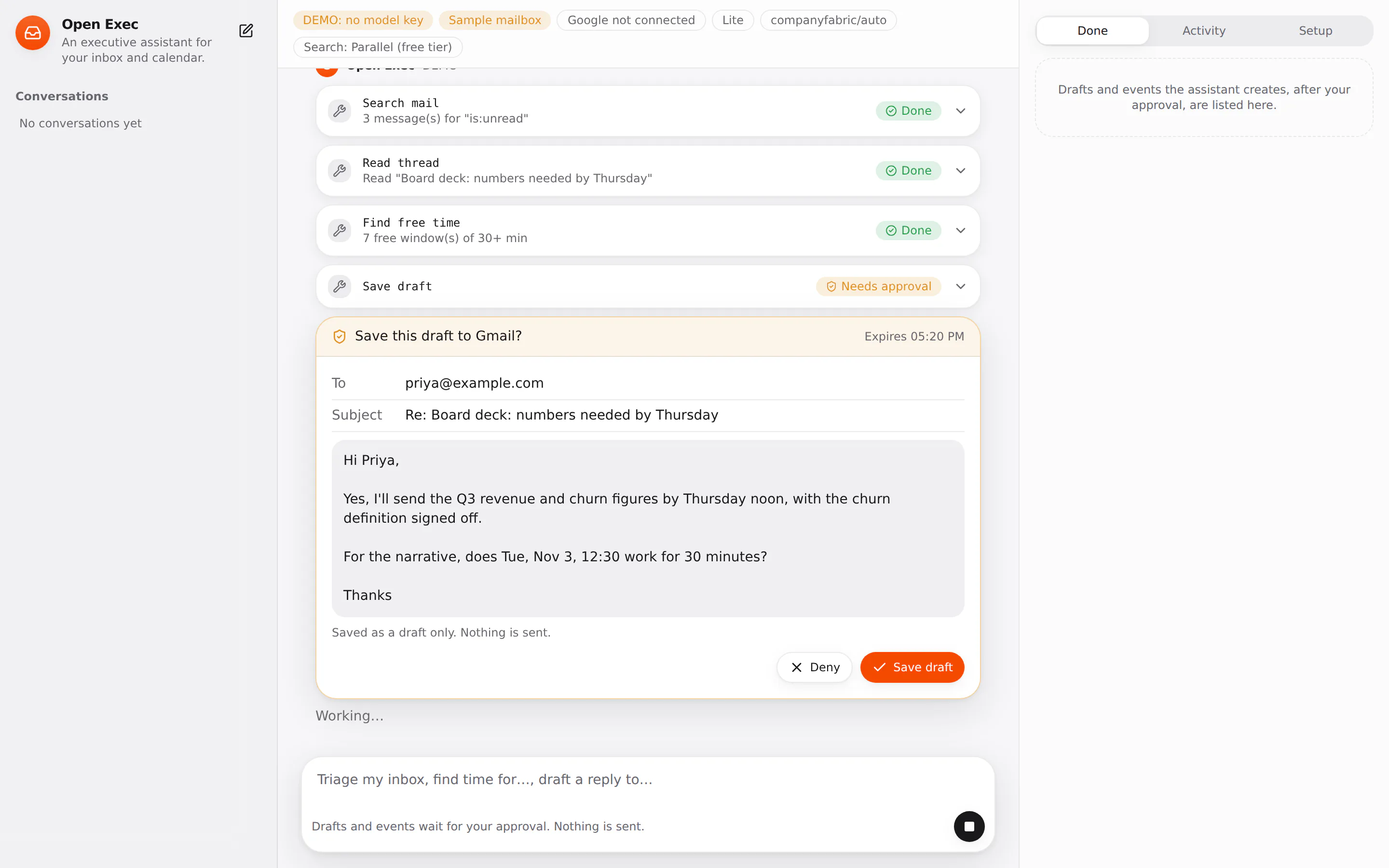
An open-source executive assistant for your Gmail and Google Calendar. It triages the inbox, reads the threads that matter, finds free time, drafts replies and puts events on your calendar. Anything it saves waits for your approval first, and nothing is ever sent: replies land in Gmail as drafts, and you press Send.
Every tool call goes through one tool layer that applies the assistant's policy, asks you before anything the policy gates, and writes an audit row first. The policies also decide which Google permissions are requested: deny a tool in assistant.config.ts and Connect Google stops asking for its scope.
| Lite | Hermes | |
|---|---|---|
| Start | pnpm dev |
docker compose up |
| Where the agent loop runs | in this Next.js server | in a Hermes Agent container |
| Inbox triage, drafts, free time, events, approvals, audit | yes | yes |
| Memory across conversations (people, preferences) | no | yes |
| Morning brief on a schedule | no | Hermes cron works; this UI does not manage schedules yet |
| Serverless hosting (Vercel) | yes | no |
Status: early. Verified in CI: install, typecheck, unit and contract tests (OAuth state and PKCE, sealed tokens, token refresh and revocation, draft headers, free-time search across time zones, approvals), production build, and Hermes starting with the assistant's tools loaded. The Gmail and Calendar calls are
implemented-untestedagainst live Google until someone runs them with a real OAuth client.
Needs Node.js 22.13+ (24 recommended; the Docker images use 24) and pnpm. From the repository root:
pnpm install
cp .env.example .env
pnpm dev
With no model key it runs a DEMO on a built-in sample mailbox (fictional people at example.com): it searches unread mail, reads the thread that matters, finds free time and drafts a reply, which waits for you to approve it. The tools, approval and audit are the real ones. One sample email contains a prompt injection, to show that the assistant reports it instead of obeying it.
Add a model key (same options as Open Research: CompanyFabric by default, OpenAI, or a local endpoint) and set DEMO_DATA=true to try a live model on the sample mailbox before connecting your own.
Each deployment uses its own Google OAuth client, so your mail goes from Google to your server and nowhere else.
- In the Google Cloud console, create a project and enable the Gmail API and the Google Calendar API.
- Configure the OAuth consent screen. For yourself or a small team, leave it in Testing and add your Google accounts as test users. (A Google Workspace organisation can choose Internal instead.)
- Create an OAuth client ID of type Web application, with the authorised redirect URI
http://localhost:3000/api/google/callback(or yourAPP_URL+/api/google/callback). - Put the client ID and secret in
.env, plusTOKEN_KEY=$(openssl rand -hex 32), restart, and press Connect Google under Setup.
What to know about Google's rules:
- Gmail permissions are restricted scopes. An app in Testing works for up to 100 test users with no review, but Google shows an "unverified app" screen, and for External apps in Testing the refresh token expires after 7 days, after which you connect again. Publishing the app for anyone to use requires Google's verification and, for Gmail, a security assessment.
- Google has no drafts-only permission:
gmail.composealso allows sending. This app has no send tool, and the tool layer refuses any tool it does not know. - Requested by default:
gmail.readonly,gmail.compose,calendar.readonly,calendar.events, plusopenid emailto show which account is connected. Denymail.draftandcalendar.createand only the read-only scopes are requested.
Tokens are stored in SQLite sealed with AES-256-GCM under TOKEN_KEY. Disconnect revokes them at Google and deletes them. If Google revokes access, the app forgets the account and asks you to connect again.
cp .env.example .env    # model key, HERMES_API_KEY and TOOL_TOKEN (openssl rand -hex 32), Google, TOKEN_KEY
docker compose up --build
Hermes runs each turn and calls the assistant's tools back over MCP (/api/mcp, bearer TOOL_TOKEN), so policies, approvals and the audit log are the same as in lite mode, and Google tokens never reach the Hermes container. Hermes' own terminal, file, browser and web tools are off in hermes/config.yaml, and its Google Workspace skill is not used, because its calls would bypass the policies.
- No login by default. The app is for one person, and once Google is connected, whoever can open it can read the mailbox. The compose file binds it to
127.0.0.1. SetAPP_PASSWORDwhenever it is reachable from anywhere else. - One Google account per deployment. For a hosted demo that strangers can try, run it with
DEMO_DATA=trueand no Google client: it then works only on the sample mailbox. Every real user runs their own deployment with their own OAuth client. - Email bodies, calendar text and web pages are passed to the model marked as data. The assistant is told never to follow instructions in them, and the tools that act (drafts, events) need your approval anyway, with the exact recipients, subject and body (or times and attendees) shown on the approval card.
- Event creation sends no invitation emails (
sendUpdates=none).
assistant.config.ts holds the instructions, a policy per tool (allow, approve, or deny by leaving it out) and limits.
| Tool id | What it does | Google scope |
|---|---|---|
mail.search |
Gmail search (Gmail query syntax) | gmail.readonly |
mail.read |
read a whole thread | gmail.readonly |
mail.draft |
save a draft, optionally as a reply in a thread | gmail.compose |
calendar.list |
events between two times | calendar.readonly |
calendar.find_time |
free windows on weekdays in working hours, in your time zone | calendar.readonly |
calendar.create |
create an event, no invitations sent | calendar.events |
search.web, page.read |
web search and page reading, as in Open Research | none |
assistant.config.ts        identity, instructions, tool policies, limits
src/lib/tools.ts           the mail and calendar tools, their Google scopes, free-time search
src/lib/backend.ts         where mail and calendar come from: Google, or the sample mailbox
src/lib/google/            OAuth (PKCE, one-time state, sealed tokens, refresh), Gmail + Calendar REST
src/lib/sample.ts          the sample mailbox and calendar
src/lib/demo.ts            the scripted DEMO turn
src/proxy.ts               the optional APP_PASSWORD gate
packages/kit/                    shared with every starter: tool broker, runtimes, MCP server, search, SQLite
pnpm testMIT. See LICENSE and NOTICE.
Not affiliated with Google, or with any company whose products offer AI assistants.
Free and MIT, from the same kit: one tool layer, approvals, an audit log, and a labelled demo with no keys. See them all on the agent starters page.
| Open Research | Research with numbered citations you can check |
| Open Coworkers | Specialist AI coworkers with their own permissions and hand-offs |
| Social Autopilot (coming soon) | Research, write and schedule posts for your channels |
Want it without running anything yourself? These are live on creative-tim.com.
Build with AI
| AI App Builder | Websites, dashboards, slide decks and ads from one prompt. Edit right on the page, deploy in one click. |
| App examples | Finished apps to remix as your starting point |
| Discover | Apps other people built, ready to remix |
| AI Video Studio | One product photo in; product images and a short video out |
Hosted agents
| Hermes Agent hosting | A Hermes agent with memory and web tools, running in the cloud |
| Spawn an AI agent | Any role you need, in a minute |
| Hire an AI employee | Ready-made roles that are always on |
For developers
| Skills.md & Stacks | Skills for Claude Code, Cursor and Codex |
| Creative Tim UI | shadcn/ui blocks for your app, v0 and Lovable |
| Registry and MCP | Install the blocks from coding agents over MCP |
| Claude Code guide | From your first prompt to agents that ship |
| AI tool comparisons and cheatsheets | Pick the right tool, and its shortcuts on one page |
| CompanyFabric | One key for every major model, the default model route for this starter: get a key, models and pricing |
| CompanyFabric templates | This starter and the others, ready to run with your CompanyFabric key |
| Premium templates | React, Next.js, Vue and HTML templates and dashboards |
Contributing: see CONTRIBUTING.md. Security: see SECURITY.md.