

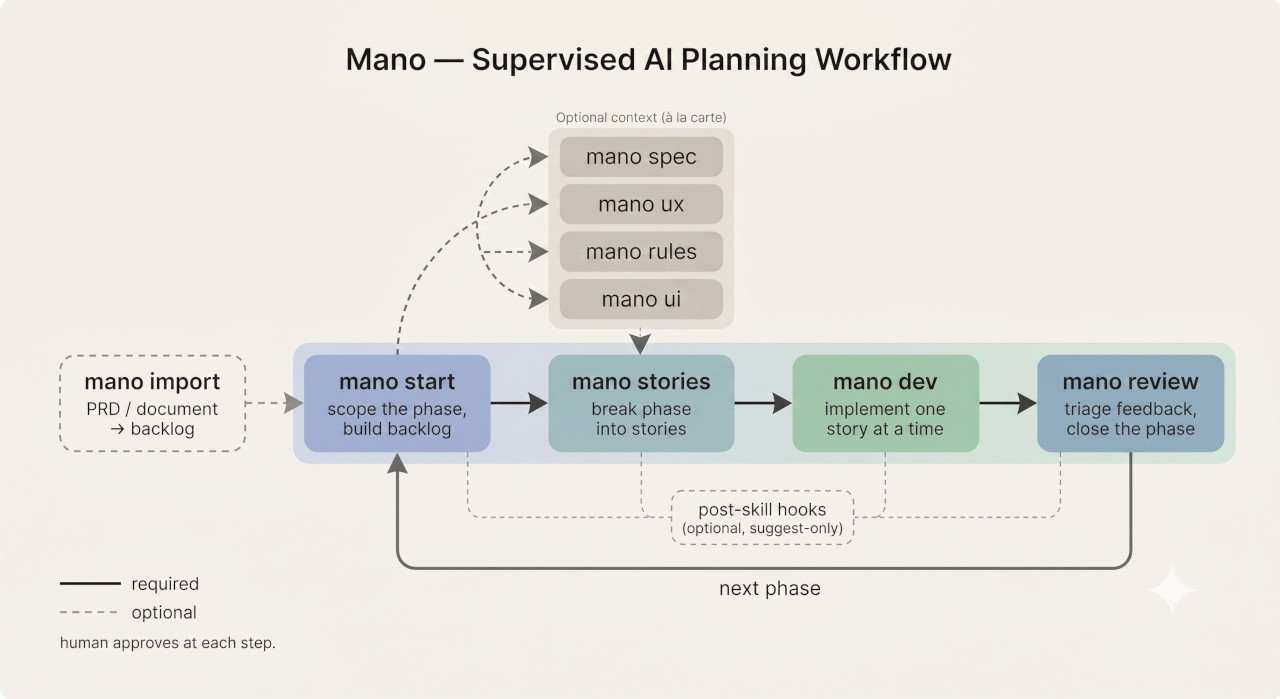
Mano is a fast planning loop for AI-assisted development.
📖 Docs & guides: mano.ceceppa.me
Plan in small phases and validate each assumption before it becomes code. You stay in control of the direction — correcting course at the brief, not after dozens of tasks have already shipped.
Mano is built on a simple assumption: software projects rarely move in a straight line. Feedback, testing, and technical discovery invalidate early assumptions. So the goal isn't a perfect upfront plan — it's a tight loop where each small phase is scoped, reviewed, and corrected before the next one starts. You catch the wrong turn early, while it's still cheap to change.
Each phase breaks into self-contained stories an agent implements one at a time by default. On greenfield work this keeps the build loop focused — but the point throughout is that you approve the direction at every seam. When you have reviewed a few small stories and want one continuous implementation turn, mano dev yolo is the explicit user-owned exception; Mano never opts into it for you.
Important: Mano is not a compiled CLI tool, a deterministic software framework, or an autonomous planning system. It is a set of skills, templates, and instructions that rely entirely on your AI agent's context window. You, the human, are the ultimate enforcer of scope, context, and quality.
Run this in your project's root directory:
npx mano-plan installThis installs Mano into your project:
_mano/— the skills, shared rule fragments, templates, hooks, scripts, and workflow Mano reads at runtimeAGENTS.md— the agent contract, dropped at your project root (always)CLAUDE.mdand.cursorrules— optional editor entry points; the installer asks which you want
Pin a version with npm's own syntax:
npx mano-plan@latest install     # newest published version
npx mano-plan@1.0.0 install      # a specific version
Updating: re-run npx mano-plan install in the same project. Existing files are left untouched — your edits are safe. Use --force to overwrite Mano's files with the newer versions, or --yes to accept defaults without prompts.
Once installed, type mano in your AI IDE's chat to see available commands, or mano start to begin.
Mano supports engineering judgment; it does not replace it. The AI may challenge vague ideas, surface gaps, suggest defaults, and help decompose work, but the human owns the final decisions.
Mano expects plans to change. Artifacts should evolve when real feedback, implementation constraints, or better understanding invalidate earlier assumptions. Change is a normal part of the workflow, not a failure of planning.
Mano optimizes for reducing the cost of changing direction. Small phases, short tickets, focused context, and lightweight artifacts make it easier to update the plan without rewriting a large pre-planned system.
Mano deliberately keeps planning surface area small. Use the minimum artifacts needed to make the next phase clear enough to build. Do not generate specs, UX docs, rules, or UI guidance just because they exist as actions.
Mano should help you think more clearly, not encourage passive acceptance. Skills are expected to challenge abstraction, short-sighted decisions, missing assumptions, and overloaded scope.
| Command | What it does |
|---|---|
mano |
Show available commands and current status. |
mano status |
Runs the deterministic state projection. Shows the selected owner, active phase, artifact state, and valid next actions. |
mano import [doc] |
Turn an existing PRD or document into a backlog, then stop. Run mano start afterwards to scope the first phase. |
mano owner [slug] |
Show, set, or clear this repository clone's optional phase owner. |
mano mode [auto|manual] |
Show or set whether finished actions chain automatically through to implementation. Defaults to manual. |
mano track [name] |
Show, set, or clear an optional local experiment/work track. |
mano start |
Scope a new project or phase. This is a dedicated command, not part of mano [action]. (mano start) |
mano [action] |
Run a planning action: spec, ux, rules, ui, stories, review. Any order, when its inputs are useful. |
mano build ["what changed"] |
Build the active phase straight from its brief — no story files. The brief's own numbered Phase Scope items are the units, tracked in progress.md. The optional quoted text is a mid-phase correction, accepted only once a valid ledger exists. |
mano dev [yolo] |
Implement the next pending story, or explicitly batch all stories currently pending with yolo. Follows the implementation contract in AGENTS.md. |
mano continue |
Resume where the project is. With an open ledger it runs the implementation entry — mano build to completion, or mano dev for one story. Otherwise it auto-runs a planning action only when there is a single obvious next step; if several are still reasonable it shows the options instead of picking the shortest path. |
mano help [skill] |
Show what a skill does and when to use it. |
mano dev and mano build are the two named paths into implementation, but you don't have to remember either command — plain phrasing like "implement the next story" or "build the phase" routes to the same flows. Either way the agent follows the implementation contract in AGENTS.md.
mano dev yolo (or the unambiguous mano-dev yolo) batches every story that is pending when the command starts. It still implements them as separate stories, in index order, marking each one done before moving on. It stops at the first blocker and never relaxes acceptance criteria, Not this story, project rules, verification, or the mandatory mano review phase close. Without the literal yolo, mano dev always stops after one story.
mano build has no yolo because it never needed one: one invocation builds the whole phase, in manual as much as in auto. Its ledger is written as each row closes, so an interrupted run resumes from disk — a fresh session picks up at the first unresolved row with nothing carried in the conversation.
mano stories + mano dev and mano build are both first-class, and a phase uses one or the other.
Which one you get asked for is not a coin flip. Once a phase has a ledger, that ledger decides: a stories index means mano dev, a progress.md means mano build, and a complete ledger of either kind means mano review. The choice is open only before a ledger exists — and there, in manual Mano shows you both; in auto the approved chain ends at mano build.
mano stories→mano devdecomposes the phase into story files first, then implements one story per session. The split is the point: a big model plans, a small-context model implements against a written contract. Best for a large or unfamiliar phase, and for anything you want to read before it is built.mano buildskips story files entirely. The unit of work is the## Phase Scopeleaf you already approved in the brief, so nothing invents a decomposition and nothing can drift from what you wrote. It keeps a small ledger atPHASE_DIR/progress.md— one row per scope leaf, one row per exit-criteria leaf — and builds the rows in order, checkpointing each one. Adjacent leaves of one scope category can be built in a single pass when they are genuinely one piece of work; the category you wrote is the ceiling on that, and every leaf is still proven separately. It runs straight through, and stops to ask only when it deviated: a missing decision in an artifact, a scope conflict, a row it had to split, a row it had to reopen, or a correction you typed mid-build.
The gates are the same on both paths. A missing spec-owned default, an undefined shared contract, an unwritten player choice, or work outside Not This Phase stops the run and routes to the skill that owns the decision — mano build runs those checks once against the whole brief, before it writes anything at all, which is the cheapest place they can fire.
The ledger's two status vocabularies are deliberate: scope rows are pending | doing | done, exit criteria are pending | met | needs-human. Built is not proven — mano review refuses to close a phase whose scope is complete but whose criteria are not.
Because mano build's ledger comes from the brief, mano start writes both ## Phase Scope and ## Exit Criteria as a numbered category with lettered leaves, and a script parses them — nothing retypes or paraphrases your text. A scope category is an outcome area you expect to be built together, not a module you are ordering; it is what gives one build pass a ceiling that came from you rather than from the model. A flat numbered scope list is still valid and builds one row at a time. A brief with a prose-only scope is refused and sent back to mano start, because inventing that split is the one thing this path forbids.
mano dev is a generic implementer, not a language specialist. If you have a dedicated coding skill (e.g. a C++ specialist), you can have it implement instead — just point it at the contract: something like "@cpp-pro, implement the next pending story following the 'Implementing a story' contract in AGENTS.md." The specialist then writes the code under the same rules as the default implementer (AC only, one-line done, stop on a gap rather than inventing). The key is the contract reference — invoking a specialist with a bare "implement the next story" skips the discipline that keeps implementation supervised and on-scope.
Solo projects keep the original behavior automatically: with no owner configured, Mano uses _mano_output/phase-N/, in-phase-N, and the existing phase sequence.
For parallel team work, opt one checkout into a stable owner slug:
mano owner alice
That clone now uses _mano_output/alice-phase-N/ and in-alice-phase-N. Another teammate can use mano owner bob for an independent sequence, or configure alice to take over or pair on Alice's current phase. mano owner shows the selection; mano owner clear returns the clone to legacy phase-N routing. Existing folders are never renamed or migrated.
The owner is stored in repository-local Git config as mano.owner, so it is not committed. Setting or clearing it requires a Git checkout; run git init first in a new directory, or use MANO_OWNER=alice for a shell. Linked worktrees share the configured value. Use a stable lowercase handle, not an email address or machine username.
mano owner, mano mode, and mano track are thin wrappers over git config --local. Each command is exactly equivalent to editing the key yourself:
| Command | Equivalent |
|---|---|
mano owner alice |
git config --local mano.owner alice |
mano owner clear |
git config --local --unset-all mano.owner |
mano mode auto |
git config --local mano.mode auto |
mano mode clear |
git config --local --unset-all mano.mode |
mano track "Option B" |
git config --local mano.track "Option B" |
mano track clear |
git config --local --unset-all mano.track |
Read them back with git config --local --get mano.mode (or mano mode / mano owner / mano track with no argument, which also tells you whether an environment variable is overriding the stored value).
Two things the wrapper adds, which is why it is still worth typing: it validates the value before storing it (an invalid owner slug or a mano mode fast is rejected at the command rather than silently ignored later), and it prints what the setting now means. Three details matter if you edit the config by hand:
--localis not optional. Mano reads these keys withgit config --local --get, so a--globalor--systemvalue is never picked up. That is deliberate: these record how this checkout is being worked on.- No
=. It isgit config --local mano.mode auto, notmano.mode = auto. - The environment wins.
MANO_OWNER,MANO_MODE, andMANO_TRACKoverride the stored value for a shell or worktree, and an empty one is an error rather than a silent fallback. Everystate.jsprojection prints the effective values, so that is where to look when a setting seems ignored.
Ownership scopes phase discovery and lifecycle gates; it is not a concurrency lock. The backlog, tech spec, UX flow, design brief, project rules, and reviews remain shared project files. Teammates should use branches or worktrees, choose disjoint backlog scope, and coordinate merges normally.
When you are exploring parallel directions, set a local track:
mano track "Option B"
Track is distinct from Source: Source records where a backlog item came from; Track records the experiment or direction it belongs to. While active, it tags imported and conversation-created items. Start copies it into the phase brief. Review items then copy that phase Track, even if your local Track changed. mano start considers only matching-track backlog items. mano track clear returns to untracked planning without modifying existing items. Track never bypasses phase approval or any conflict check. Like the other two, it is repository-local Git config — mano track "Option B" is exactly git config --local mano.track "Option B" (see The three local settings are plain Git config above), and MANO_TRACK overrides it for a shell.
Setting or clearing Track requires a Git checkout because Mano stores it in repository-local Git config. Run git init first in a new directory, or use MANO_TRACK="Option B" for a shell.
You can also narrow one Start run without changing provenance or scope authority:
mano start from source "Piano brief"
mano start from track "Option B"
mano start from source "Piano brief" and track "Option B"
Source uses a case-insensitive substring match. Track uses a case-insensitive exact match. Both only filter candidates; you still approve the phase scope.
By default Mano is manual: every command finishes, prints what it changed, and hands back to you. That is the point — you steer at each seam.
On a project where you have stopped reading the intermediate artifacts and just run the commands in sequence yourself, you can say so:
mano mode auto
From then on, once you approve a phase scope, Mano runs the actions that phase needs and finishes at mano build, without you typing each one — including when you came in through mano import, where the whole path from document to built phase writes no story files. (A phase that already has a stories index keeps its path and finishes at mano dev yolo instead.) Three things keep it supervised:
- You still approve the phase. Auto mode is armed by that approval and never replaces it — the brief is still where you correct course, before any code exists.
- It pauses for any question. A decision to confirm, a clarification, an ambiguous next action, hook findings, a blocker — it stops and asks. Nothing is ever picked on your behalf. Answer, and it carries on.
- It never closes the phase. The chain stops after implementation.
mano reviewis always yours to run.
At the scope prompt, 1 and go are exact synonyms: both approve the scope and start the displayed auto chain. To change it and approve in one reply, use wording such as go, skip rules or 1, add ux; an edit without 1 or go changes the proposal but does not start it.
For a new interactive frontend, auto mode normally includes ux and ui when the exact flow, responsive composition, hierarchy, or visual states are not already covered. Those artifacts are still optional to you—you can explicitly skip either—but auto mode does not make that product decision on your behalf merely because the interface uses familiar controls.
Suggest hooks are the one behaviour that inverts after approval: in manual or unarmed runs Mano asks before running them; during an armed auto chain they run automatically — because you are deliberately not reading the artifacts mid-chain, so the hook is the only check left. Their findings still need your approval before anything is edited. Command hooks run automatically in both modes.
mano mode shows the current setting and mano mode manual turns it off. Like the owner, it lives in repository-local Git config (mano.mode) and is not committed — it records how much you review, not a property of the project. mano mode auto is exactly git config --local mano.mode auto; see The three local settings are plain Git config above. MANO_MODE overrides it for a shell.
Persisting mano mode auto or mano mode manual therefore requires the project to be a Git checkout. In a new project directory, initialise version control first:
git init
mano mode auto
Mano never runs git init for you. Importing, scoping, and other manual-mode planning can still happen before a repository exists; the Git requirement begins when you persist a run-mode choice. For a temporary shell or worktree override, use MANO_MODE=auto instead.
Actions are independent, not sequential. There is no fixed conveyor belt, but not every action is equally useful at every moment. Each skill checks for required context first: some can proceed with partial inputs, others warn and redirect you to the action that creates the missing artifact.
When a user types a Mano command in their AI IDE's chat interface, the agent is instructed to carry out that planning command directly. Since this relies entirely on the agent's context window and instruction-following capabilities, you must actively steer the agent if it hallucinates state or breaks character.
If any command launches the wrong skill, use the hyphenated form. Every Mano action also exists as an exact skill name
mano-<action>(mano-start,mano-review,mano-dev, …). If the spaced form ever invokes a built-in or third-party skill that shares the action word (a code-review tool grabbingmano review, a dev server grabbingmano dev), re-run it hyphenated — the hyphenated name matches a Mano skill and nothing else. Full dispatch rule:workflow.md.
Run a Mano action again when concrete new information affects its artifact. The skill preserves unaffected content and updates only the relevant sections. mano stories never regenerates a completed story; changed shipped behavior becomes a new lettered corrective story.
| Command | Role | File |
|---|---|---|
mano import |
Decomposes an existing PRD/document into a backlog, then stops | skills/import.md |
mano owner |
Configures optional repository-local phase ownership for team work | skills/owner.md |
mano mode |
Configures whether finished actions chain automatically (auto) or hand back (manual) |
skills/mode.md |
mano track |
Configures an optional local experiment/work track for imports, phase candidates, and review follow-ups | skills/track.md |
mano start |
Scopes the idea, populates the backlog (from conversation), proposes phases | skills/start.md |
mano rules |
Defines and updates project rules — components, patterns, architecture | skills/rules.md |
mano spec |
Translates the phase brief into tech spec | skills/spec.md |
mano ux |
Defines UX flows — screens, navigation, user interactions | skills/ux.md |
mano ui |
Establishes visual language and component guide | skills/ui.md |
mano stories |
Breaks specs into implementable stories | skills/stories.md |
mano review |
Records evidence, triages feedback, closes the phase | skills/review.md |
mano build |
Builds the active phase from its brief's own scope items, tracked in progress.md |
skills/build.md |
mano dev [yolo] |
Implements the next pending story, or the invocation-time pending set with explicit yolo |
skills/dev.md |
| (shared) | The implementation contract both code paths read: gap gates, acceptance evidence, Repair Mode, read budget, output discipline | rules/implement.md |
(shared, auto only) |
The chain rules a planning skill applies while an armed auto run is in flight — loaded only when the state projection reports MODE: auto, never on a manual run |
rules/auto.md |
The user owns scope, priorities, and product tradeoffs. mano spec can recommend concrete technical defaults and mano ui can set a concrete visual direction, but both are always overridable.
Mano is strictly à la carte and functions as a Just-In-Time (JIT) planning system.
You only pay the cognitive tax for what you are building today. The shortest complete phase is two commands plus the close: mano start to scope the work, mano build to build it from that brief, and mano review to close the phase. The story path adds one: mano start → mano stories to generate the tasks → mano dev per story (one turn each by default, or one explicit YOLO batch) → mano review. Every other action (spec, ux, rules, ui) is optional context tightening.
When implementation finishes the phase, it hands you the brief's own Validate now: checks — the Try lines you wrote in the validation plan, not checks Mano invented — and mano review shows each one again beside the promise it tests, because that review is usually a new session where the earlier message is gone.
The optional actions can be skipped; mano review cannot. Review is what closes a phase — it is the only action that moves that exact phase identity's backlog items from its in-phase status to resolved, and mano start will not scope the next phase in the selected namespace until the current one is closed that way. The log is deliberately a compact decision record: evidence, the human decision it informed, assumption outcomes, and resulting backlog changes. It is not a release recap or mandatory mini-postmortem.
Optional actions can be created now, reused from existing work, copied from a similar project, adapted from external inputs, or skipped entirely when they would add noise. Only run them when the current phase needs more clarity, constraints, or alignment. You never run the whole pipeline "just in case."
Skipping is not free, though. "Optional" means you decide where a decision gets made. It does not make the decision disappear. Stories and Dev stop when a missing UX, UI, rule, default, or public contract would force invention. Small local choices may remain implementation decisions. Run an optional artifact when its missing decisions would block work or create project-wide drift.
On a new project, mano start populates the backlog (from conversation), suggests a candidate first phase, and then stops. It must not create the projected phase brief, create stories, or stamp the projected in-phase status until the human explicitly approves the phase scope. With no owner configured those paths remain phase-N; owner-qualified paths appear only after explicit opt-in. If you're starting from an existing PRD or document, run mano import <doc> first — it decomposes the document into the backlog — then mano start to scope the phase.
- (Optional)
mano import <doc>→ decompose an existing PRD/document into the backlog first. Skip if you're starting from a conversation. mano start→mano startscopes input, populates the backlog, suggests the next phase, and waits for approval before writing the phase brief.mano spec→mano specwrites tech spec.mano ux→mano uxdefines UX flow (for user-facing phases).mano rules→mano rulesdefines project rules (recommended for new projects).mano ui→mano uiextends the project-wide design brief and creates or updates the current phase preview.mano stories→mano storiesbreaks into stories.mano dev→ implement the next pending story (repeat until the phase is built). Ship. Gather feedback.mano review→mano reviewrecords validation results, triages feedback into the backlog, writes the review log, and closes the phase.
This is an example path, not a mandatory conveyor belt. After any step, choose the next action from the artifacts that are still missing or need revision.
mano start→mano startscopes input, creates/updates the backlog, and suggests the next phase.- Approve the phase brief scope.
mano stories→mano storieswrites stories directly.mano dev→ implement the next pending story, repeat until the phase is built.mano review→mano reviewrecords validation results, triages feedback, and closes the phase. Required — this is what lets the nextmano startproceed.
Use the minimal path when the phase is already clear and extra artifacts would add noise instead of signal. The optional planning actions are what you skip here; review still closes the phase.
Review does not pretend that every completed phase was validated. It records what happened and keeps the exact phase checks visible. Where or how you checked the result is useful but optional. Mano omits that field when you do not supply it; it does not grade the review. close it is your sign-off, and Mano treats it as one: it records each exit criterion as signed off by you — in progress.md with the date, on the build path — and accepts the assumptions you shipped on. What it does not do is answer anything Mano asked you. Two slots are yours alone: what happened, and each Validation Question. If a close leaves either open, Mano comes back once — and only once — with a single line listing exactly those, because you did not write the brief's questions and have no reason to remember them at close time. This is where you find out what you were about to skip. didn't check and didn't test it are complete answers, recorded as yours, and whatever else you say in that reply is triaged like any other feedback. Mano never fills one in for you. Feedback is optional; an honest record of its absence is not. Empty worked/didn't-work sections, story counts, test counts, and shipped-feature summaries are omitted unless a fact directly supports the decision.
After a review, mano review closes the phase. If you don't need Mano for the rest — that's fine. A tool that never lets go is a dependency, not a tool.
Requirements change during implementation. You don't have to finish the phase to adjust:
- On the stories path, found a bug or missing feature? Use
mano stories— it creates a pending story numbered to reflect ship order (e.g.story-3a-…, where the letter marks insertion position, not a sub-task of story 3). Runmano devwhen you want to implement the next pending row. - On the build path, just say it — to the running build, or at invocation. Both
mano build "the picker keeps the old value"and the same sentence typed mid-run go through one classifier: a defect in something already marked done reopens those rows and fixes under them (no new work is invented — the row was simply never done); an in-goal nuance no row covers is appended as a lettered row in your own words; and a genuinely distinct outcome adds no row and no code, and is offered to the backlog instead. Every one of those shows you what changed before any code follows. The argument is accepted only once a valid ledger exists — with no ledger there is nothing to correct, andmano start "[the change]"revises the brief instead. - Need to change the active phase scope? Before implementation starts,
mano start "[what changed]"revises the brief in place and re-asks for your approval. Once a ledger exists the brief is frozen: on the stories path a change becomes a lettered corrective story, on the build path a correction row.mano startwill not advance while the phase remains open. - Need to update specs or stories? Run the owning action with the concrete change. It updates affected content only. Done stories remain immutable.
For mano spec, rerunning the command is also how you sync the planning doc back to reality after project setup. Once the project has a real manifest and lockfile (any language — package.json/package-lock.json, pnpm-lock.yaml, yarn.lock, bun.lockb, Cargo.lock, go.sum, requirements.txt/uv.lock, CMakeLists.txt, etc.), or anytime you add/remove/replace a library, run mano spec again so mano spec can reconcile _mano_output/tech-spec.md with the actual installed toolchain. It also receives the exact backlog items assigned to the active phase, so source requirements are not lost when the human-facing phase brief summarizes them. For a brownfield public interface, it checks the named existing declaration surface before confirming a replacement or extension. The completeness gate is deliberately limited to consumer-visible/public or independently-owned multi-story boundaries; a local helper or component API owned by one story stays an implementation decision.
Planning before implementation means _mano/, _mano_output/, and agent instructions already exist when a greenfield frontend app is scaffolded. Many project generators reject that non-empty root. Mano never solves this by moving those files away.
When a generator needs an empty destination, mano spec records a guarded command such as:
node _mano/scripts/scaffold.js run --name my-app -- npx create-example-app@latest {target}The helper generates the app in a temporary directory outside the project, checks the entire result, and then adds only non-conflicting files. It never overwrites or deletes an existing file, ignores a staged .git, and stops before copying if (for example) the generator's README.md differs from one already in the project. Failed or conflicting output remains staged so it can be inspected. mano stories makes this a requirement of bootstrap story-0, and mano dev must stop rather than move _mano, _mano_output, Git metadata, or agent instructions out of the way. Replace the example generator with the exact command chosen in your tech spec; {target} must remain literal so the helper can supply the empty destination.
The pipeline doesn't require you to finish before course-correcting.
_mano_output/
├── backlog.md               ← future work, deferred items, review follow-ups (created by `mano import` / `mano start`; owned by `mano start` / `mano review`; `mano spec` / `mano rules` resolve only projected gap items; editable by you)
├── tech-spec.md             ← project-wide, cumulative (`mano spec` extends per phase)
├── ux-flow.md               ← project-wide, cumulative (`mano ux` extends per phase)
├── design-brief.md          ← canonical, cumulative project-wide visual language (if generated)
├── project-rules.md         ← optional; created by `mano rules` or provided manually when project rules are useful
├── reviews.md               ← review log; `mano start` reads this when shaping later phases
├── phase-1/
│   ├── phase-brief.md       ← problem, vision, scope for this phase
│   ├── design-preview.html  ← self-contained visual preview for this phase (if generated)
│   ├── progress.md          ← `mano build` ledger: one row per scope leaf, one per exit-criteria leaf
│   └── stories/             ← the other path's ledger; a phase has one or the other
│       ├── README.md         ← story index
│       └── story-*.md        ← one file per story
├── phase-2/
│   └── ...
├── alice-phase-1/          ← optional; only after `mano owner alice`
│   └── ...
└── ...
design-brief.md is the cumulative, canonical visual contract. Each projected PHASE_DIR/design-preview.html is a non-canonical snapshot of that exact phase identity's screen composition, not a project-wide file to replace or grow forever. Re-running mano ui may update the active phase's preview, but later or differently owned phases do not read or rewrite it. A legacy _mano_output/design-preview.html from an older Mano version is left untouched; Mano does not guess which phase it belongs to.
Each phase brief is self-contained — problem, vision, design principle, scope, validation plan, assumptions, and risks. Technical decisions and UX flow live at project level and grow only when they are useful. Future work lives in backlog.md. Artifacts are living working documents, not permanent contracts.
Planning artifacts live under _mano_output/. The installer writes Mano's runtime under _mano/ and installs a fenced AGENTS.md contract at the project root. It may also install fenced CLAUDE.md or .cursorrules guidance when requested.
Mano's installed runtime layout lives under _mano/ inside the user's project. This repository contains the framework source files at the root for authoring, but the contract exposed to coding agents in real projects uses _mano/skills and _mano/templates.
Mano treats the filesystem as the source of truth, but phase-scoped skills do not ask the agent to infer state from directory listings. The installed deterministic state script selects legacy or owner-scoped routing and returns exact paths. If that script fails, the skill must stop instead of guessing from chat context or scanning a different phase.
You can override or guide the framework's default behavior by adding specific files to your workspace.
This optional file manages architectural patterns, routing formats, workflow preferences, and other recurring constraints when the project needs them.
- Creation: Created by running
mano rules, copied from another project, or written manually.mano startdoes not seed this file automatically. - Updates:
mano rulesis the primary command for updating this file. Other actions may respect it when present, but optional artifacts are not created just to complete a default structure.
Spec vs Rules: What's the difference? Mano enforces a strict separation of concerns to prevent AI context bloat:
tech-spec.mdis the WHAT (The Blueprint): It defines libraries, data schemas, and exact consumer-visible interface contracts (e.g., "We will use PostgreSQL, andGET /usersreturns this result/error shape").project-rules.mdis the HOW (The Building Codes): It defines reusable architecture, signature, folder, and styling conventions (e.g., "All API handlers must be wrapped incatchAsync, and we separate UI logic from data fetching").The quick test: the spec answers a reviewer's question — "is this the right technical approach?" Rules answer a contributor's question — "where do I put this file and what do I name it?" A spec decision never changes owner. A project rule may define how contributors apply it consistently, but it references the spec instead of copying the library, format, value, or exact interface. Folder structure, naming, and file-placement conventions are always rules, never spec — even before
project-rules.mdexists.
Because Mano operates on a strictly "à la carte" file-based system, you can completely skip a skill by providing your own documentation. If you already have a spec or design, simply create the corresponding file in _mano_output/ and Mano will read and respect it automatically:
design-brief.md[PHASE_DIR]/design-preview.html(optional phase snapshot;phase-Nby default)tech-spec.mdux-flow.mdproject-rules.md
Mano does not create true agent isolation, persistent model memory, or an autonomous orchestration engine. Its scripts do provide deterministic state projections and format-safe writes for fragile operations.
LLMs only reason over the context currently provided to them. Artifact boundaries, role specialization, and phase separation are maintained through user discipline and selective context exposure — not hard enforcement.
Mano reduces planning entropy by encouraging bounded reasoning scopes and structured project artifacts, but humans remain responsible for:
- validating outputs
- resolving contradictions
- detecting stale assumptions
- deciding what context to expose
This is not a fully autonomous system. It is a collaboration framework for guiding LLM-assisted planning work.
Mano's state lives on disk, and _mano/scripts/state.js rebuilds your exact position for a few hundred tokens — resuming in a fresh session is nearly free, while every message in a long session replays everything that came before it. The intended loop is concrete:
- One story per session. Run
mano dev, let it finish its story, end the session. Start the next story in a fresh session —state.js --nextrestores the position. - One planning command per session boundary. A planning command's output is a file; when it lands, that is a natural place to end the session rather than continue in the same context.
- End sessions instead of compacting them. Compaction keeps a lossy summary of the expensive part; a fresh session plus the state projection keeps everything that matters and drops everything that doesn't.
Honest note: mano dev yolo is by construction the least token-efficient mode — one session carries every story in the batch. That is a deliberate trade for one continuous hands-off run; use it knowingly.
Explicit human decisions control the project. After that, use the artifact that owns the decision instead of ranking whole document types:
- The phase brief owns the current goal, scope, exclusions, and learning plan.
- The tech spec owns technical choices, exact public contracts, defaults, and domain mechanics.
- The UX flow owns user actions, branches, navigation, and recovery paths.
- The design brief owns visual direction, composition, and visual values.
- Project rules own reusable conventions, required patterns, and prohibitions.
- Stories decompose those decisions into bounded implementation and observable acceptance criteria.
When two artifacts disagree, do not silently prefer either one. Show the conflict and ask the human to resolve it. Then update each affected artifact through its owner.
Project artifacts may become outdated as decisions evolve.
Artifacts can exist in four states:
- Current — aligned with latest project direction
- Stale — partially outdated but still useful
- Conflicting — contradicts newer decisions
- Deprecated — retained only for historical reference
When a decision changes, rerun its owning skill with the concrete change. Update only affected sections and references. Preserve done stories; add corrective work when shipped behavior changes. Restructure or replace a whole artifact only when the human explicitly chooses that broader change.
Drift is the normal cost of staying in control: as you change direction, edit code, or rescope, the artifacts that described the old state fall behind. Mano treats this as expected, not a fault.
Re-running the relevant skill (for example mano rules) can align artifacts that have drifted — updating a stale reference to match what its source-of-truth artifact now says, rather than restating the same fact in several places. Each shared value or decision has one owning artifact; the others reference it, so alignment means re-pointing the references, not copying the value around.
Alignment is a supervised step, not an automatic sync. When a value or decision conflicts across artifacts, Mano surfaces the conflict for you to resolve. It never silently picks one. After the decision, each owning skill applies the smallest relevant update. A broader rewrite requires explicit approval.
Mano cannot eliminate typical LLM failure patterns.
Watch for:
- stale artifact assumptions
- contradictory project documents
- speculative architecture growth
- overconfident recommendations
- context leakage between planning phases
- unnecessary process expansion
When outputs become unfocused or contradictory, reduce context scope, identify the owning artifact, and rerun that skill with the resolved decision. Do not rewrite unaffected artifacts.
Mano is intentionally small. The skills, templates, and workflow documents in _mano/ describe how Mano thinks, not how your specific project behaves. When you run Mano on a real project, you'll discover constraints, conventions, and integration friction that are specific to your stack, your tooling, or your collaborating skills. Those belong in your project's AGENTS.md, not in Mano itself.
Common places where project-specific rules earn their place:
-
Output discipline for third-party skills. Specialist skills (language experts, code reviewers, accessibility auditors) often have their own output habits — verbose verification notes, scratch test files, narrative explanations appended to artifacts. These habits make sense for one-shot interactions and become noise in long-running projects. AGENTS.md is the right place to constrain them.
-
Tooling conventions. Package manager choice, test framework, build commands, dependency installation patterns. These are project decisions, not framework decisions. Recording them in AGENTS.md keeps implementing agents consistent across stories without bloating Mano's own files.
-
Implementation house style. Naming, file placement, framework-specific patterns. Some of these belong in
_mano_output/project-rules.md(wheremano rulescaptures repeatable conventions); some belong in AGENTS.md (where coding agents read at session start). The line is roughly: rules that constrain what gets built go in project-rules; rules that constrain how agents behave during implementation go in AGENTS.md. -
Integration with external systems. If your project uses an external review skill, a specific testing service, a particular deployment flow, document how Mano-shaped work hands off to those systems. Don't try to make Mano itself aware of them.
The pattern is: Mano stays general; your project's AGENTS.md absorbs the specifics. This keeps Mano upgradable across projects and keeps your project's particular constraints from drifting into framework files where they don't belong.
Mano artifacts are optimized for humans first. They should be easy to read, edit, trim, or replace manually without rerunning a skill. Skills accelerate planning, but they do not own the documents.
The backlog may contain a short, optional Core Product Principles section for durable product values that should survive across phases — expectations such as speed, simplicity, interaction feel, accessibility level, or tone that are easy to lose during iterative planning. Keep it small and human-editable; it does not need a separate process or artifact.
mano start owns this continuity and copies only the principles relevant to the current phase into the phase brief. Downstream skills do not read the backlog for general project memory. The narrow exceptions are deterministic projections: mano spec receives only unresolved spec-gap items and mano rules receives only unresolved rule-gap items; each can resolve only an exact item it fully addressed.
A few design principles keep Mano's skills predictable — especially with smaller models — without adding process.
These are not extra steps. They are lightweight guardrails baked into how each skill behaves.
Skills should not justify weak outputs with excuses such as:
- "This is enough for now" when important ambiguity remains.
- "The user can figure it out later" when a decision affects the current phase.
- "This is obvious" when the artifact does not state the reasoning clearly.
- "We can add detail later" when missing detail blocks implementation.
- "The model probably knows" when context was not provided.
When a skill cannot produce a useful artifact from the available context, it should say what is missing, explain the tradeoff, and offer a smaller useful next step.
Artifacts should have simple "good enough" checks.
Exit criteria are not approval gates. They help humans quickly judge whether an artifact is usable, incomplete, or too vague.
A Mano artifact is usually good enough when:
- it supports the current phase
- it is readable and editable by a human
- it avoids unnecessary future planning
- it exposes important assumptions
- it gives the next skill or developer enough context to continue
Skills should load or request only the context needed for the current task.
Prefer:
- phase brief before full backlog
- rules that only some runs need, in a fragment those runs load (
rules/auto.mdloads only underMODE: auto) - filtered
state.js --gapsoutput instead of direct gap-related backlog access - relevant artifact sections before entire documents
- explicit provided context before inferred project memory
- small targeted follow-up questions before broad discovery
Avoid pulling every artifact into every skill. Mano should preserve useful reasoning quality by keeping context bounded.
Mano can support optional post-skill hooks through the installed _mano/hooks/ folder.
A hook becomes active only when an .example.md file is copied or renamed without .example:
_mano/hooks/post-spec.example.md  -> inactive
_mano/hooks/post-spec.md          -> active
A hook's ## Mode section decides how it runs — the three kinds produce different things:
check is a checklist Mano applies itself, automatically, in both modes, right after the related skill's artifacts are written — no confirmation, because the checklist is your own pre-written review. Findings still go through per-item triage before anything is edited. This is the primary shape: most project hooks are "always check these things after this skill."
suggest (the default) points at an external skill or command whose findings are a specialist opinion you have to weigh. In manual mode or before an auto chain is armed, Mano mentions it after the related skill and asks whether to run it. During the armed chain Mano runs it, continues if there are no findings, and pauses for per-item triage if there are.
command produces an exit code — a mechanical side effect. It names one command and Mano runs it every time, in both modes, without asking. Useful for deterministic follow-up work your project always wants done:
# post-import hook

## Mode
command

## Command
node scripts/sync-backlog.js
Writing the file is the authorization, so you are not asked each time. Mano runs it from the project root, reports it in one line of the execution log, and on failure reports the exact error without retrying or editing anything to compensate. To run the same script after several skills, create one hook file per skill (post-import.md, post-start.md, post-review.md).
The line between the kinds is judgement vs mechanism: an external opinion arriving before you have formed your own changes what you think, so you are asked first; your own checklist and your own script carry no such surprise, so they run every time.
When any check or suggest hook reports findings, Mano returns a compact numbered triage.
You can apply an in-scope edit, decide between options, route the finding, or
skip it. Each hook can change only the artifact owned by its related skill.
Running a hook never pre-approves its findings. Mano adds no findings ledger.
post-stories keeps a stricter flow because completed stories are immutable.
Default example hooks include:
_mano/hooks/post-import.example.md
_mano/hooks/post-start.example.md
_mano/hooks/post-spec.example.md
_mano/hooks/post-rules.example.md
_mano/hooks/post-ux.example.md
_mano/hooks/post-ui.example.md
_mano/hooks/post-stories.example.md
_mano/hooks/post-review.example.md
The shipped examples are short check-mode checklists; copy one, trim the checklist to what your project cares about, and rename it without .example. For an external specialist review instead, set ## Mode to suggest and name the exact command or skill in a ## Run section.
Mano never prints a suggest hook's full prompt unless asked. It never names a specific external skill in generic output. Hook findings never authorize edits: Mano presents each finding for selection and applies only the chosen, in-scope changes. In manual or unarmed work, the human decides when to run a suggest hook. During an armed auto chain, Mano runs it after the related artifact and pauses only when findings need triage.