
A modern GPU workload orchestration SDK for C# and .NET.
DXSharp brings DirectX 12, GPU compute, DXGI, the DXC shader compiler, DirectML, animation, and media into a modular .NET SDK. It gives engine builders, graphics programmers, and tool developers direct access to the Windows GPU environment, with expressive managed APIs and explicit control over native resources.
It is also a game and engine laboratory: a place to build interactive worlds, explore computational techniques, and turn working experiments into reusable infrastructure. Rendering, simulation, animation, machine learning, and media share the same underlying questions of state, dependencies, ownership, and execution.
Preserve the freedom of creation. Unify the machinery of execution.


Get started · Samples · Tutorials · Release notes · Support matrix · Roadmap
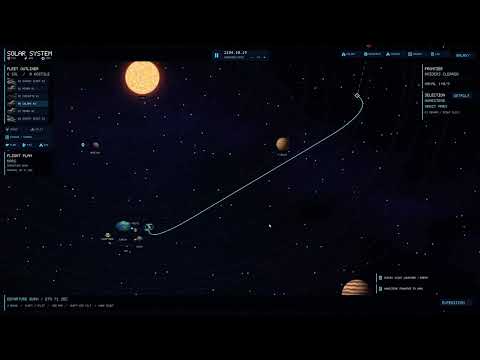
Watch the Fleet Battler playtest →
Fleet Battler is our evolving strategy-game laboratory: explore star systems, survey worlds, develop colonies, fit ships, and command fleets. It brings rendering, asset loading, simulation, compute, input, and audio together in a playable application. Tactical gameplay runs on the CPU; civilian traffic and asteroid workloads use GPU compute, with traffic instance buffers consumed directly by rendering.
The video captures a work in progress. Follow the sample and controls and development plan as the playtests and implementation evolve.
- Graphics and compute: D3D12 devices, command queues and lists, resources, descriptors, pipelines, indexed/instanced meshes, depth/stencil, swap chains, compute dispatch, and initial DXR workflows.
- Explicit lifetimes: generated COM interop, deterministic native ownership, recorded dependency retention, and fence-based retirement. Descriptor pools and upload/readback rings support reusable frame allocations.
- Shaders: runtime DXC compilation with diagnostics and include callbacks, owned bytecode, and incremental MSBuild compilation for embedded or deployed shader assets.
- Content and animation: static glTF/GLB scenes, a defined skinned-GLB import contract, animation interpolation and fades, material maps, and persistent GPU skinning.
- Application hosts: lightweight native Win32 windows, WinForms, optional WPF viewports, and optional WinUI 3 composition with XAML overlays.
- Media and numerical workloads: optional Media Foundation playback with D3D12 video-texture rendering, plus same-device DirectML Add/GEMM execution and numerical checks.
The public native layer exposes broad declarations from pinned SDK metadata. The managed layers add ownership and reusable workflows. API coverage and the support matrix distinguish those declarations from implemented and runtime-qualified features.
Current release: 0.4.0-preview.4 · Windows x64 · .NET 10 and .NET 11.
In a Windows x64 application targeting net10.0-windows10.0.26100.0 or net11.0-windows10.0.26100.0:
dotnet add package DXSharp.Core --version 0.4.0-preview.4The smallest device-creation example:
using DXSharp.Graphics;

using var device = GraphicsDevice.Create( );
Console.WriteLine( device.AdapterName );
Select the framework, host, asset, media, or DirectML packages as needed. Core remains independently usable. Native dependencies are staged through NuGet build targets. See the first application tutorial for the complete project and shader tooling for build-time DXC integration.
Building the checkout requires the SDK pinned in global.json. Samples default to .NET 10; install its runtime too, or select .NET 11 with -p:DXSharpRuntimeMajor=11.
git clone https://github.com/atcarter714/DXSharp.git
cd DXSharp
dotnet run --project samples/FleetBattler -c Release
Try GPU skinning, media playback, or a bounded software-adapter smoke run:
dotnet run --project samples/CharacterLab.Native -c Release
dotnet run --project samples/VideoPlayer -c Release
dotnet run --project samples/ModernTriangle -c Debug -- --warp --frames=4
dotnet run --project samples/ModernCompute -c Debug -- --warp --directml --gemm
--warp selects Microsoft's software adapter. Install Windows Graphics Tools when using the D3D12 debug layer. Hardware features are queried at runtime.
| Package | Role |
|---|---|
DXSharp.Native |
Public generated graphics, imaging, media, audio, input, DXC, and DirectML declarations |
DXSharp.Core |
Owned D3D12/DXGI resources, command recording, synchronization, allocation helpers, pipelines, and runtime DXC |
DXSharp.Assets |
Device-independent model, animation, material, and texture data |
DXSharp.Framework |
Game timing, animation, GPU skinning, shared frame rendering, and native Win32 hosting |
DXSharp.Framework.Desktop |
WinForms application hosting |
DXSharp.Framework.Wpf |
Optional WPF child-HWND viewport |
DXSharp.Framework.WinUI |
Optional WinUI 3 composition viewport and XAML overlays |
DXSharp.Media |
Optional Media Foundation playback and video-texture rendering |
DXSharp.DirectML |
Optional DirectML device/operator ownership and tensor execution |
DXSharp.Tools.Builds |
Incremental DXC shader compilation and embedding/staging through MSBuild |
The original DXSharp and DXSharp.Dxc projects preserve the RCW-based compatibility API. New development uses the modern packages above. Preview 4 replaces the old experimental Framework surface; existing Framework consumers should read the migration notes.
See SDK architecture for dependency boundaries, native access, and ownership contracts. Optional UI and media dependencies stay in their own packages; the separately maintained Noesis integration has its own repository and licensing requirements.
| Workload | What to explore |
|---|---|
| Fleet Battler | Strategy gameplay, orbital navigation, colonies, ship fitting, and compute-to-draw traffic |
| CharacterLab | Persistent GPU skinning, animation, and materials; a shared scene across WinForms, native Win32, WPF, and WinUI hosts |
| VideoPlayer | Local-file playback, seeking, looping, volume, and D3D12 presentation in WinUI |
| N-Body Gravity | GPU-resident ping-pong simulation and instanced rendering |
| ModernCompute | Compute readback, DirectML tensor operations, and capability checks |
| DXR Hello World | Acceleration structures, shader tables, ray dispatch, and image readback |
| Rendering samples | Triangles, textures, indexed lighting, instancing, depth/stencil, planar shadows, and static models |
Every runnable sample uses project references in the checkout. Package qualification converts those same projects into isolated NuGet consumers, so source development and package usage exercise the same implementations.
DXSharp's direction is a composable GPU execution foundation with a capable .NET game framework and toolchain above it. Applications should be able to combine rendering, simulation, animation, numerical work, and media while retaining control over resource placement and execution. The broader scheduling and tooling model is an ongoing engineering goal.
Author in Houdini, Blender, Maya, Cascadeur, or the tools that suit the project. Conventional assets and procedural workflows should meet through explicit interchange and content-processing contracts. The SDK should support different creative processes and engine architectures.
Upcoming work includes broader SDK/workflow coverage, DirectStorage, current GameInput, spatial audio, a visual ray-tracing scene, richer materials and content processing, and reusable lifecycle/input/audio services. Templates, inspection tools, profiling, and an integrated game-development workflow form the longer-term framework direction. Windows PC is the current platform; Xbox remains a future target requiring separate platform qualification.
Follow the public roadmap, framework direction, and showcase plan. The current release is a preview; these documents distinguish delivered work from planned capabilities.
From an x64 Visual Studio Developer PowerShell with the pinned .NET SDK, C++ build tools, and Windows SDK installed:
./build.ps1 -Configuration Release
./build/VerifySamples.ps1
Open DXSharp.sln for IDE development. See build requirements and release qualification for the complete environment and commands.
Release gates cover native COM ownership under JIT and NativeAOT, WARP graphics/numerical checks, shader builds, and isolated package consumption. Preview 4 also passed fresh NuGet.org-only verification on .NET 10 and 11 for all ten package IDs, the DXC build task, and all 17 sample consumers (release evidence).
The graphics runtime targets Windows x64. Linux CI exercises portable COM/CPU fixtures. Optional WPF, WinUI, and media workloads have their own runtime qualification; the interop NativeAOT checks do not imply NativeAOT support for every application host. See the support matrix for exact boundaries and recorded hardware acceptance.
Created by Aaron T. Carter / Arkaen Solutions, DXSharp began with the ambition of bringing the feel of SlimDX and SharpDX to modern Direct3D 12 development in C#. It now grows through complete workloads, shared infrastructure, and reproducible checks.
Issues, focused pull requests, sample improvements, and hardware reports are welcome. Include a reproduction, commit/package version, adapter/driver, runtime, and relevant validation output when reporting a bug.
DXSharp is MIT licensed. Third-party runtimes and sample assets retain their respective licenses.