

Dynamic Link equivalent for DaVinci Resolve to After Effects, REAPER & Ableton Live
A native DaVinci Resolve Workflow Integration Plugin that bridges DaVinci Resolve with Adobe After Effects, REAPER, and Ableton Live, providing a Dynamic Link-like workflow for VFX, motion graphics, and audio post-production.








DaVinci Resolve
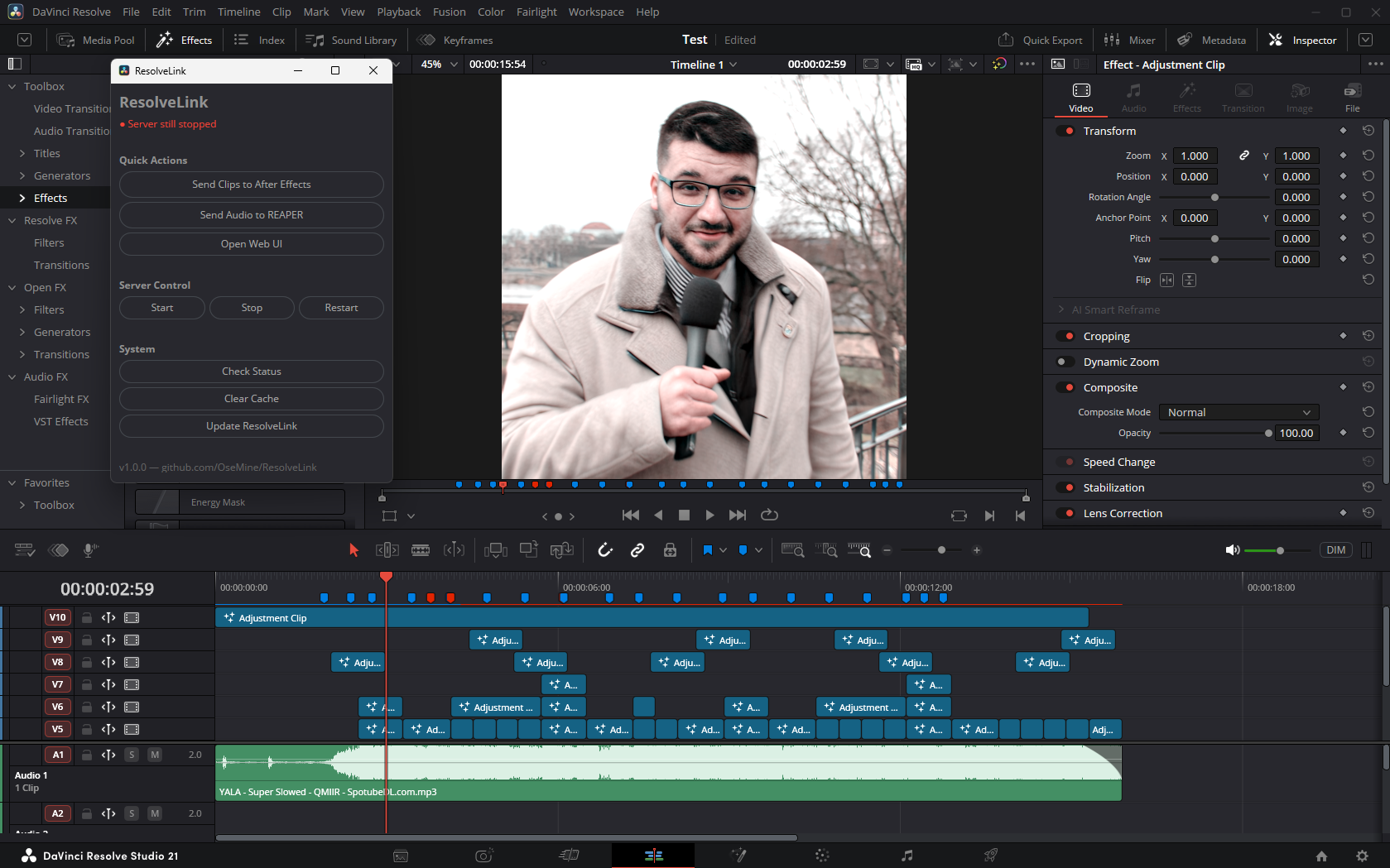
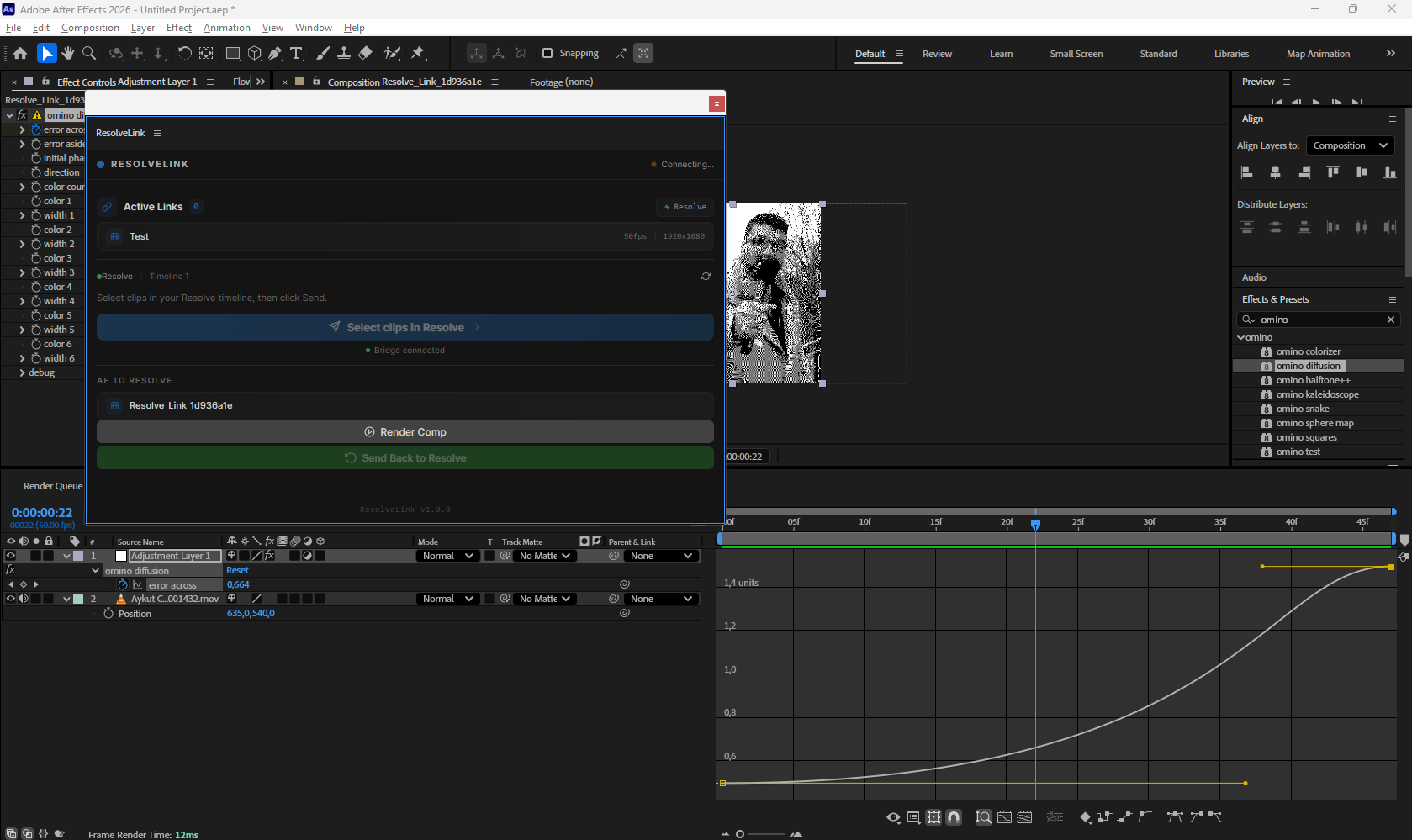
After Effects
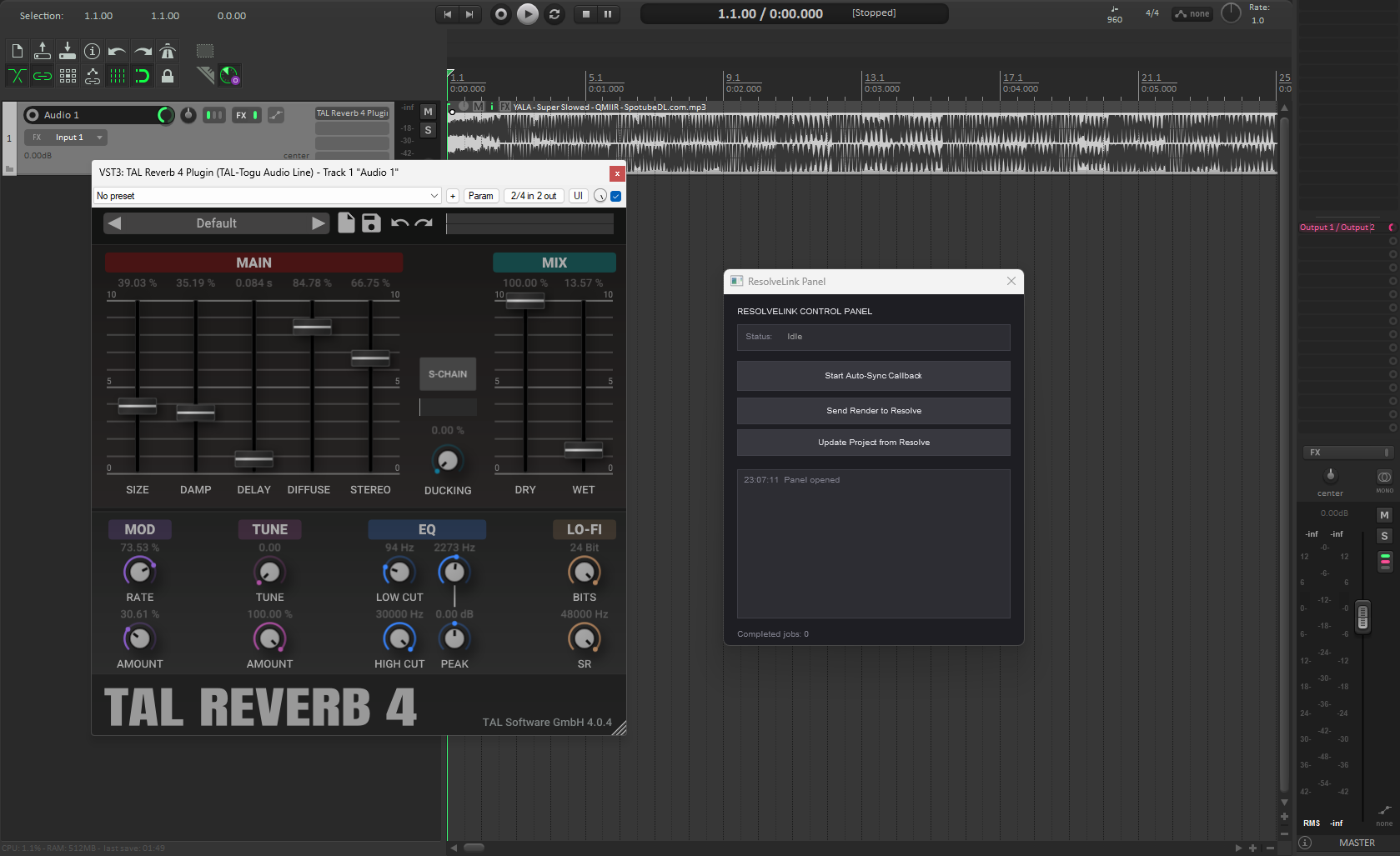
REAPER
Ableton Live

DaVinci Resolve lacks Adobe's Dynamic Link. When VFX work needs to happen in After Effects, audio needs to be mixed in REAPER, or music/sound design needs Ableton Live — editors must manually export clips, open the target application, import footage, match timecodes, render, and re-import back. This breaks creative flow and wastes hours.
ResolveLink automates the entire round-trip. Select clips in Resolve, click one button, and a synchronized After Effects composition is created instantly. When AE work is rendered, the result automatically syncs back to the Resolve timeline as a compound clip. For audio, send clips directly to REAPER for mixing — the same round-trip workflow applies. For music/sound design, send clips to Ableton Live for beat sync, stem export, and device automation.
 ┌──────────────────┐      ┌──────────────────┐      ┌──────────────────┐
 │  DaVinci Resolve  │ ───> │  ResolveLink       │ ───> │  After Effects   │
 │                   │      │  Bridge Server    │      │                  │
 │  Select Clips     │      │  - REST API       │      │  CEP Extension   │
 │  Click "Send"     │      │  - File Watcher   │      │  Auto Comp       │
 │  Auto Re-import   │ <─── │  - WebSocket      │ <─── │  Render & Export │
 └──────────────────┘      └────────┬─────────┘      └──────────────────┘
                                     │
                                     │
                            ┌────────▼─────────┐
                            │                   │
                            │    REAPER DAW     │
                            │                   │
                            │  Panel UI         │
                            │  Named Pipe IPC   │
                            │  Render & Export  │
                            └──────────────────┘
                                     │
                            ┌────────▼─────────┐
                            │                   │
                            │   Ableton Live    │
                            │                   │
                            │  Named Pipe IPC   │
                            │  Clip/Device Ctrl │
                            │  Stem Export      │
                            └──────────────────┘
- One-Click Send — Select clips in the Resolve timeline, send directly to After Effects
- Auto Composition — Creates perfectly synchronized AE compositions with correct resolution, framerate, and timecodes
- Auto Workflow — If AE is running, jobs are queued for the CEP extension; if not, AE is launched with the script automatically
- File Watcher — Monitors render output folders and syncs completed renders back to Resolve automatically
- Compound Clip Import — Rendered output is automatically imported back into Resolve as a compound clip (V2 render over V1 originals)
- CEP Extension — Panel inside After Effects that polls for jobs, executes scripts, and handles rendering
- Marker Transfer — Timeline markers from Resolve are transferred to AE comp markers
- Transform Preservation — Crop, zoom, pan, rotation, opacity, anchor point from Resolve clips applied to AE layers
- Native Native Extension — C++ extension with named pipe IPC (sub-ms latency) + WebSocket fallback
- Unified Panel — Single GFX UI window with all controls (no dependencies required)
- Background Callback — Toggle ON/OFF to auto-import audio from Resolve into REAPER
- Send Render to Resolve — One-click render and import audio back into DaVinci
- Update Project — Sync REAPER items to match Resolve timeline (position, length, track)
- File-based IPC — No network dependency between REAPER scripts and server
- Auto-Save — Projects saved automatically to
exports/reaper-projects/ - Stem Export — Render each track as separate stem file (WAV/FLAC/MP3/AIFF)
- Clip-Level Export — Each Resolve audio clip lands as separate REAPER item with correct position/duration
- Content-Hash Change Detection — SHA256-based render detection prevents false "unchanged" results
- Track Index Matching — Unambiguous clip matching via
trackIdx:filenamekeys - ReaPack Repository — Install scripts via ReaPack package manager
- File Locking — Atomic writes with lock files prevent IPC race conditions
- Native Extension (C++) — Ableton Extension SDK integration, sub-millisecond named pipe IPC
- Live Set Control — Full transport (play/stop/record/seek), tempo, time signature, loop, quantization
- Clip Management — Create audio/MIDI clips, launch/stop, gain/pitch/warp, envelopes, warp markers
- Track Control — Volume, pan, mute, solo, arm, device chains, sends/returns
- Device Management — Instruments, audio/MIDI effects, racks (Audio/MIDI/Instrument/Drum), chains, macros, mappings
- Parameter Automation — Read/write device parameters, add/clear automation envelopes
- Stem Export — Per-track stem rendering with solo-in-place automation
- MIDI Remote Scripts — Python scripts for Ableton MIDI remote control surface
- Max for Live — Auto-generated Max for Live device configs for complex workflows
- Project File System —
.rlproject files in~/Documents/ResolveLink/ProjectName/with full directory structure - Desktop App — Electron UI for server management, project browser, and status
- Real-time Status — Live status indicators via WebSocket
- Setup Wizard — Auto-detect Python and AE paths, first-run configuration
- Dark UI — Matches DaVinci Resolve's professional dark theme exactly
- Cross-Platform — Windows, macOS, and Linux support
- Project Templates — VFX shot, audio post, color grade templates
- Keyboard Shortcuts —
?for cheat sheet,Ctrl+Enterto send,Ctrl+Shift+Rrefresh - Light/Dark Mode — Theme toggle with system preference detection
- Random Workflow Tips — Helpful tips on each app load
- Token Auth — Optional token-based auth for write operations
- Discord Rich Presence — Shows "Working on [Project]" in Discord status (optional)
- GitHub Releases — Tagged releases with auto-generated installers
iex (iwr -UseBasicParsing "https://raw.githubusercontent.com/OseMine/ResolveLink/main/install.ps1").Contentcurl -fsSL https://raw.githubusercontent.com/OseMine/ResolveLink/main/install.sh | bash- Download
install.luafrom the latest release - Open DaVinci Resolve
- Go to Workspace > Console (or press Alt+F9)
- Paste the contents of
install.luaand press Enter
That's it. The script will:
- Detect your OS and check for Git + Node.js
- Download the correct release version automatically
- Run the full setup (deps, build, extensions, .env)
- Deploy Resolve scripts and start the server
ResolveLink also ships as a self-contained desktop application. The installer
bundles the bridge server, so no separate npm run server is needed.
- Download the installer for your platform from the
latest release:
- Windows —
ResolveLink-<version>-x64.exe(NSIS installer) - macOS —
ResolveLink-<version>-<arch>.dmg - Linux —
ResolveLink-<version>-x64.AppImage
- Windows —
- Install and launch ResolveLink. The app starts the server on
http://127.0.0.1:3030and opens the UI.
User data is stored per user:
| Platform | Location |
|---|---|
| Windows | %APPDATA%\ResolveLink |
| macOS | ~/Library/Application Support/ResolveLink |
| Linux | ~/.config/ResolveLink |
The folder contains config.json, exports/, temp/, and server.log
(useful when reporting startup problems).
Build installers locally:
npm run build:electron:win     # Windows NSIS installer
npm run build:electron:mac     # macOS DMG (x64 + arm64)
npm run build:electron:linux   # Linux AppImage
Artifacts are written to dist-electron/. macOS signing/notarization runs only
when APPLE_ID, APPLE_ID_PASSWORD, and APPLE_TEAM_ID are set.
- In REAPER, go to Options > Show REAPER resource path
- Open
Scripts/ReaPack/Packages/ - Add this URL in ReaPack > Edit repositories:
https://raw.githubusercontent.com/OseMine/ResolveLink/main/index.xml - Click OK, then ReaPack > Synchronize packages
- Install from ReaPack > Browse packages > ResolveLink
| Script | Description |
|---|---|
| ResolveLink Panel | Unified control panel (all-in-one) |
| ResolveLink Callback | Background worker for auto-import |
| ResolveLink Send to Resolve | Render and import to DaVinci |
| ResolveLink Update Project | Sync REAPER to DaVinci timeline |
| ResolveLink Logger | Toggleable console logger for debugging |
| OS | Path |
|---|---|
| Windows | %LOCALAPPDATA%\ResolveLink |
| macOS | ~/Applications/ResolveLink |
| Linux | ~/.local/share/ResolveLink |
On first run, the setup wizard auto-detects Python and After Effects paths and generates a .env file. You can re-run it anytime:
.\scripts\setup.ps1 -ForceAll configuration is driven by .env:
| Variable | Default | Description |
|---|---|---|
PORT |
3030 |
Server port |
HOST |
127.0.0.1 |
Bind address |
EXPORT_DIR |
./exports |
Where renders are saved |
TEMP_DIR |
./temp |
Generated scripts location |
PYTHON_PATH |
python |
Python executable |
AE_PATH_WIN |
(auto-detected) | After Effects install path |
AE_PATH_MAC |
(auto-detected) | After Effects install path |
REAPER_PATH_WIN |
(auto-detected) | REAPER install path (Windows) |
REAPER_PATH_MAC |
(auto-detected) | REAPER install path (macOS) |
ABLETON_PATH_WIN |
(auto-detected) | Ableton Live install path (Windows) |
ABLETON_PATH_MAC |
(auto-detected) | Ableton Live install path (macOS) |
RESOLVE_SCRIPTING_PATH |
(auto-detected) | Resolve scripting modules |
WATCHER_ENABLED |
true |
Enable file watcher |
WATCH_FOLDERS |
(none) | Extra folders to watch (comma-separated) |
LOG_LEVEL |
info |
Log level (debug/info/warn/error) |
See .env.example for all options.
| Layer | Technology |
|---|---|
| Frontend UI | React 18, TypeScript, Tailwind CSS, Lucide Icons |
| Desktop Shell | Electron 28 |
| Backend Server | Node.js, Express, Chokidar, WebSocket (ws), Zod, dotenv |
| Resolve Bridge | Python 3.10+ (DaVinciResolveScript API), Node.js child_process wrapper |
| Adobe Automation | CEP Extension (HTML/JS panel), ExtendScript (.jsx), base64-encoded payloads |
| REAPER Automation | Native C++ extension (named pipes), Lua scripts, file-based IPC fallback |
| Ableton Automation | Native C++ extension (Ableton Extension SDK), ExtendScript, OSC/MIDI |
| Validation | Zod schema validation on all POST/PUT endpoints |
| Testing | Vitest (unit + integration) |
| Project Files | JSON-based .rl format in ~/Documents/ResolveLink/ProjectName/ |
resolvelink/
├── install.lua                 # One-step installer (paste into Resolve Console)
├── scripts/                    # Management scripts
│   ├── setup.ps1 / setup.sh   # Unified installer/updater
│   ├── start.ps1 / start.sh   # Start server
│   ├── stop.ps1 / stop.sh     # Stop server
│   ├── status.ps1 / status.sh # Check status
│   └── deploy-*.ps1           # Deploy extensions
│
├── packages/                   # Monorepo packages
│   ├── server/                 # Backend
│   │   ├── src/
│   │   │   ├── index.js               # Express + WebSocket + Chokidar + Job queue
│   │   │   ├── config.json            # Default config
│   │   │   ├── logger.js              # Structured logger
│   │   │   ├── perf.js                # Request performance middleware
│   │   │   ├── middleware/            # Zod validation middleware
│   │   │   ├── routes/                # REST API route handlers
│   │   │   ├── integrations/          # External tool integrations
│   │   │   │   ├── ae/                # After Effects (spawn, JSX generators)
│   │   │   │   ├── reaper/            # REAPER (service, generators, watcher)
│   │   │   │   └── ableton/           # Ableton Live (service, generators)
│   │   │   └── services/              # Core services
│   │   ├── resolve-bridge.py          # Python DaVinci Resolve scripting bridge
│   │   └── package.json
│   │
│   ├── ui/                     # Frontend (React + Vite + TypeScript)
│   │   ├── src/
│   │   │   ├── components/            # React components
│   │   │   └── lib/                   # API client, hooks, utilities
│   │   └── package.json
│   │
│   └── shared/                 # Shared types and utilities
│       └── package.json
│
├── native/                       # Native C++ extensions
│   ├── reaper/                   # REAPER native extension
│   │   ├── CMakeLists.txt
│   │   ├── include/               # Headers
│   │   └── src/                   # Source
│   │
│   └── ableton/                  # Ableton Live native extension
│       ├── CMakeLists.txt
│       ├── include/               # Headers
│       │   ├── AbletonExtension.h
│       │   ├── LiveSetManager.h
│       │   ├── TransportController.h
│       │   ├── ClipManager.h
│       │   ├── DeviceManager.h
│       │   ├── ipc/IPCServer.h
│       │   └── util/
│       └── src/                   # Source
│           ├── plugin_main.cpp    # Extension entry point
│           ├── ExtensionImpl.cpp  # Implementation
│           ├── LiveSetManager.cpp
│           ├── TransportController.cpp
│           ├── ClipManager.cpp
│           ├── DeviceManager.cpp
│           ├── ipc/IPCServer.cpp
│           └── util/
│
├── extension/                  # CEP Extension (inside After Effects)
│   ├── CSXS/manifest.xml
│   ├── client/                # Panel UI (HTML/JS/CSS)
│   └── host/host.jsx          # ExtendScript host functions
│
├── resolve-scripts/            # DaVinci Resolve scripts
│   ├── ResolveLink.lua         # Main launcher
│   ├── send-to-ae.py          # Clip send dialog (tkinter)
│   └── send-to-reaper.py      # Audio clip send dialog (tkinter)
│
├── reaper-scripts/                 # REAPER scripts
│   ├── resolve-link-panel.lua      # Unified GFX control panel (v2.2.0)
│   ├── resolve-link-logger.lua     # Toggleable console logger (shared)
│   ├── render-lib.lua              # Shared render config + import logic
│   ├── json.lua                    # Shared JSON decoder module
│   ├── reaper-callback.lua         # Background worker (file-based IPC)
│   ├── send-to-resolve.lua         # Render and import to DaVinci
│   ├── update-project.lua          # Sync REAPER to DaVinci timeline
│   └── lock.lua                    # File locking module
│
├── adobe/                      # ExtendScript library
│   └── import_pipeline.jsx    # Standalone AE composition importer
│
├── resolve-scripts/            # Shared Python module
│   └── resolvelink_shared.py
│
├── test/                       # Test suite
├── docs/                       # Documentation
├── assets/                     # Images and icons
├── exports/                    # Render output (watched)
├── temp/                       # Generated scripts and payloads
├── index.xml                   # ReaPack repository
├── RELEASE.md                  # Release notes
├── vitest.config.js            # Test config
├── electron.js                 # Electron main process
├── .env.example                # Configuration template
├── package.json
└── README.md
| Document | Description |
|---|---|
| Architecture | System design, data flow, component interaction |
| API Reference | REST endpoints, WebSocket protocol, data types |
| Setup Guide | Installation, configuration, troubleshooting |
| Workflow Guide | Step-by-step user workflow |
| Release Notes | Version history and changelog |
- Node.js 18+
- Python 3.10+ (for Resolve scripting bridge)
- DaVinci Resolve 19+ (scripting API supported in free and Studio)
- Adobe After Effects 2022+ (for CEP)
- REAPER 6+ (optional, for audio post-production workflow)
- Ableton Live 11.3+ (optional, for music/sound design workflow)
| Command | Description |
|---|---|
npm run dev |
Start server + Vite dev server concurrently |
npm run server |
Start only the backend server |
npm run ui |
Start only the Vite dev server |
npm run build |
Build the frontend for production |
npm run build:server |
Bundle the server for the desktop app |
npm run build:icons |
Regenerate app icons from web/public/icon.svg |
npm run build:electron |
Build the desktop app for the current platform |
npm start |
Start the Electron app (uses the local dev server) |
npm test |
Run all tests (vitest) |
npm run test:watch |
Run tests in watch mode |
npm run install:all |
Install all workspace dependencies |
- Selection — Editor selects clips in the Resolve timeline
- Send — Clicks "Send Selection to After Effects"
- Translate — Plugin reads clip metadata via the Python scripting bridge
- Generate — Server creates
.jsx+.json, queues job for CEP extension - Execute — CEP extension inside AE picks up the job, creates synchronized composition
- Edit — VFX artist works in After Effects
- Render — Artist renders (via CEP panel, plugin, or manually)
- Detect — File watcher detects the new render in exports/
- Import — Render is automatically imported back into Resolve as a compound clip
- Sync — UI shows updated link status via WebSocket
- Selection — Editor clicks "Send Audio to REAPER" in the Resolve launcher
- Dialog — Tkinter dialog shows available audio clips for selection
- Generate — Server generates Lua import script + JSON payload + render config
- IPC — Server writes job file to
exports/reaper-jobs/ - Execute — Panel's callback picks up job, imports audio into REAPER
- Work — Audio engineer mixes in REAPER
- Save — Project auto-saved to
exports/reaper-projects/ - Render — Engineer renders to configured export directory
- Import — Panel sends rendered audio to server, imports into Resolve
- Sync — Audio track added to Resolve timeline, old clips muted
- Selection — Editor clicks "Send to Ableton" in the Resolve launcher
- Dialog — Shows available audio/MIDI clips for selection
- Generate — Server creates Ableton link with OSC payload, MIDI script, Max for Live config
- IPC — Job sent via native extension named pipe (sub-ms latency)
- Execute — Native extension places clips, sets tempo, creates tracks/devices
- Work — Producer arranges, mixes, designs sound in Ableton Live
- Export — Stem export or master render via native extension
- Import — Auto-import back to Resolve or manual import via UI
- Sync — UI shows updated link status via WebSocket
| Shortcut | Action |
|---|---|
Ctrl+Shift+R |
Refresh selection from Resolve |
Ctrl+Enter |
Send selected clips to AE |
Ctrl+T |
Toggle tools panel |
Ctrl+, |
Open setup wizard |
? |
Show keyboard shortcut cheat sheet |
Esc |
Close modals/panels |
MIT
Built for editors who refuse to break their creative flow.