


Relevant context stays visible while you develop.
Code states what the system does.
It rarely states why it does it that way, what was tried before, or which constraint made the obvious solution impossible.
That understanding exists. It is simply somewhere you are not looking while you work.
CodeContext+ makes it visible at the place it applies: the file open in front of you, and the line your cursor is on.
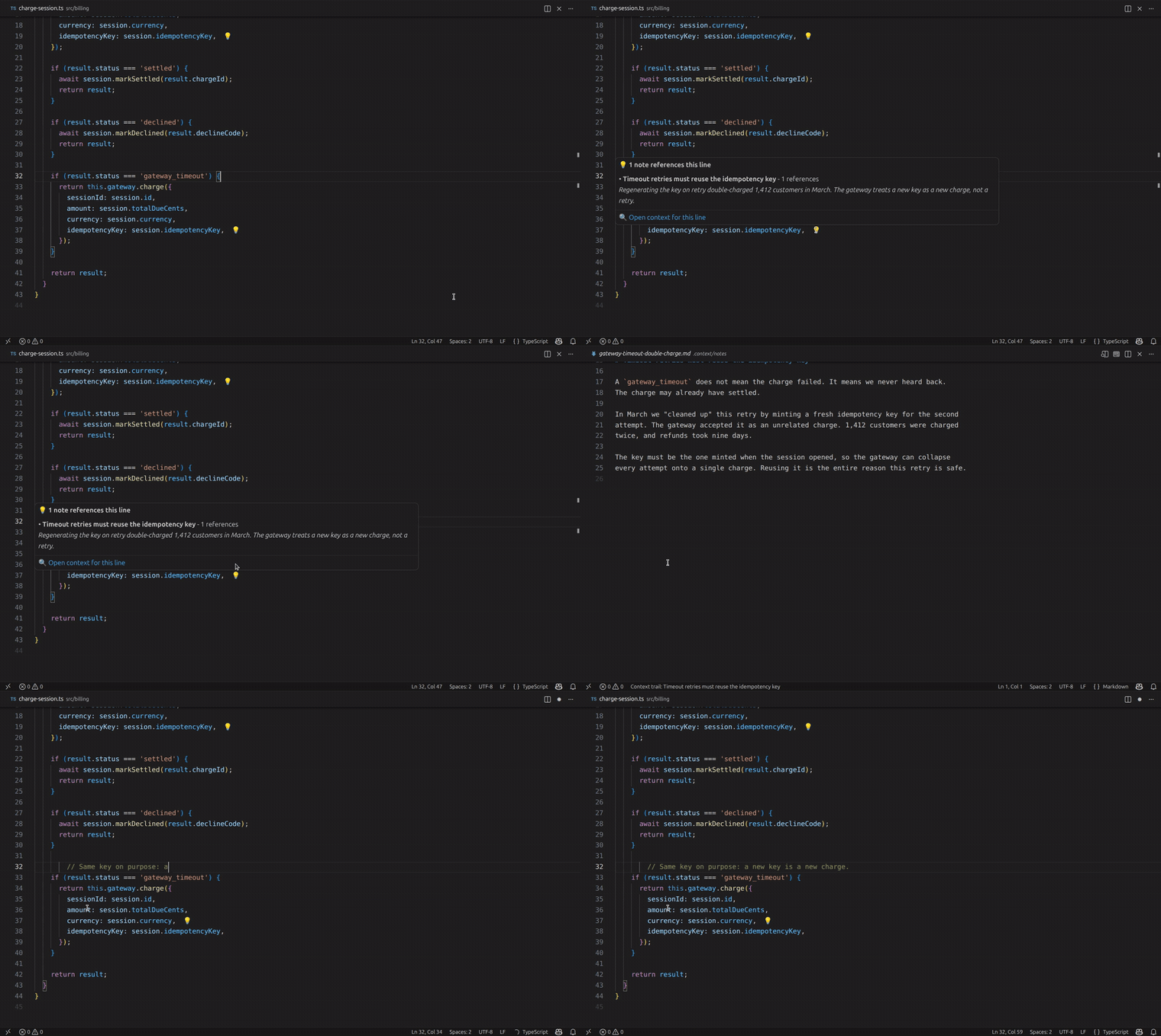
Twenty-two seconds, no narration: a developer is about to tidy up a retry, discovers the incident that made it necessary, and carries on, informed. (full-resolution clip)
A single line may carry a bug investigation, a rejected refactor, an architectural decision, and a failed experiment behind it.
While the work is happening, that reasoning is obvious to everyone involved. Once the work ships, it scatters:
- into pull request threads,
- into tickets,
- into chat history,
- into documents nobody opens again,
- into the memory of whoever was there.
Nothing is lost, exactly. It is just no longer reachable at the moment it would change a decision.
So the next person to touch that line - often you, months later - re-derives what was already known. They re-open the investigation that already concluded. They re-attempt the approach that already failed.
The code survived. The understanding did not.
Most tools respond to this by offering somewhere better to put the knowledge.
But the knowledge usually already exists. It was written down, in a commit message, a design document, a thread, a runbook. The failure is not that it was never recorded. The failure is that nothing surfaced it while the code was being read.
Storage answers where does this live?
Development needs an answer to a different question:
what do I need to know about the line I am editing, right now?
That is the entire purpose of this extension:
CodeContext+ exists to make relevant context remain visible while software is being developed.
Everything it does follows from that sentence. If context is recorded but invisible, it has already failed. If it is visible but unrelated to the code you are reading, it is noise.
It protects the reasoning that never fits in the code itself:
- why a bug exists, and what has already been ruled out,
- which architectural decision constrains this file,
- which trade-off was accepted deliberately,
- what an earlier attempt broke,
- what a migration still expects to happen here,
- what looks wrong but must stay that way.
It protects that reasoning by keeping it attached to a location, and by projecting it back into the editor whenever you arrive at that location.
Equally important is what it does not attempt.
CodeContext+ does not try to understand your repository. It never infers a relationship, guesses at similarity, or ranks your codebase by relevance. It has no model of your project. It surfaces exactly what someone stated applies here, and nothing else.
The scope is deliberately narrow - the file you are reading, the line you are editing, what connects to them, and where you have just been. That narrowness is what keeps the extension quiet enough to leave switched on.
Lines that carry context get a small 💡 marker at the end of the line, so you can see where understanding exists before you decide whether you need it.
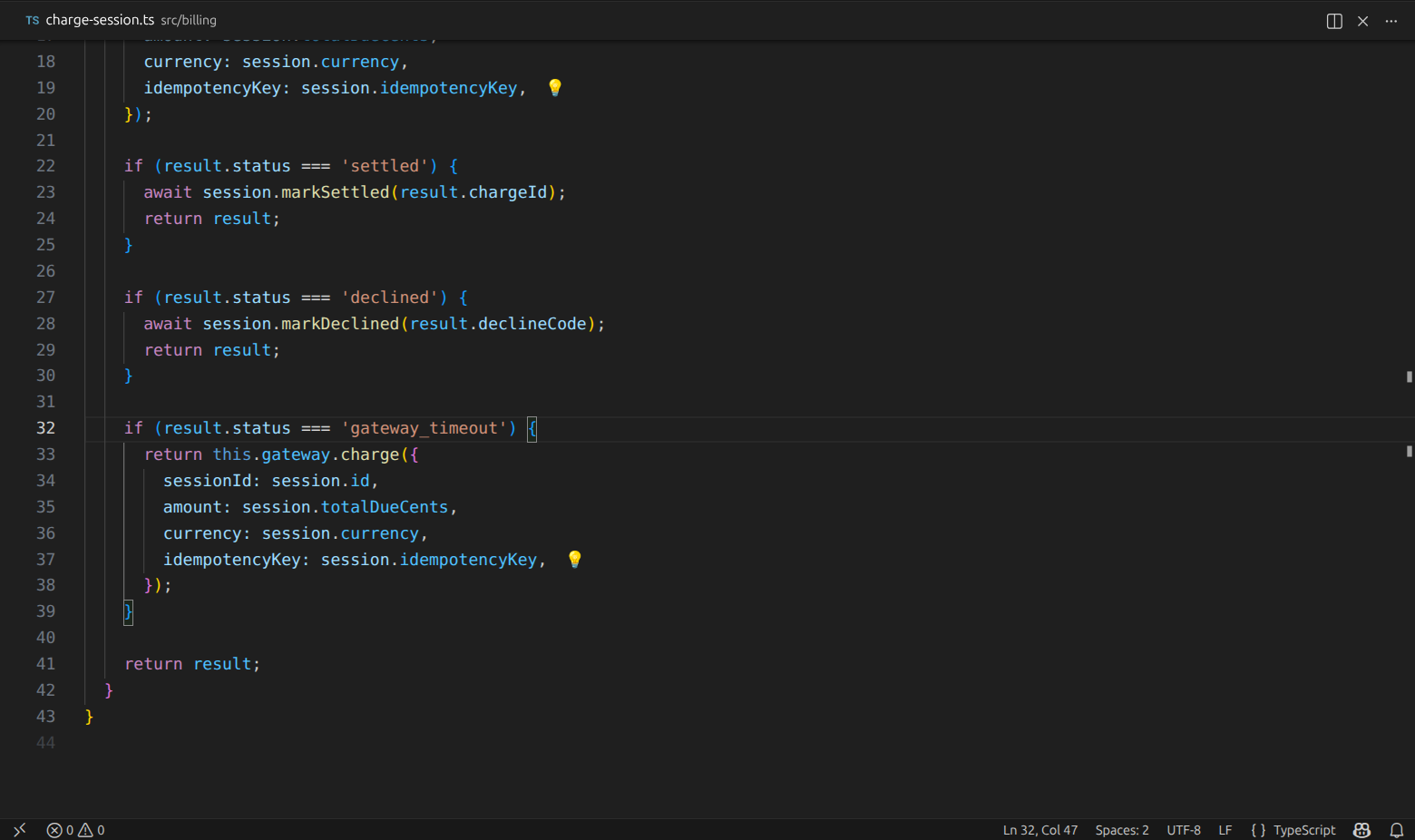
Nothing above announces itself. A developer skimming this retry has no reason to suspect it is load-bearing - except that two lines are marked as already carrying context.
Hover the marker and the context comes to you: what it is, its summary, how many places in the codebase it covers, and a link that opens everything attached to that line.
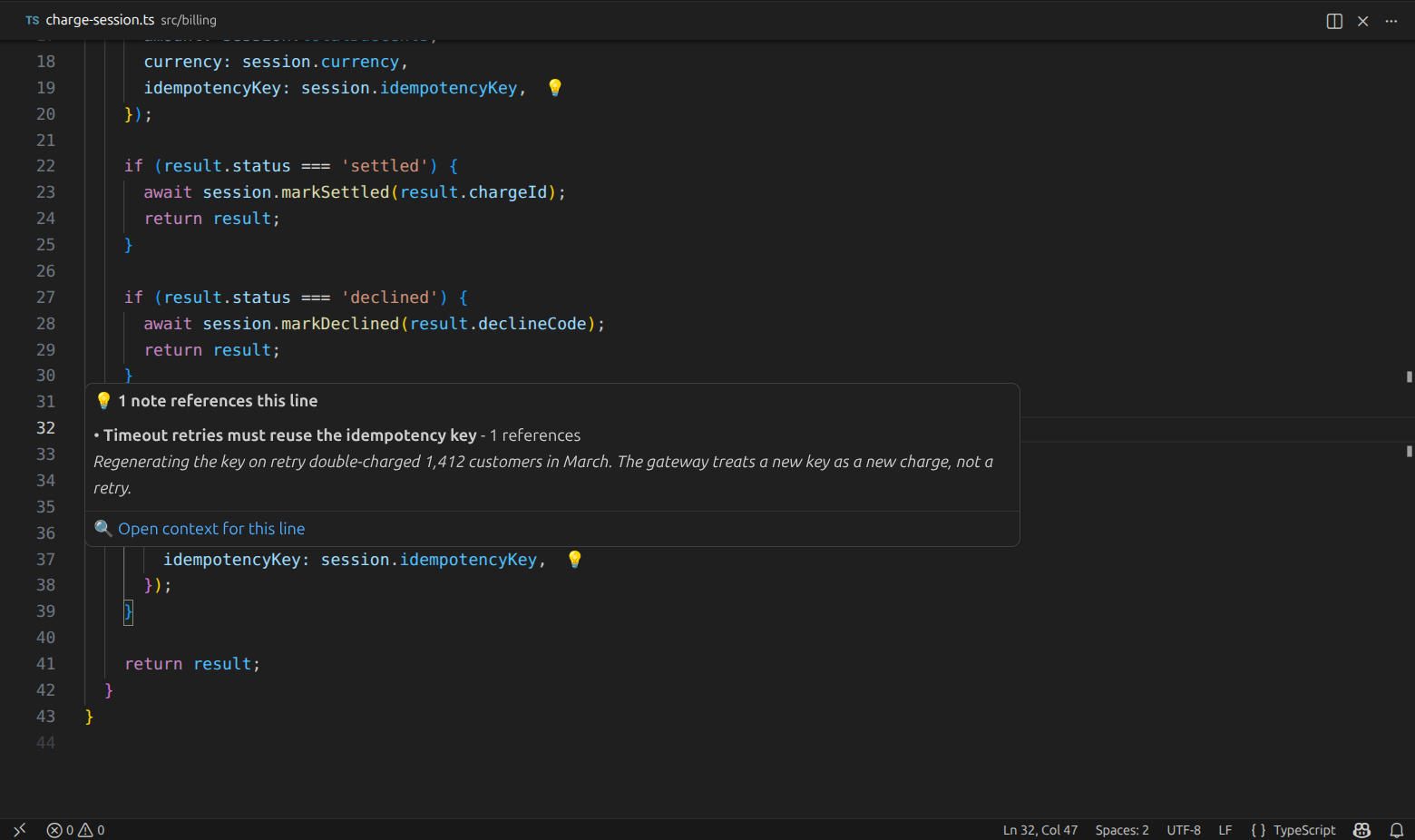
That answers the question the code cannot: the key is reused deliberately, because regenerating it once double-charged 1,412 customers. No search, no ticket archaeology, no colleague to interrupt - and a refactor that would have shipped an outage quietly does not happen.
Markers stay unobtrusive on purpose. When a file carries a lot of context, at most thirty markers are shown at once - the ones nearest your cursor - and a hover lists up to five entries, then tells you how many more exist. Density is capped so a heavily documented file stays readable.
Show context for current file and Show context for this line collect everything that applies and let you pick. When only one thing applies, they skip the picker and take you straight there.
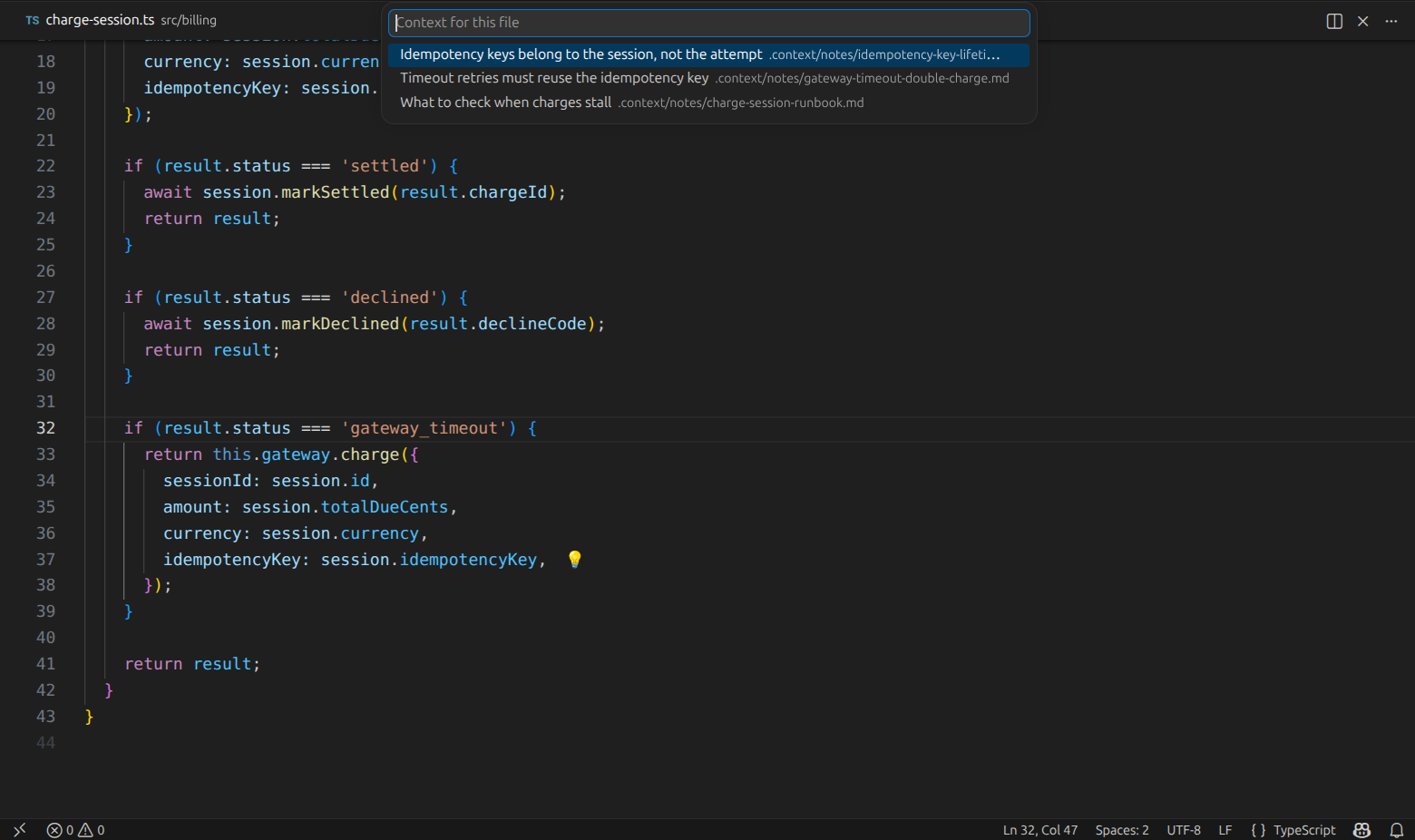
Three different kinds of understanding apply to this one file - an incident, a decision, and a runbook - and all three are one keystroke away instead of scattered across three systems.
Understanding rarely stands alone. An investigation leads to a decision, which leads to the migration that caused it.
Open linked note follows a connection outward, Open backlinks follows connections back to whatever points here, and Open related notes shows both directions at once. Open code reference returns you to code, jumping to the exact line the context describes.
Nothing here is inferred. Every connection you can follow is one that somebody stated explicitly.
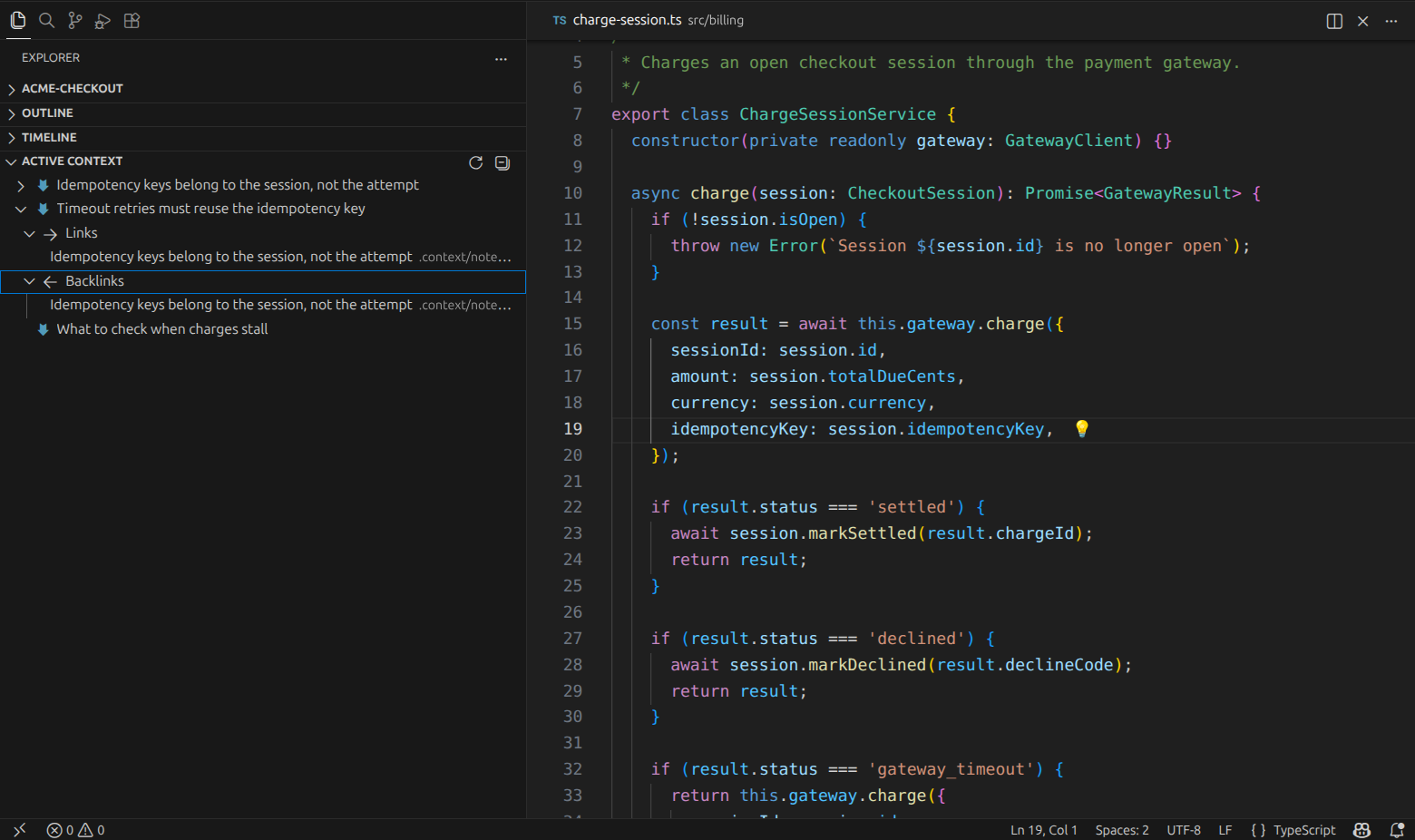
The incident points at the decision it produced, and the decision points back at the incident that forced it. Only entries with real connections open - the runbook at the bottom has none, so it stays a leaf.
Following context is only useful if you can keep your bearings. As you open context, CodeContext+ remembers the path you took through it during this session, and shows that trail briefly in the status bar so you can see how you arrived where you are.
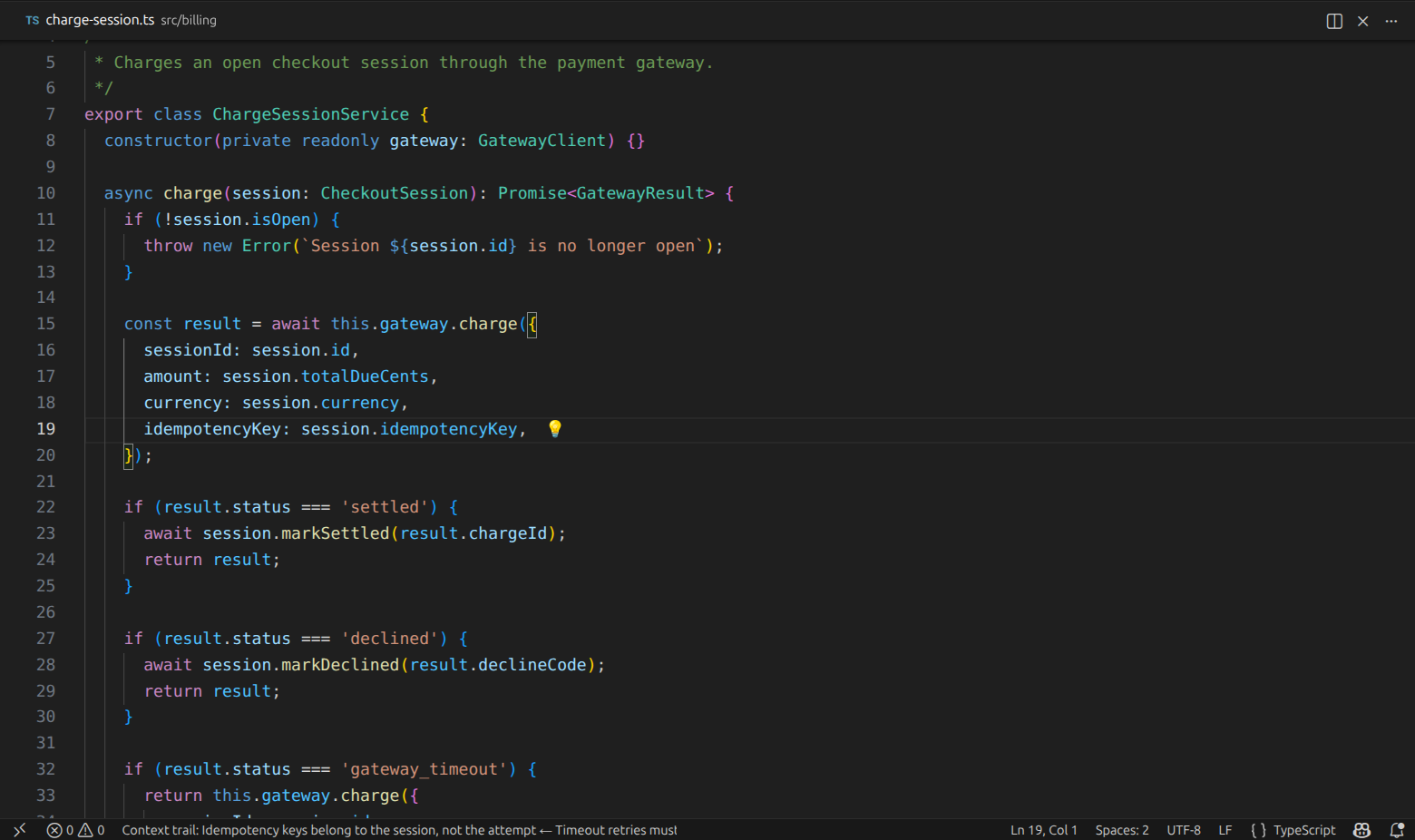
It also uses that path to decide ordering: what you looked at most recently, and the kind of context you were last working with, surfaces first in hovers. The memory is session-scoped and bounded - it disappears when the window closes, and never becomes a second thing to maintain.
The Active Context view in the Explorer lists everything the workspace has, and expands only where real connections exist. Selecting an entry opens it. Go to note by ID jumps straight to a known identifier, and Refresh notes list rebuilds the view on demand.
Recording context is a solved problem; every team already does it somewhere. Surfacing it at the moment of relevance is the part that fails, so that is the only part this extension is responsible for.
Context appears because someone explicitly stated it applies to a location. There is no AI inference, no embeddings, no similarity scoring, no probabilistic matching, no hidden relationships. What you see, someone meant.
The extension resolves context for the file in front of you, on demand, by reading the files under your context folder. There is no repository-wide index and no model of your project to build, warm up or maintain.
What appears follows only from what was declared, so the same declarations always project the same context and there is no ranking you cannot predict. When something is genuinely ambiguous, the extension says so instead of guessing: duplicate identifiers are reported rather than silently resolved, and a connection pointing at something that does not exist is shown as broken rather than quietly dropped. A visible problem is worth more than a convenient guess.
The vocabulary stays small on purpose. Every concept the extension understands must earn its place by making context visible; nothing exists to build a richer metadata model for its own sake.
The boundary matters as much as the feature set, because a tool that drifts across it stops being usable while you code.
- Not a documentation system. Documentation explains a system to someone who is not currently editing it. CodeContext+ addresses the person who is.
- Not a knowledge base or PKM. Organizing, tagging and curating knowledge for its own sake is a different job with different tools. Here, context earns its place only by being attached to code that exists.
- Not a note-taking or authoring experience. There is no editor, no preview pane, no formatting toolbar. Your existing editor already writes Markdown, and your existing tools already write documents.
- Not a graph or semantic index. Nothing is crawled, embedded, ranked or modelled. Relationships exist only where someone declared them.
- Not an AI assistant. Nothing is generated, summarized or guessed on your behalf.
What belongs to CodeContext+ is narrow: taking context that already exists and keeping it visible where the work happens.
Everything above is the product. This is the mechanism that currently delivers it - plain files in your repository, versioned and diffable with the code they describe.
Context is stored as Markdown files under a folder in your workspace, .context/notes by default. Every .md file below that folder is picked up, including inside dotted directories.
Each file opens with YAML frontmatter. id is the stable identity everything else points at, and it is read from the frontmatter rather than derived from the filename, so renaming a file never breaks a connection. title is the label you see in hovers, pickers and the Explorer:
---
id: auth-token-expiration
title: Token expiration investigation
type: bug
summary: >
  Login flow accepts stale tokens during session refresh.
  Previous fixes caused invalid session reuse.
---
summary is what you read on hover without opening anything. type is a free-form operational label - bug, decision, runbook - used to order hovers around the kind of work you are currently doing. tags are optional labels shown when you pick between files.
references is what makes context visible in the editor. Each entry names a file, optionally with a line:
references:
  - src/auth/auth.service.ts#42
The same reference can be written in expanded form. Both are read into the same model, so the choice is purely one of taste:
references:
  - file: src/auth/auth.service.ts
    line: 42
Paths are resolved relative to the workspace folder, and absolute paths are accepted as well. A reference with a line marks that line; a reference without one applies to the file as a whole and surfaces at its first line.
You do not have to write references by hand. Put the cursor on the line that needs context, run Add reference for current location, and pick where it should be recorded - selecting several destinations at once if the same line matters in more than one place. Entries that already exist are reported rather than duplicated.
links names other context by id:
links:
  - auth-refactor
  - jwt-strategy
Backlinks are derived from those declarations, so a connection written once is navigable from both ends and nothing has to be kept in sync by hand. Add related note appends links from a picker, several at a time.
Identity is the only thing holding this together, which is why the extension refuses to improvise when identity is unclear. If two files claim the same id, ID navigation and link resolution stop and report the conflict instead of choosing. A link pointing at an id that does not exist is listed as broken, and will not open.
All commands live under the CodeContext+ category in the Command Palette:
| Command | What it does |
|---|---|
| Show context for current file | Everything attached to the open file |
| Show context for this line | Everything attached to the current line |
| Create project note | Prompts for a title and tags, then opens the new file |
| Open project note | Picks from everything in the workspace |
| Go to note by ID | Jumps to a known identifier |
| Add reference for current location | Attaches the cursor's file and line |
| Add related note | Links the open file to others |
| Open linked note | Follows an outgoing connection |
| Open backlinks | Follows incoming connections |
| Open related notes | Both directions at once |
| Open code reference | Jumps to the code a reference describes |
| Refresh notes list | Re-reads the Active Context view |
| Change workspace folder | Chooses which root applies, in multi-root workspaces |
| Setting | Default | Effect |
|---|---|---|
codeContextPlus.enable |
true |
Turns the extension off, including editor markers |
codeContextPlus.notes.notesFolder |
.context/notes |
Workspace-relative folder read for context |
Both are resource-scoped, so each folder of a multi-root workspace can be configured independently.
- Install CodeContext+ from the VS Code Marketplace.
- Open a workspace.
- Run CodeContext+: Create project note, give it a title, and describe what you know - the reasoning, the constraint, the thing that will not be obvious later.
- Open the file that reasoning applies to, put the cursor on the relevant line, and run CodeContext+: Add reference for current location.
- A
💡marker appears on that line. It will be there the next time anyone opens the file.
From then on the context is part of the repository: it travels with clones, shows up in diffs, and is reviewed like any other change.
CodeContext+ is open-source and welcomes community contributions:
-
Fork the GitHub repository.
-
Create a new branch:
git checkout -b feature/your-feature
-
Make your changes, commit them, and push to your fork.
-
Submit a Pull Request against the
mainbranch.
Before contributing, please review the Contribution Guidelines for coding standards, testing, and commit message conventions. Open an Issue if you find a bug or want to request a new feature.
We are committed to providing a friendly, safe, and welcoming environment for all, regardless of gender, sexual orientation, disability, ethnicity, religion, or other personal characteristic. Please review our Code of Conduct before participating in our community.
For a complete list of changes, see the CHANGELOG.md.
- Manuel Gil - Owner - @ManuelGil
See also the list of contributors who participated in this project.
- GitHub:
- X (formerly Twitter):



-
Auto Barrel Automatically generates and maintains barrel (
index.ts) files for your TypeScript projects. -
Angular File Generator Generates boilerplate and navigates your Angular (9→20+) project from within the editor, with commands for components, services, directives, modules, pipes, guards, reactive snippets, and JSON2TS transformations.
-
NestJS File Generator Simplifies creation of controllers, services, modules, and more for NestJS projects, with custom commands and Swagger snippets.
-
NestJS Snippets Ready-to-use code patterns for creating controllers, services, modules, DTOs, filters, interceptors, and more in NestJS.
-
T3 Stack / NextJS / ReactJS File Generator Automates file creation (components, pages, hooks, API routes, etc.) in T3 Stack (Next.js, React) projects and can start your dev server from VSCode.
-
Drizzle ORM Snippets Collection of code snippets to speed up Drizzle ORM usage, defines schemas, migrations, and common database operations in TypeScript/JavaScript.
-
CodeIgniter 4 Spark Scaffolds controllers, models, migrations, libraries, and CLI commands in CodeIgniter 4 projects using Spark, directly from the editor.
-
CodeIgniter 4 Snippets Snippets for accelerating development with CodeIgniter 4, including controllers, models, validations, and more.
-
CodeIgniter 4 Shield Snippets Snippets tailored to CodeIgniter 4 Shield for faster authentication and security-related code.
-
Mustache Template Engine - Snippets & Autocomplete Snippets and autocomplete support for Mustache templates, making HTML templating faster and more reliable.
For developers who work with .vsix files for offline installations or distribution, the complementary One-Click VSIX extension is recommended, available for both Chrome and Firefox.
One-Click VSIX integrates a direct "Download Extension" button into each VSCode Marketplace page, ensuring the file is saved with the
.vsixextension, even if the server provides a.ziparchive. This simplifies the process of installing or sharing extensions offline by eliminating the need for manual file renaming.
This project is licensed under the MIT License. See the LICENSE file for details.