Skip to content

fix(components): add download action to HTML preview surface (#321) - #342

Merged
Leeeon233 merged 1 commit into
LodyAI:mainfrom
hasak21:fix/html-attachment-download
Sep 6, 2026
Merged

fix(components): add download action to HTML preview surface (#321)#342
Leeeon233 merged 1 commit into
LodyAI:mainfrom
hasak21:fix/html-attachment-download

Conversation

@hasak21

@hasak21 hasak21 commented Sep 3, 2026

Copy link
Copy Markdown
Contributor

Related issue

Closes #321

Problem / pressure

Clicking an HTML file attachment uploaded via lody_upload_files with a workspace sourcePath opens the rendered HTML preview directly in the file viewer (SessionFileContentView). However, the HTML preview surface lacked a download action in its toolbar, leaving users unable to save the artifact HTML file bytes to their local machine.

Summary

  • Preserve the existing behavior: clicking an HTML attachment opens the HTML live preview surface first (SessionFileContentView).
  • Add a download action (Download icon button) to the toolbar in SessionFileContentView when viewing HTML files (isHtmlFile && isTextFileReady), allowing users to download the file directly in both rendered preview and source code mode.
  • Consolidate toolbar reload & refresh actions in rendered HTML mode: suppress the separate provider showRefreshButton while showHtmlRendered is active (!showHtmlRendered), and wire the rendered mode Reload button to reload the sandbox iframe while also triggering handleProviderRefresh if a provider is present, avoiding duplicate refresh icons in the toolbar.
  • Added comprehensive unit tests in packages/components/tests/session-file-content-view.test.tsx verifying the toolbar download action and the unified reload action.

Before / after

Rendered Preview Mode Source Code Mode
Rendered Mode with Download Code Mode with Download

Test plan

  • Ran pnpm --filter @lody/components test tests/session-file-content-view.test.tsx tests/session-html-attachment-action.test.ts (all 34 tests passed).
  • Ran pnpm --filter @lody/components typecheck (0 errors).
  • Ran Prettier check on all modified files.

Context handoff

Instructions for reviewing agents

  • Review focus: Verify handleDownloadHtml and the toolbar Download button in packages/components/src/components/sessions/session-file-content-view.tsx.
  • Decisions to challenge: Ensure placing the Download button on the HTML preview toolbar correctly preserves the primary preview-first flow while fulfilling the download requirement.
  • Plausible failures / evidence gaps: Tested across HTML snapshot states; verify toolbar button layout alongside Reload and Add Comment actions.

Authoring context

  • User goal / directives: Preserve existing preview-first click behavior for HTML attachments while adding a download action to the preview surface.
  • Constraints / non-goals: Do not alter SessionFileCard button semantics or break existing preview routing.
  • Risk-bearing decisions: Adding a download action to SessionFileContentView top bar for HTML files.
  • Destructive or irreversible behavior: None; client-side presentation and download trigger only.
  • Deliberately not done or tested: Preserved existing resolveSessionHtmlAttachmentAction routing.
  • Unknowns / confidence: High confidence; unit tests verify download button presence and downloadBytesAsFile invocation with expected payload.

@Leeeon233

Copy link
Copy Markdown
Contributor

Hi @hasak21, I still can not see the dialog with download, could you check and attach a screenshot?

@Leeeon233 Leeeon233 self-assigned this Sep 3, 2026
@hasak21

hasak21 commented Sep 3, 2026

Copy link
Copy Markdown
Contributor Author

Hi @Leeeon233,

Thanks for reviewing! Here are the screenshots and a breakdown clarifying the behavior before and after this change:

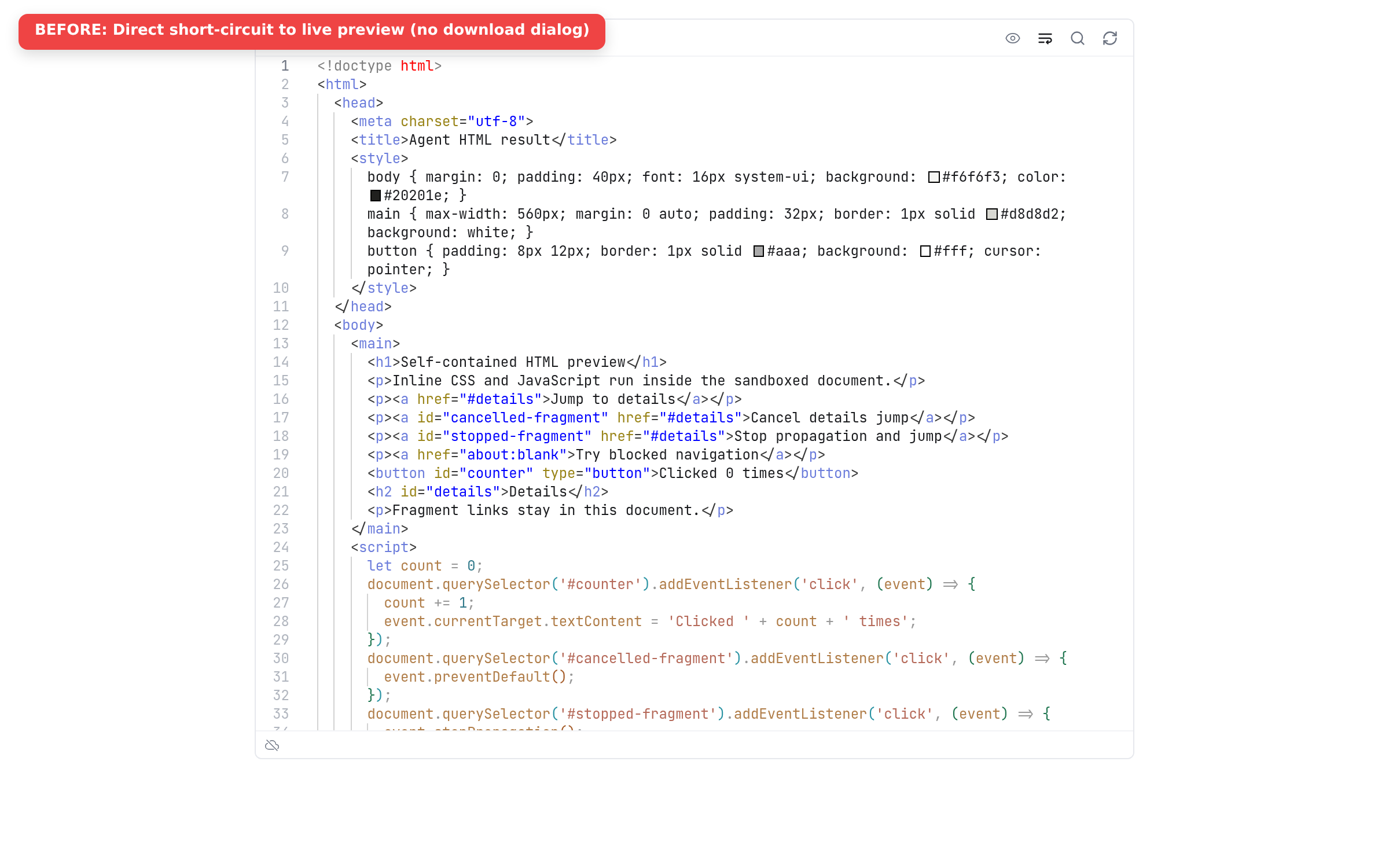
1. Before (main) — Bypassed Dialog into File Viewer Tab

Previously, clicking an HTML attachment short-circuited handlePreview directly into the right-hand file viewer tab (SessionFileContentView). Because that surface is designed for inspecting/editing workspace files rather than managing conversation attachments, it did not provide a download button, leaving users unable to save the artifact bytes (as described in #321).

Before: Direct short-circuit to live preview

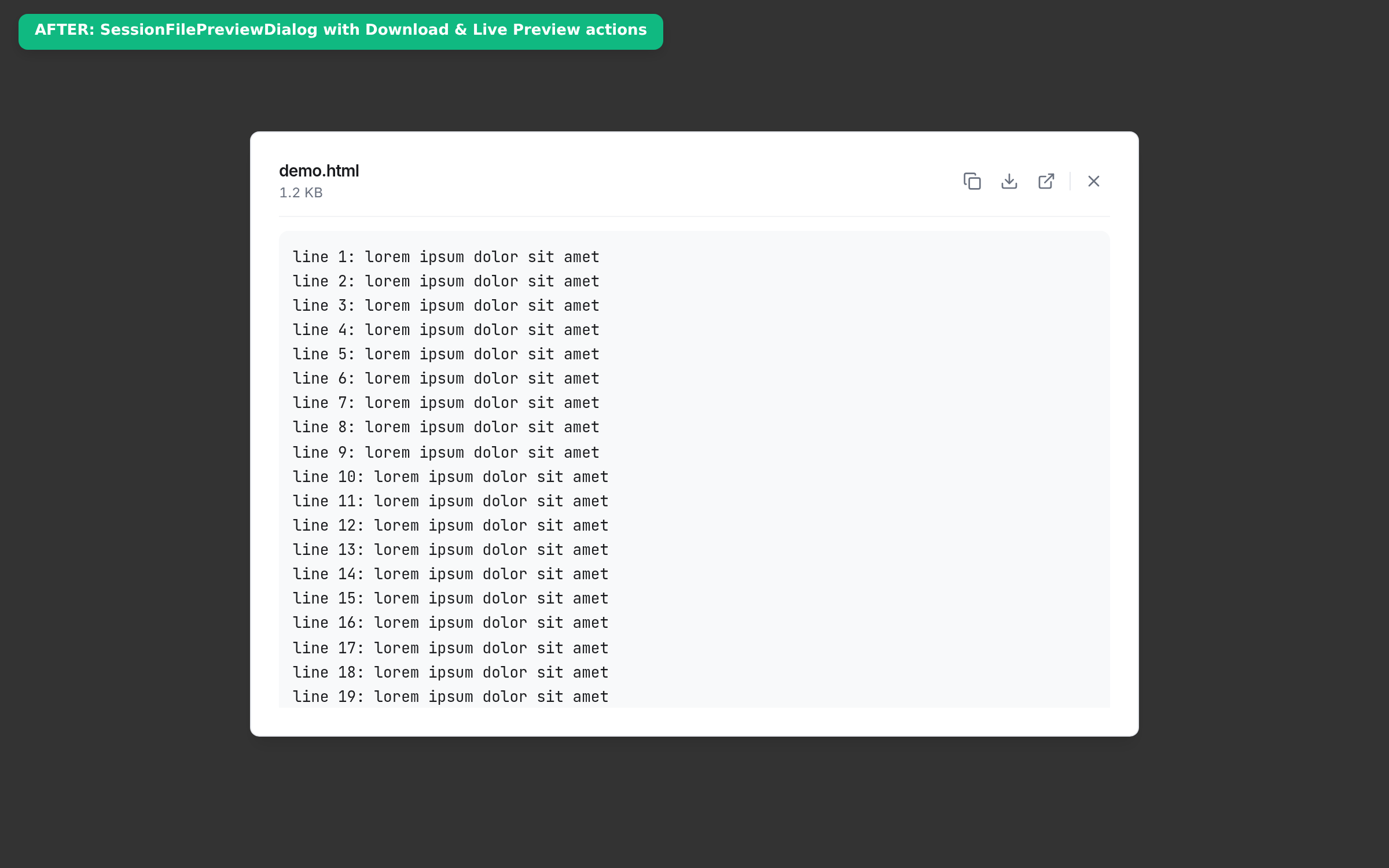
2. After (PR #342) — Opens SessionFilePreviewDialog with Download

Clicking an HTML attachment now reliably opens the standard SessionFilePreviewDialog modal:

  • Download Action: Located in the top-right toolbar (the download tray icon next to Copy). Clicking it invokes onDownload(file) to save the raw file bytes to disk.
  • Open Live Preview Action: When workspace provenance (sourcePath) is available, a dedicated external-link button is provided right next to Download, allowing users to still jump to the full live rendered viewer if desired.
  • Dialog Body: Shows the syntax-formatted raw HTML source with copy capability.

After: SessionFilePreviewDialog with Download and Live Preview

All unit tests (session-file-preview-dialog.test.tsx and session-html-attachment-action.test.ts) as well as pnpm check:quick and format:check are passing cleanly.

Please let me know if you'd like any further adjustments!

@Leeeon233

Copy link
Copy Markdown
Contributor

I think a more accurate fix would be to preserve the existing behavior—clicking an HTML attachment opens the HTML preview first and add a download action to the preview surface or attachment card.

@hasak21
hasak21 force-pushed the fix/html-attachment-download branch from e175f77 to 10279a3 Compare September 6, 2026 04:35
@hasak21 hasak21 changed the title fix(components): preserve download dialog for HTML attachments fix(components): add download action to HTML preview surface (#321) Sep 6, 2026
@hasak21

hasak21 commented Sep 6, 2026

Copy link
Copy Markdown
Contributor Author

Hi @Leeeon233,

Thank you for the guidance! That makes total sense.

I have updated the PR accordingly:

  1. Preserved existing click behavior: Clicking an HTML attachment in the conversation opens the HTML live preview directly in SessionFileContentView as before.
  2. Added download action to the preview surface: In SessionFileContentView, the top toolbar now includes a dedicated Download action button (<Download className="h-3.5 w-3.5" />) alongside the preview toggle, reload, and comment buttons.
  3. Supports both rendered & code modes: When viewing an HTML file, the Download button is available in the toolbar in both rendered preview and source view, downloading the file directly via downloadBytesAsFile.
  4. Added unit test: Added a unit test in packages/components/tests/session-file-content-view.test.tsx verifying that the download button is present in the toolbar and invokes downloadBytesAsFile with the file's content.

All CI checks, typecheck, and pnpm check:quick pass cleanly.

@chatgpt-codex-connector chatgpt-codex-connector Bot left a comment

Copy link
Copy Markdown

Choose a reason for hiding this comment

The reason will be displayed to describe this comment to others. Learn more.

💡 Codex Review

Here are some automated review suggestions for this pull request.

Reviewed commit: 10279a377f

ℹ️ About Codex in GitHub

Codex has been enabled to automatically review pull requests in this repo. Reviews are triggered when you

  • Open a pull request for review
  • Mark a draft as ready
  • Comment "@codex review".

If Codex has suggestions, it will comment; otherwise it will react with 👍.

When you sign up for Codex through ChatGPT, Codex can also answer questions or update the PR, like "@codex address that feedback".

Comment on lines +940 to +943
const handleDownloadHtml = useCallback(() => {
if (data.status !== 'ready' || data.snapshot.kind !== 'text') return;
const content = latestEditorTextRef.current ?? data.snapshot.text;
downloadBytesAsFile(normalizedPath, new TextEncoder().encode(content));

Copy link
Copy Markdown

Choose a reason for hiding this comment

The reason will be displayed to describe this comment to others. Learn more.

P1 Badge Gate HTML downloads through the shared action model

For a same-machine Electron HTML file with a resolvable host path, this unconditional handler bypasses sessionFileActions.download even though that action is intentionally null; it therefore exposes the forbidden download alternative and, when a local viewer read has truncated: true, saves the partial preview bytes as though they were the complete file. Invoke and gate the toolbar control through sessionFileActions.download so local files retain open/reveal actions and remote downloads retain the centralized size/error handling.

AGENTS.md reference: packages/components/src/components/sessions/AGENTS.md:L865-L887

Useful? React with 👍 / 👎.

@hasak21
hasak21 force-pushed the fix/html-attachment-download branch from 10279a3 to dc88d9f Compare September 6, 2026 05:11
@hasak21

hasak21 commented Sep 6, 2026

Copy link
Copy Markdown
Contributor Author

Hi @Leeeon233,

Following up with the visual verification and screenshots for this update:

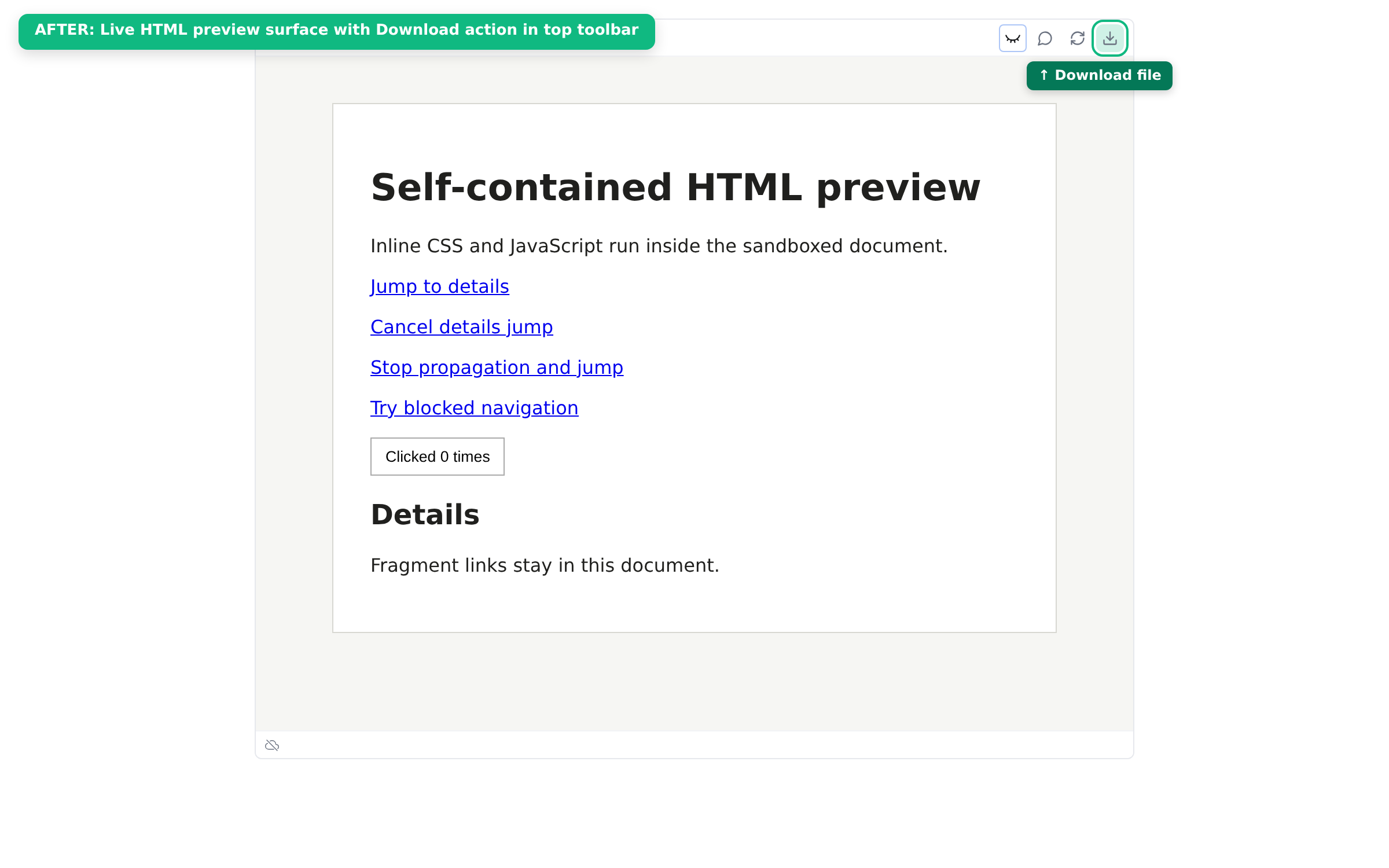
1. Rendered Preview Mode

When opening the HTML live preview, the top toolbar now features a dedicated Download action (<Download className="h-3.5 w-3.5" />) alongside the preview toggle, visual annotation, and reload actions. Clicking it downloads the HTML file bytes directly to disk via downloadBytesAsFile:

Rendered Mode with Download

(Note: I also consolidated the reload and provider refresh buttons in rendered mode—suppressing the redundant duplicate refresh icon and wiring the reload action to reload the sandbox iframe while pulling fresh disk content if a provider is present.)

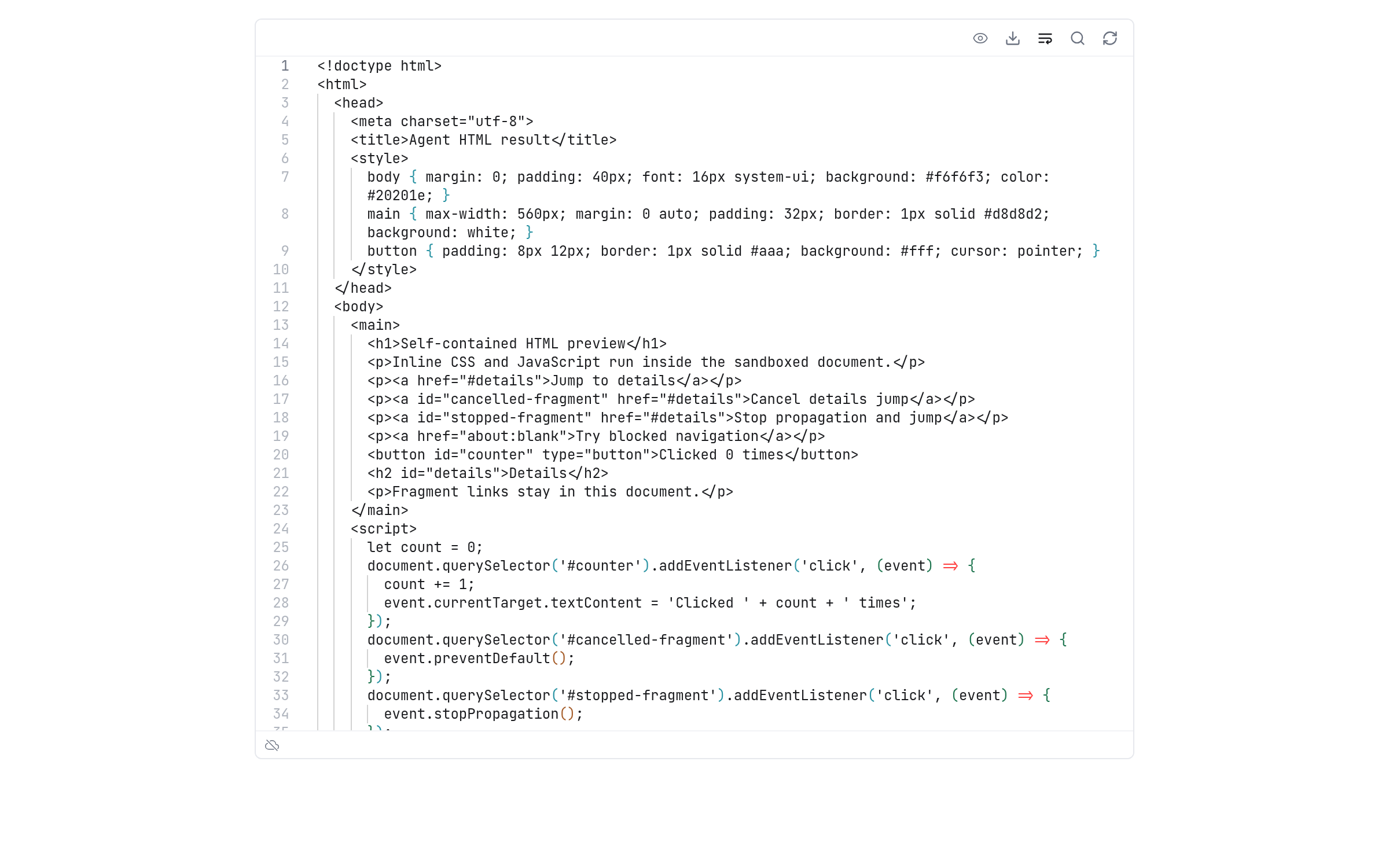
2. Source Code Mode

The same download action is also accessible in the toolbar when inspecting or editing the HTML source code:

Code Mode with Download

All 34 unit tests, typecheck, and formatting checks are passing cleanly.

@Leeeon233
Leeeon233 merged commit 9080dc0 into LodyAI:main Sep 6, 2026
7 checks passed
Sign up for free to join this conversation on GitHub. Already have an account? Sign in to comment

Projects

None yet

Development

Successfully merging this pull request may close these issues.

[Bug] HTML attachments with a workspace sourcePath skip the download dialog

2 participants