



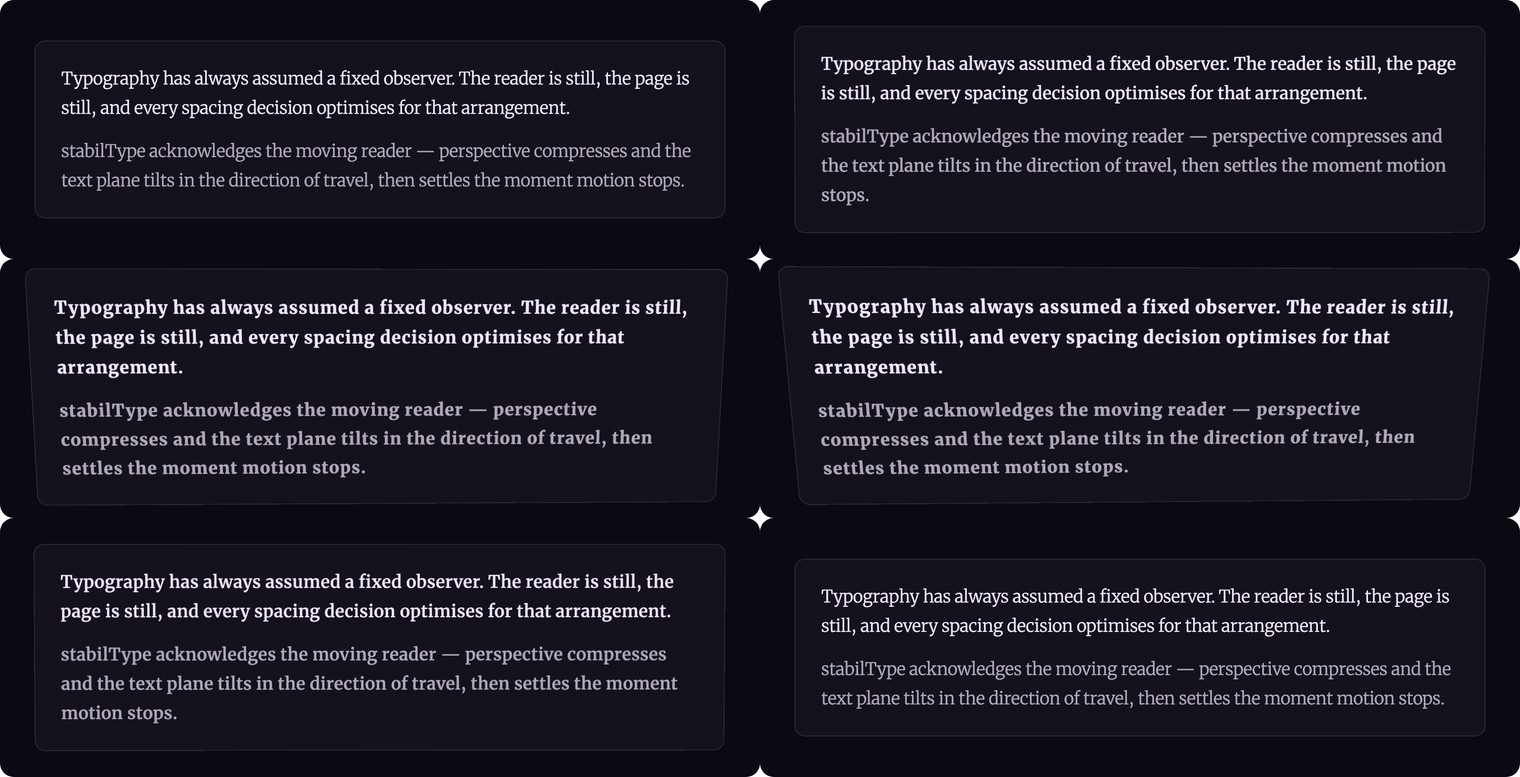
Motion-adaptive typography — adjusts letter-spacing, weight, optical size, slant, opacity, and perspective tilt in real time based on scroll velocity and device motion. Faster movement loosens tracking, increases weight, and tilts the type away; slower movement returns to rest. The text physically registers the energy of reading.
▶ See it live at stabiltype.com — scroll the page (or move your cursor / tilt your phone) to feel it. · npm · GitHub
TypeScript · Zero dependencies · ~1.9 kB min+gzip · React + Vanilla JS
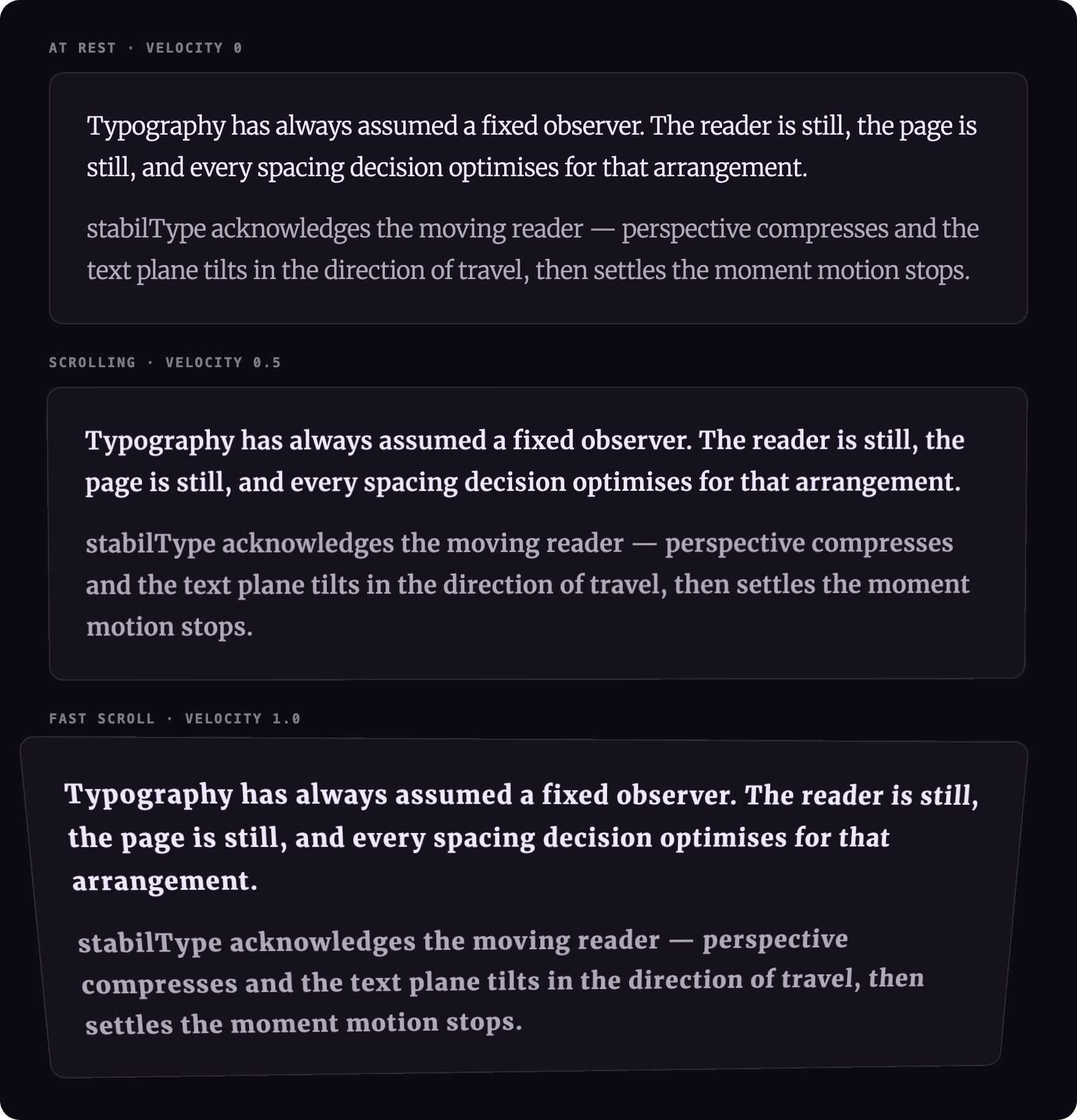
The same paragraph at three downward-scroll speeds (velocity 0, 0.5, 1.0). Weight climbs 300 → 800, optical size opens up, and the tracking loosens as velocity rises — every value is lerp-interpolated from the velocity through the option ranges below. (These captures push weightRange to [300, 800] to make the ramp obvious; the library default is [300, 600].)
npm install @liiift-studio/stabiltypeNext.js App Router: this library uses browser APIs. Add
"use client"to any component file that imports from it.
StabilTypeText is a controlled component — pass it a velocity value and it adapts the typography accordingly. Velocity is a signed scalar from –1 to +1: the magnitude drives the speed-based effects (weight, optical size, tracking, opacity) while the sign drives the directional ones (slant, tilt) — 0 is at rest, +1 is peak downward/forward motion, –1 is peak upward/backward. Compute velocity however you like (scroll delta, devicemotion, a spring simulation) and re-render. For a turnkey scroll source, see Driving from scroll in React below.
import { StabilTypeText } from '@liiift-studio/stabiltype'

<StabilTypeText
  velocity={scrollVelocity}
  trackingRange={[0, 0.08]}
  weightRange={[300, 700]}
  opszRange={[12, 36]}
>
  Typography in motion
</StabilTypeText>useStabilType takes a ref, a velocity value, and options. It applies the typography directly to the element on every render where velocity changes, and calls removeStabilType automatically on unmount to restore the element's original inline styles. StabilTypeText wraps the hook, so it cleans up the same way.
"use client"
import { useStabilType } from '@liiift-studio/stabiltype'
import { useRef } from 'react'

export default function Demo({ velocity }: { velocity: number }) {
  const ref = useRef<HTMLParagraphElement>(null)

  // velocity is a number –1…+1, or a Velocity2D { x, y } for 2D motion.
  // Get one from useScrollVelocity() below, devicemotion, or any source.
  useStabilType(ref, velocity, {
    weightRange: [300, 700],
    smoothing: 0.2,
  })

  return <p ref={ref}>Typography in motion</p>
}The React APIs above are controlled — they don't listen to anything themselves, so you supply the velocity. In vanilla JS startStabilType(el, options) reads scroll for you, but the hook and component leave that to you. Here's a small, copy-paste hook that produces a normalised, decaying –1…+1 scroll velocity — the same model startStabilType uses internally (normalise the per-frame scroll delta, then decay back toward rest):
"use client"
import { useEffect, useRef, useState } from 'react'

// Returns a signed scroll velocity in –1…+1: magnitude = speed, sign = direction.
export function useScrollVelocity(velocityMax = 15) {
  const [velocity, setVelocity] = useState(0)
  const lastY = useRef(0)
  const lastT = useRef(0)
  const current = useRef(0)

  useEffect(() => {
    lastY.current = window.scrollY
    lastT.current = performance.now()

    const onScroll = () => {
      const now = performance.now()
      const dt = now - lastT.current
      if (dt > 0) {
        const dy = window.scrollY - lastY.current
        current.current = Math.sign(dy) * Math.min(Math.abs(dy / dt * 16.67) / velocityMax, 1)
      }
      lastY.current = window.scrollY
      lastT.current = now
    }

    let raf = 0
    const tick = () => {
      current.current *= 0.85          // decay back to rest after scrolling stops
      if (Math.abs(current.current) < 0.002) current.current = 0
      setVelocity(current.current)
      raf = requestAnimationFrame(tick)
    }

    window.addEventListener('scroll', onScroll, { passive: true })
    raf = requestAnimationFrame(tick)
    return () => {
      window.removeEventListener('scroll', onScroll)
      cancelAnimationFrame(raf)
    }
  }, [velocityMax])

  return velocity
}
Feed it straight into the component:
"use client"
import { StabilTypeText } from '@liiift-studio/stabiltype'

export default function Hero() {
  const velocity = useScrollVelocity()
  return <StabilTypeText velocity={velocity} weightRange={[300, 700]}>
    Typography in motion
  </StabilTypeText>
}
If all you want is scroll-driven behaviour with no custom velocity source, the vanilla startStabilType(el, options) is the least-effort path — it includes this exact scroll loop (and an idle-sleep optimisation) for free. Wrap it in a useEffect over a ref and you're done.
startStabilType is the self-contained entry point. It starts a requestAnimationFrame loop, reads scroll velocity each frame, and updates the element's typography. Returns a stop function.
import { startStabilType, removeStabilType } from '@liiift-studio/stabiltype'

const el = document.querySelector('p')
const stop = startStabilType(el, {
  weightRange: [300, 700],
  trackingRange: [0, 0.06],
  velocityMax: 15,
})

// Later — stop the loop and restore original styles:
stop()
removeStabilType(el)
To drive from an external velocity source (device motion, pointer tracking, a physics engine), pass a velocity callback. startStabilType calls it every animation frame:
import { startStabilType } from '@liiift-studio/stabiltype'

const el = document.querySelector('p')

// devicemotion example — y acceleration mapped to –1…+1
let currentVelocity = 0
window.addEventListener('devicemotion', (e) => {
  currentVelocity = Math.max(-1, Math.min(1, (e.acceleration?.y ?? 0) / 9.8))
})

const stop = startStabilType(el, () => currentVelocity, {
  weightRange: [300, 700],
  tilt: 5,
})
For manual control — drive velocity yourself from any source:
import { applyStabilType, removeStabilType } from '@liiift-studio/stabiltype'

const el = document.querySelector('p')

// Call on every animation frame with the current velocity –1…+1:
applyStabilType(el, scrollVelocity, {
  weightRange: [300, 700],
})

// Or pass a 2D velocity (e.g. from devicemotion):
applyStabilType(el, { x: 0.3, y: 0.8 }, {
  tilt: 5,
})

// Restore original styles:
removeStabilType(el)import type { StabilTypeOptions, Velocity2D } from '@liiift-studio/stabiltype'
const opts: StabilTypeOptions = {
trackingRange: [0, 0.06],
weightRange: [300, 600],
smoothing: 0.2,
velocityMax: 20,
}
const velocity: Velocity2D = { x: 0, y: 0.7 }| Option | Type | Default | Description |
|---|---|---|---|
trackingRange |
[number, number] |
[0, 0.06] |
Letter-spacing in em: [at rest, at max velocity] |
weightRange |
[number, number] |
[300, 600] |
wght axis: [at rest, at max velocity] |
opszRange |
[number, number] |
[12, 24] |
opsz axis: [at rest, at max velocity] |
opacityRange |
[number, number] |
[1, 0.7] |
Opacity: [at rest, at max velocity] |
slntRange |
[number, number] |
[8, -8] |
slnt axis: [at peak upscroll, at peak downscroll] |
smoothing |
number |
0.15 |
EMA smoothing factor (0–1). Higher = more smoothing, slower response |
velocityMax |
number |
15 |
Scroll velocity in px/frame that maps to maximum adjustment. Only used by startStabilType |
perspective |
number |
600 |
CSS perspective depth in px at peak velocity. Controls dolly compression. Set to 0 to disable |
tilt |
number |
3 |
rotateX tilt in degrees at peak velocity. Direction follows scroll: downscroll tips top away, upscroll tips bottom away |
weightAxis |
string |
'wght' |
Variable font weight axis tag |
opszAxis |
string |
'opsz' |
Variable font optical size axis tag |
slntAxis |
string |
'slnt' |
Variable font slant axis tag |
liveBaseFVS |
boolean |
false |
Re-read font-variation-settings from the computed cascade every frame instead of snapshotting it on first activation. Only needed if external CSS changes the element's FVS at runtime; adds one getComputedStyle() per frame |
applyStabilType takes a signed velocity value (–1 = max negative direction, +1 = max positive direction) and maps it through each option range using linear interpolation. The resulting values are written as font-variation-settings (weight, opsz, slnt), letter-spacing, opacity, and a CSS transform (perspective + rotateX tilt) directly on the element's inline style. The first call saves the original inline styles so removeStabilType can restore them exactly.
startStabilType runs a requestAnimationFrame loop. Each frame it reads window.scrollY, computes the delta from the previous frame, normalises it against velocityMax, applies exponential moving average smoothing, then calls applyStabilType. The smoothing factor prevents jerky jumps on large scroll events.
2D velocity: Pass a Velocity2D { x, y } object to applyStabilType or useStabilType for device-motion or horizontal-scroll scenarios. The y component drives the main axis adaptations; x drives the slnt tilt independently.
Variable font requirement: The weight, opsz, and slant effects require a variable font exposing those axes. stabilType always writes font-variation-settings; on a font without a given axis the browser simply ignores it, so the effect degrades to whatever the font does support plus the always-available opacity and letter-spacing. There is no axis sniffing — load a variable font (with the axes you reference) to get the full effect.
startStabilType honours prefers-reduced-motion. When the user's OS-level "reduce motion" setting is on, startStabilType returns a no-op and never starts its animation loop — no scroll listener, no style writes.
The lower-level APIs do not gate themselves. applyStabilType, useStabilType, and StabilTypeText apply exactly what you pass them every frame — they have no reduced-motion check, because you own the velocity source. If you drive them yourself, honour the preference at the source so motion-sensitive users aren't animated against their wishes:
"use client"
import { StabilTypeText } from '@liiift-studio/stabiltype'
import { useScrollVelocity } from './useScrollVelocity' // from "Driving from scroll in React" above

export default function Hero() {
  const reduce = typeof window !== 'undefined'
    && window.matchMedia('(prefers-reduced-motion: reduce)').matches
  const velocity = useScrollVelocity()
  return <StabilTypeText velocity={reduce ? 0 : velocity}>Typography in motion</StabilTypeText>
}
Passing 0 keeps the type at its at-rest values, so the content stays fully legible with no animation.
| Export | Description |
|---|---|
applyStabilType(el, velocity, options?) |
Apply one frame of typography adaptation. Velocity is number or Velocity2D. |
startStabilType(el, options?) |
Start a rAF scroll loop. Returns stop(). |
removeStabilType(el) |
Stop any running loop and restore original inline styles. |
lerp(a, b, t) |
Linear interpolation utility exported for custom velocity mapping. |
overrideAxis(baseFVS, axis, value) |
Override one axis in a font-variation-settings string, preserving others. |
useStabilType |
React hook: (ref, velocity, options?) |
StabilTypeText |
React component. Controlled via velocity prop. |
StabilTypeOptions |
TypeScript interface for all options. |
Velocity2D |
Interface for 2D velocity input { x: number, y: number }. |
StabilTypeText, useStabilType, and startStabilType all require a browser environment. Add "use client" to any component that imports them:
"use client"
import { StabilTypeText } from '@liiift-studio/stabiltype'package.json at the repo root lists next as a devDependency. This is a Vercel detection workaround — not a real dependency of the npm package. Vercel's build system inspects the root package.json to detect the framework; without next present it falls back to a static build and skips the Next.js pipeline, breaking the /site subdirectory deploy.
The package itself has zero runtime dependencies. Do not remove this entry.