


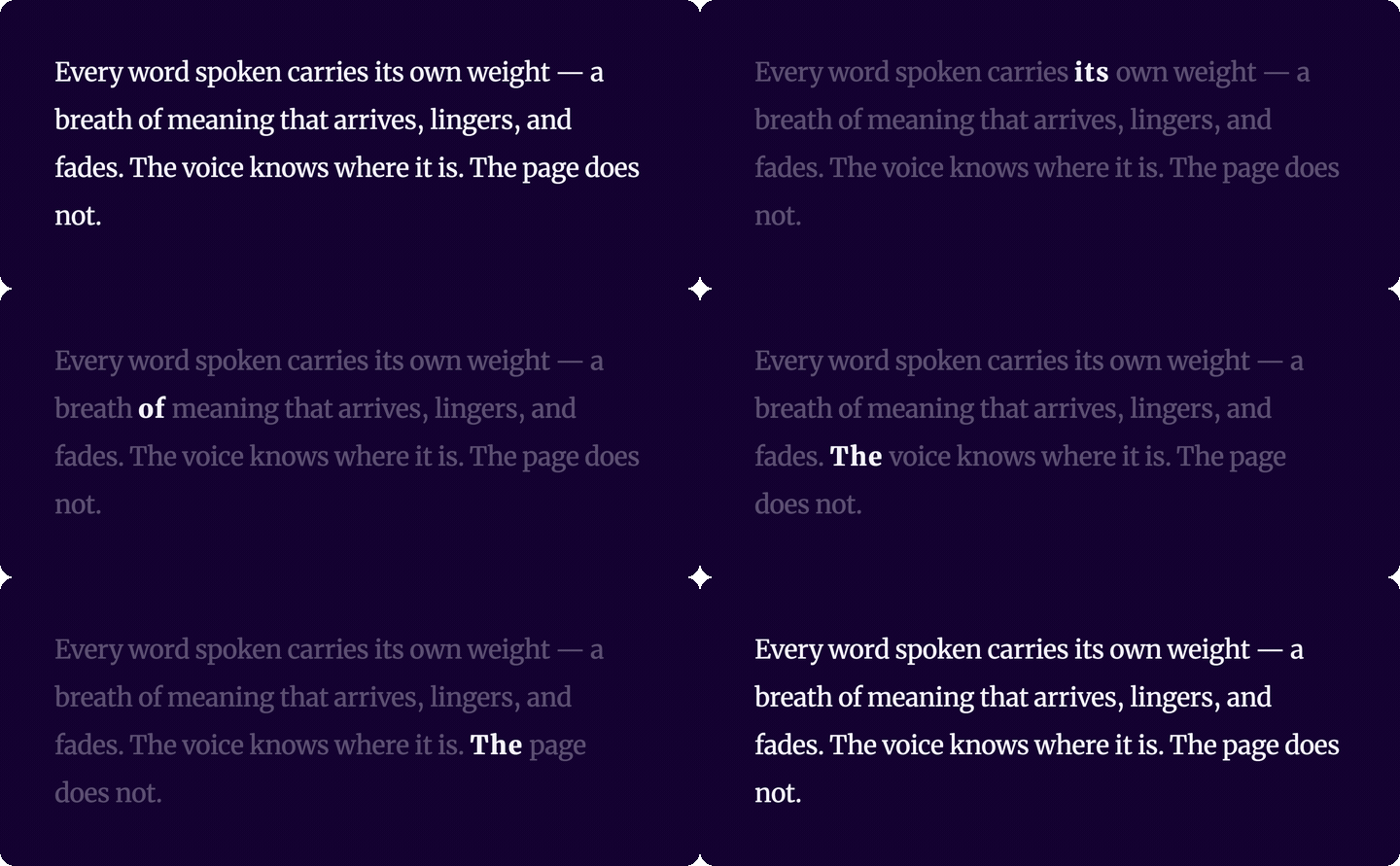
Typography that follows your voice — per-word typographic emphasis synced to Web Speech API boundary events. Each spoken word gets wider tracking, heavier weight, and larger optical size; the rest of the text recedes. A read-along effect grounded in typographic logic, not arbitrary highlight colours.
speechtype.com · npm · GitHub
TypeScript · Zero dependencies · React + Vanilla JS
Good for read-along reading aids, language-learning apps, teleprompters, and any interface where a spoken voice and on-screen text need to stay visibly in sync.
Requires a variable font with
wghtandopszaxes (e.g. Merriweather, Inter, Source Serif). The weight and optical-size emphasis are written viafont-variation-settings; with a static font only the tracking and opacity changes apply.
npm install @liiift-studio/speechtypeNext.js App Router: this library uses browser APIs. Add
"use client"to any component file that imports from it.
SpeechTypeText is a controlled component — you manage a SpeechSynthesisUtterance yourself, track which word is active in state, and pass the index as a prop. This pattern gives you full control over voice, timing, and UI.
Note: the controlled component and the
useSpeechTypehook only apply the visual options (activeTracking,activeWeight,activeOpsz,inactiveOpacity,transitionMs). The speech options (rate,pitch,volume,onUnsupported,onError) are only read bystartSpeechType, since in the controlled pattern you own theSpeechSynthesisUtterance.SpeechTypeTextalso takes anasprop (default"p") and forwards anyaria-*,data-*,role, andlangattributes to the rendered element.
"use client"
import { SpeechTypeText } from '@liiift-studio/speechtype'
import { useState, useCallback } from 'react'

const TEXT = 'The quick brown fox jumps over the lazy dog.'

export default function Demo() {
  const [activeWordIndex, setActiveWordIndex] = useState(-1)

  const handleSpeak = useCallback(() => {
    const utterance = new SpeechSynthesisUtterance(TEXT)
    utterance.onboundary = (e) => {
      if (e.name === 'word') {
        const wordIndex = TEXT.slice(0, e.charIndex).trim().split(/\s+/).filter(Boolean).length
        setActiveWordIndex(wordIndex)
      }
    }
    utterance.onend = () => setActiveWordIndex(-1)
    speechSynthesis.speak(utterance)
  }, [])

  return (
    <>
      <SpeechTypeText activeWordIndex={activeWordIndex} activeWeight={700} inactiveOpacity={0.45}>
        {TEXT}
      </SpeechTypeText>
      <button onClick={handleSpeak}>Speak</button>
    </>
  )
}For a simpler setup, skip SpeechTypeText and let startSpeechType manage everything directly on a plain element ref:
"use client"
import { useRef } from 'react'
import { startSpeechType, removeSpeechType } from '@liiift-studio/speechtype'

export default function Demo() {
  const ref = useRef<HTMLParagraphElement>(null)
  // stop() cancels speech and resets emphasis but keeps spans in place.
  // removeSpeechType() does a full teardown — cancels speech AND restores original HTML.
  // Call stop() for pause/stop controls; call removeSpeechType() only on unmount or full reset.
  const stopRef = useRef<(() => void) | null>(null)

  function handleSpeak() {
    if (!ref.current) return
    stopRef.current?.()  // cancel any in-progress speech first
    stopRef.current = startSpeechType(ref.current, { activeWeight: 700, rate: 0.9 })
  }

  function handleStop() {
    stopRef.current?.()
    stopRef.current = null
  }

  return (
    <>
      <p ref={ref}>The quick brown fox jumps over the lazy dog.</p>
      <button onClick={handleSpeak}>Speak</button>
      <button onClick={handleStop}>Stop</button>
    </>
  )
}useSpeechType is the low-level hook behind SpeechTypeText. Use it when you need the controlled pattern but want to render your own element:
"use client"
import { useSpeechType } from '@liiift-studio/speechtype'
import { useRef, useState, useCallback } from 'react'

export default function Demo() {
  const ref = useRef<HTMLParagraphElement>(null)
  const [activeWordIndex, setActiveWordIndex] = useState(-1)

  useSpeechType(ref, activeWordIndex, { activeWeight: 700 })

  return <p ref={ref}>The quick brown fox jumps over the lazy dog.</p>
}startSpeechType is the all-in-one entry point for vanilla use. It wraps the words in spans, starts the Web Speech API, updates the emphasis on each boundary event, and returns a stop function.
import { startSpeechType, removeSpeechType } from '@liiift-studio/speechtype'

const el = document.querySelector('p')
const stop = startSpeechType(el, {
  activeWeight: 700,
  activeTracking: 0.06,
  rate: 0.9,
})

// Later — stop speech and restore original HTML:
stop()
removeSpeechType(el)
For more control, use the lower-level functions:
import { prepareSpeechType, applySpeechType, removeSpeechType } from '@liiift-studio/speechtype'

const el = document.querySelector('p')
prepareSpeechType(el)               // wraps each word in a span

applySpeechType(el, 3)              // emphasise word at index 3
applySpeechType(el, -1)             // clear emphasis

removeSpeechType(el) // restore original HTMLimport type { SpeechTypeOptions } from '@liiift-studio/speechtype'
const opts: SpeechTypeOptions = {
activeTracking: 0.08,
activeWeight: 800,
inactiveOpacity: 0.3,
rate: 0.85,
}Visual options apply everywhere; speech options are only read by startSpeechType (see the note under React component).
| Option | Type | Default | Scope | Description |
|---|---|---|---|---|
activeTracking |
number |
0.06 |
visual | Letter-spacing on the active (currently spoken) word, in em |
activeWeight |
number |
700 |
visual | wght axis value on the active word. Must sit within the font's wght axis range |
activeOpsz |
number |
24 |
visual | opsz axis value on the active word. Must sit within the font's opsz axis range |
inactiveOpacity |
number |
0.45 |
visual | Opacity of inactive (not currently spoken) words. Keep ≥ 0.3 for legibility — values below ~0.5 may drop contrast under WCAG AA depending on your colours |
transitionMs |
number |
80 |
visual | CSS transition duration in ms for style changes |
rate |
number |
0.9 |
speech | Speech rate (0.1–10). Passed to SpeechSynthesisUtterance |
pitch |
number |
1 |
speech | Speech pitch (0–2). Passed to SpeechSynthesisUtterance |
volume |
number |
1 |
speech | Speech volume (0–1). Passed to SpeechSynthesisUtterance |
onUnsupported |
() => void |
— | speech | Called when the browser has no speechSynthesis. Use it to surface a fallback (e.g. show the text statically or a manual stepper) |
onError |
(e: SpeechSynthesisErrorEvent) => void |
— | speech | Called on a real speech error. The normal "interrupted" cancellation is filtered out for you |
prepareSpeechType reads the element's text content and wraps each word in a <span class="st-word"> — without changing visual layout. Note: inline child elements (<em>, <strong>, <a>, etc.) are flattened to plain text during wrapping. applySpeechType then writes font-variation-settings, letter-spacing, and opacity as inline styles directly on each span (no CSS class toggles). The active span gets wider tracking, heavier weight, and larger optical size; inactive spans get reduced opacity. CSS transitions on those properties are set once by prepareSpeechType.
startSpeechType wires a SpeechSynthesisUtterance to the browser's Web Speech API, listens for boundary events, maps the character offset to a word index, and calls applySpeechType on each event. It returns a stop function that cancels synthesis and removes all emphasis.
Browser support: Web Speech API is supported in Chrome, Edge, and Safari. Firefox requires a flag. Note that Safari fires boundary events sparsely, so word-level sync is most reliable in Chromium-based browsers; where boundaries don't fire, the text simply stays un-emphasised. startSpeechType falls back silently in environments without speechSynthesis — pass onUnsupported to detect that case and render your own fallback:
startSpeechType(el, {
  onUnsupported: () => showManualStepper(),     // no Web Speech API here
  onError: (e) => console.warn('Speech failed', e.error),
})speechType is built for read-along contexts, so it ships screen-reader support rather than leaving it to you:
- Each word span is marked
aria-hidden="true"and the active word also getsaria-current="true", so assistive tech reads continuous text instead of 27 separate spans. - An off-screen
aria-live="polite"region announces the active word as emphasis moves, keeping non-visual users in sync with the highlight. - All emphasis is plain CSS (
font-variation-settings,letter-spacing,opacity) — no content is duplicated or reordered.
Two trade-offs to design around:
- Contrast. Inactive words fade to
inactiveOpacity(default0.45), which reduces contrast. Keep it at0.3or higher and verify the result still meets WCAG AA (4.5:1) against your background — or raise it toward1if your audience needs maximum legibility. - Inline markup is flattened.
prepareSpeechTypereadstextContent, so inline children (<em>,<strong>,<a>, …) inside the target element are replaced by plain text when words are wrapped. Apply speechType to elements whose formatting you don't need to preserve, and usegetCleanHTML(el)to recover the unwrapped markup if needed.
| Export | Description |
|---|---|
prepareSpeechType(el, options?) |
Wraps each word in a span. Call once before applySpeechType. |
applySpeechType(el, activeIndex, options?) |
Emphasises word at activeIndex. Pass -1 to clear. |
startSpeechType(el, options?) |
All-in-one: prepares spans, starts Web Speech API, returns stop(). |
removeSpeechType(el) |
Cancels synthesis and restores original HTML. |
getCleanHTML(el) |
Returns element HTML with all injected spans removed. |
useSpeechType |
React hook: (ref, activeWordIndex, options?) |
SpeechTypeText |
React component. Controlled via activeWordIndex prop. Forwards ref. |
SpeechTypeOptions |
TypeScript interface for all options. |
SPEECH_CLASSES |
CSS class names injected by the algorithm (st-word). |
SpeechTypeText, useSpeechType, and startSpeechType all require a browser environment. Add "use client" to any component that imports them:
"use client"
import { SpeechTypeText } from '@liiift-studio/speechtype'package.json at the repo root lists next as a devDependency. This is a Vercel detection workaround — not a real dependency of the npm package. Vercel's build system inspects the root package.json to detect the framework; without next present it falls back to a static build and skips the Next.js pipeline, breaking the /site subdirectory deploy.
The package itself has zero runtime dependencies. Do not remove this entry.