
Based on the original DeepMind Colab: google-deepmind/open_x_embodiment
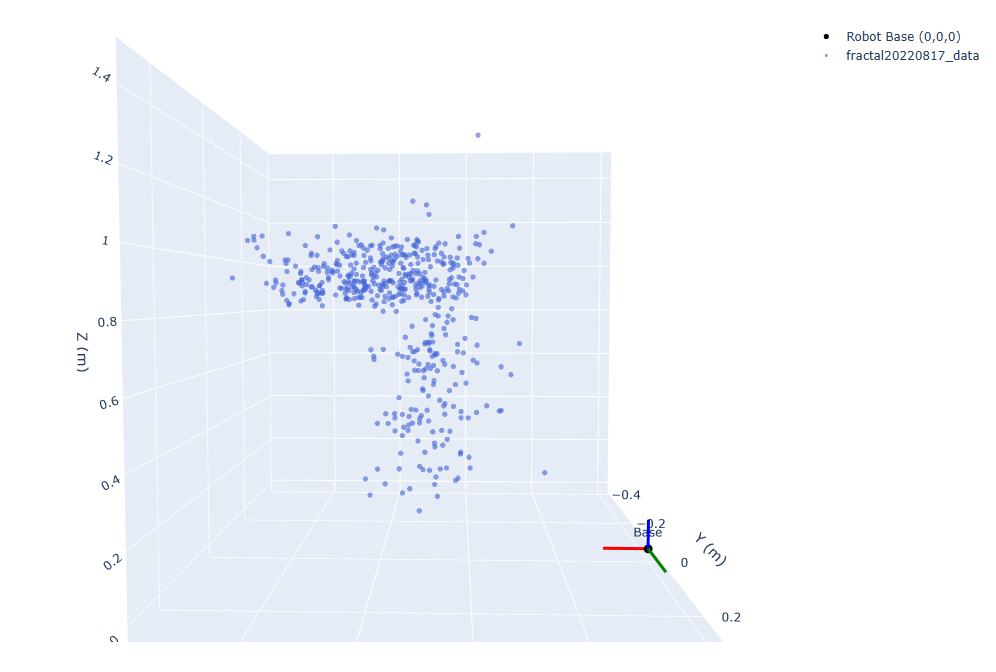
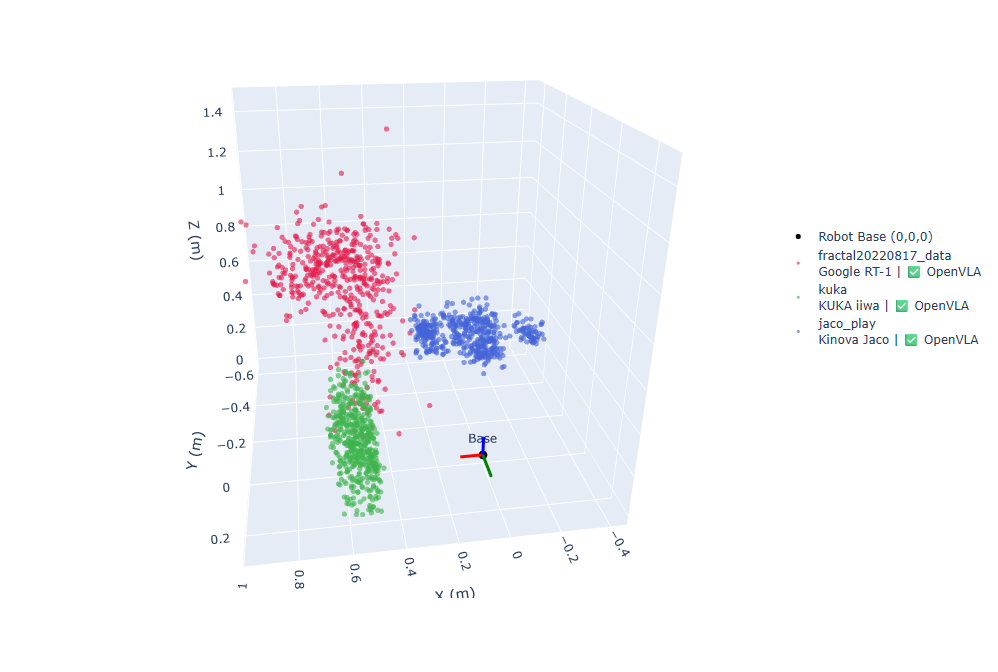
Visualize the 3D spatial distribution of end-effector (EEF) final positions across robot datasets in the Open X-Embodiment collection (DeepMind / Google).
For each training episode the robot's end effector reaches a final target position, expressed in the robot's world coordinate frame with the robot base at the origin. By collecting the final EEF position of every episode across all datasets we can answer:
- What region of 3D space was each robot trained to reach?
- How do the reachable workspaces differ between robot platforms?
- Which datasets share compatible spatial distributions?
Individual dataset visualization:
Combined dataset visualization:
The Open X-Embodiment dataset aggregates demonstrations from 22 robot embodiments across 21 institutions, all following the RLDS format:
dataset → episodes → steps → { observation, action, reward, is_first, is_last, … }
Datasets are hosted on Google Cloud Storage at gs://gresearch/robotics/ (~5 TB total). This project reads only metadata from GCS and streams steps for cache generation — no bulk download required.
colabs/
  Open_X_Embodiment_Datasets.ipynb   # main notebook
endpoints_cache/
  <dataset_name>.npy                 # pre-computed endpoint arrays (one point per episode)
public/
  individual.png                     # screenshot — individual viz
  combined.png                       # screenshot — combined viz
All work lives in colabs/Open_X_Embodiment_Datasets.ipynb, split into two sections.
Identifies and documents the EEF position field for each of the 33 supported datasets.
| Cell | Content |
|---|---|
| Feature exploration | Connects to GCS, prints the full feature spec of every dataset |
DATASET_EEF_CONFIG |
Per-dataset extraction config: field path + slicing strategy |
DATASET_ROBOT_INFO |
Per-dataset robot platform + gripper type |
DATASET_EEF_CONFIG = {
    "fractal20220817_data": {
        "field":   ["observation", "base_pose_tool_reached"],
        "indices": slice(0, 3),   # take [x, y, z] from a larger vector
        "reshape": False
    },
    "viola": {
        "field":   ["observation", "ee_states"],
        "indices": None,
        "reshape": True           # interpret as flattened 4×4 matrix
        # "reshape_convention": "row"  ← default, uses matrix[3, :3]
    },
    "uiuc_d3field": {
        "field":   ["observation", "state"],
        "indices": None,
        "reshape": True,
        "reshape_convention": "col"  # uses matrix[:3, 3] (standard translation column)
    },
}
Three extraction strategies, applied in order:
| Step | Trigger | Operation |
|---|---|---|
| 1 — Slice | indices is not None |
data = data[indices] before any reshape |
| 2a — Direct | reshape=False |
return data as-is |
| 2b — Reshape (row) | reshape=True, no reshape_convention |
matrix[3, :3] (last row) |
| 2b — Reshape (col) | reshape=True, reshape_convention="col" |
matrix[:3, 3] (translation column) |
Two datasets use non-standard step-level field paths (not inside observation):
asu_table_top_converted_externally_to_rlds→step["ground_truth_states"]["EE"]iamlab_cmu_pickup_insert_converted_externally_to_rlds→step["action"]
For each dataset in DATASET_EEF_CONFIG, extracts the final EEF position of each episode (last step only) and saves it to endpoints_cache/<dataset_name>.npy. The cell skips datasets already on disk and caps at 500 episodes per dataset via get_safe_split.
Memory is explicitly released between datasets (gc.collect(), tf.keras.backend.clear_session()).
The notebook clones this repo inside Colab (/content/OpenX-Embodiment-Datasets-Visualization/) and pulls from endpoints_cache/ — no extraction runs at visualization time.
Set DATASET_NAME and explore interactively:
- View: 3D scatter or 2D projections (XY, XZ, YZ)
- Normalize: scales each axis 0→1 to compare workspace shapes
- Origin marker: colored coordinate axes (X=red, Y=green, Z=blue) at (0, 0, 0)
- Title:
dataset | robot | OpenVLA/OOD tag | n=<episodes>
Compare multiple datasets on the same figure:
- Checkbox panel for any combination of the 33 datasets
- Each dataset gets a distinct color from a 33-color palette
- Same 3D / 2D / normalize controls
- Labels show: dataset name, robot platform, OpenVLA/OOD tag, episode count
- ✅ OpenVLA (15 datasets used in OpenVLA training) vs 🔵 OOD
Click the badge at the top. The notebook clones this repo to access the cache — no GCS credentials needed for visualization only.
The feature exploration and cache generation cells read/stream from GCS.
Requires Python 3.10 (Python 3.11 has a known recursion bug with tfds.load):
pip install tensorflow tensorflow-datasets plotly ipywidgets Pillow numpy gcsfs
jupyter notebook colabs/Open_X_Embodiment_Datasets.ipynb| Library | Role |
|---|---|
tensorflow_datasets (tfds) |
Read dataset specs and stream steps from GCS |
tensorflow / gc |
Session and memory management during cache generation |
plotly |
Interactive 3D and 2D scatter plots |
ipywidgets |
Checkbox / radio widget controls in Colab |
numpy |
.npy cache storage and normalization |
subprocess / os |
Clone repo and locate cache inside Colab |