A Python library developed with ctypes to manipulate Windows, Linux and macOS processes (32-bit and 64-bit),
reading, writing and searching values in the process memory.





Read, write and scan the memory of any process — straight from Python.
One unified API. Three operating systems. No C compiler. No native build step.
Tweak a value in a running game · inspect a live program's state · harvest data straight from RAM — on Windows, Linux and macOS.
Quick Start · Usage Guide · Troubleshooting · Platform Notes · The App · Contributing
Runs on 🪟 Windows · 🐧 Linux · 🍎 macOS — 32-bit and 64-bit, with the same code on all three.
| Read & write memory | Change live values on the fly — just like Cheat Engine, but in a few lines of Python. |
Pure-Python via ctypes |
No compilation, no native wheels — pip install and you're done. |
| Scan modes | Exact, not-exact, bigger / smaller (±equal), in-range, out-of-range. |
| Pattern scan | Byte signatures or regex — grep for process memory. |
| Pointer chains | Walk multi-level pointers ([[base+0x10]+0x20]+0x30) in one call. |
| Live pointers | A RemotePointer handle re-resolves its chain on every .value read/write. |
| Module enumeration | List loaded executables & libraries with their base address — base + offset beats ASLR. |
| Allocate / free memory | Reserve and release memory inside the target (Windows & macOS). |
| Snapshot caching | The Cheat-Engine "scan → refine → refine" loop, accelerated. |
| Bundled GUI app | A full memory scanner ships in the box — just type pymemoryeditor. |
Available on PyPI for Windows, Linux and macOS — no native build step, no extra wheels.
$ pip install PyMemoryEditorTo also install the bundled GUI app, use the app extra and launch it from any terminal:
$ pip install "PyMemoryEditor[app]"
$ pymemoryeditorOpen a target process inside a with block, then read, write or scan its memory using
plain Python types. Everything fits in a handful of lines:
from PyMemoryEditor import OpenProcess

with OpenProcess(process_name="example.exe") as process:
    value = 120

    # Scan the whole process for every address holding that value.
    for address in process.search_by_value(int, 4, value):
        print(f"Found at 0x{address:X}")
Open a process by process name or PID — whichever you have:
OpenProcess(process_name="notepad.exe")   # by process name
OpenProcess(pid=1234) # by PIDYou rarely know the address of a value up front — you find it by scanning. The typical loop is the same one Cheat Engine made famous:
- Scan for a value you can see (e.g. your health is
100) — you get back many candidate addresses. - Let the value change in the target (you take damage →
95). - Refine: keep only the addresses that now hold the new value. Repeat until one address remains — that's your value.
- Read, write or freeze it.
with OpenProcess(process_name="game.exe") as process:
    # 1. First scan — every address currently holding 100.
    candidates = list(process.search_by_value(int, 4, 100))

    # 3. After the value drops to 95 in-game, keep only the matches that agree.
    survivors = [
        address
        for address, value in process.search_by_addresses(int, 4, candidates)
        if value == 95
    ]

    # 4. Overwrite the survivors back to a high value.
    for address in survivors:
        process.write_process_memory(address, int, 4, 9999)
For big targets, cache the region map once and reuse it across scans — see the refine-scan workflow.
The building blocks are read_process_memory and write_process_memory. Numeric types
(int, float, bool) infer the buffer length automatically; str and bytes
need an explicit size.
from PyMemoryEditor import OpenProcess

# By default OpenProcess opens a read+write handle,
# so no permission needed for the common case.
with OpenProcess(process_name="notepad.exe") as process:
    address = 0x0005000C

    # Read: 4 bytes inferred for int.
    value = process.read_process_memory(address, int)

    # Write: same — pass None to use the default width.
    process.write_process_memory(address, int, None, value + 7)

    # Strings require an explicit size:
name = process.read_process_memory(address, str, 32)Look up a value anywhere in memory and stream every match:
for address in process.search_by_value(int, 4, target_value):
print(f"Found address: 0x{address:X}")The default is EXACT_VALUE, but you can swap in any ScanTypesEnum mode:
Click to see all eight modes
| Mode | Description |
|---|---|
EXACT_VALUE |
Value equals the target. (default) |
NOT_EXACT_VALUE |
Value is anything but the target. |
BIGGER_THAN |
Value is strictly greater than the target. |
SMALLER_THAN |
Value is strictly less than the target. |
BIGGER_THAN_OR_EXACT_VALUE |
value ≥ target |
SMALLER_THAN_OR_EXACT_VALUE |
value ≤ target |
VALUE_BETWEEN |
min ≤ value ≤ max (use search_by_value_between) |
NOT_VALUE_BETWEEN |
Value falls outside the given range. |
from PyMemoryEditor import ScanTypesEnum

for address in process.search_by_value(int, 4, target, scan_type=ScanTypesEnum.BIGGER_THAN):
    ...

for address in process.search_by_value_between(int, 4, min_value, max_value):
    ...
All of these work with strings too — just remember that for bytes the comparison
depends on your system's byteorder.
For long scans, the same methods can yield progress alongside each address:
for address, info in process.search_by_value(int, 4, target, progress_information=True):
print(f"Address: 0x{address:<10X} | Progress: {info['progress'] * 100:.1f}%")For the classic Cheat-Engine loop — "first scan → restrict → restrict" — enumerate the memory regions once and reuse the snapshot across every subsequent call. On heavy targets (browsers, JVMs with 100 000+ regions) this is a huge win, because the per-call region enumeration is the dominant cost otherwise.
with OpenProcess(pid=1234) as process:
    regions = process.snapshot_memory_regions()

    # First pass — every address holding 100.
    candidates = list(process.search_by_value(int, None, 100, memory_regions=regions))

    # Refine — keep only those that now hold 95.
    refined = [
        addr
        for addr, value in process.search_by_addresses(int, None, candidates, memory_regions=regions)
        if value == 95
    ]
All of snapshot_memory_regions(), search_by_value, search_by_value_between and
search_by_addresses accept the same memory_regions= keyword. Pass an empty list
([]) to explicitly scan nothing.
If you have a long list of addresses to read, search_by_addresses is far faster
than calling read_process_memory in a loop — it reads each memory page only once
and pulls every requested address out of it, slashing the number of syscalls.
for address, value in process.search_by_addresses(int, 4, addresses_list):
print("Address", hex(address), "holds the value", value)A process's address space is split into regions — contiguous blocks of memory,
each with its own size and permissions. get_memory_regions() streams the
address, size and metadata of every region the target owns:
for region in process.get_memory_regions():
print(hex(region["address"]), region["size"], region["struct"])A module is a file mapped into the process — the main executable plus every
shared library it loaded (.exe/.dll on Windows, the binary and .so files
on Linux, the Mach-O image and .dylib files on macOS). get_modules() yields
a ModuleInfo for each one:
for module in process.get_modules():
    print(
        module.name,
        hex(module.base_address),
        module.size,
        module.path
    )
...get_threads() yields a ThreadInfo for every thread running inside the
target — useful for introspection (how many workers does it spawn? is the
main thread still alive?). main_thread is a shortcut to the lowest-id one.
for thread in process.get_threads():
    print(thread.tid, thread.state, thread.priority)

print("Main thread:", process.main_thread.tid)
tidis the OS-native thread id (POSIX TID on Linux, thread id on Windows, Mach port on macOS);stateandpriorityare filled in where the platform exposes them and areNoneotherwise.
Pass a raw bytes regular expression and the scanner applies it directly to
memory, letting you locate data by its shape. The example below extracts
every email address held in the target's memory.
email = rb"[A-Za-z0-9._%+\-]+@[A-Za-z0-9.\-]+\.[A-Za-z]{2,}"

# byte_length is the maximum length of a single match (used to span chunk reads).
for address in process.search_by_pattern(email, byte_length=128):
    raw = process.read_process_memory(address, bytes, 128)
    print(address, raw.split(b"\x00", 1)[0].decode("ascii", "replace"))
Patterns also work the other way — for code. Absolute addresses shift between
builds, but byte signatures remain stable: provide an IDA-style hex string
with ? wildcards and search_by_pattern returns every match, the same
technique Cheat Engine, IDA and Ghidra use to locate code that has moved.
for address in process.search_by_pattern("48 8B ? ? 00 00 89 ?"):
print(f"Match at 0x{address:X}")A multi-level pointer is a static base plus a series of offsets —
module + offset → [+x] → [+y] → …. Walk the whole chain in one line, then
read or write the final address as usual:
# module + 0x10F4F4 -> [+0x0] -> [+0x158]   (a value behind a two-level pointer)
hp_address = process.resolve_pointer_chain(base + 0x10F4F4, [0x0, 0x158])
hp = process.read_process_memory(hp_address, int, 4)
ptr_size=4 for 32-bit targets, ptr_size=8 (default) for 64-bit.
resolve_pointer_chain finds an address once. A RemotePointer wraps that
recipe in a reusable handle: read or write the value through .value, and it
re-walks the chain every time — so the same handle keeps working even when the
target moves things around in memory.
# A handle to the player's HP, behind a two-level pointer.
hp_ptr = process.get_pointer(address, pytype=int, bufflength=4)

print(hp_ptr.value)   # read it
hp_ptr.value = 9999   # write it
You can do pointer math too: hp_ptr + 4 gives a new handle 4 bytes further
along (handy when values sit side by side), without touching memory. Omit the
offsets to wrap an address you already have — e.g. one found by a scan.
# Mana is stored right after HP, so just step 4 bytes forward.
mp_ptr = hp_ptr + 4
print(mp_ptr.value)Reserve a fresh block inside the target process, write to it like any other
address, then release it. The library remembers each allocation's size, so
free_memory(address) works without you tracking it:
address = process.allocate_memory(64)             # base of a new 64-byte region
process.write_process_memory(address, int, 4, 1337)
process.free_memory(address)                       # release it
allocate_memory takes an optional, platform-specific permission (a PAGE_*
value on Windows — default PAGE_EXECUTE_READWRITE; a VM_PROT_* bitmask on
macOS — default read+write), mirroring OpenProcess(permission=...).
Note
Linux is not supported here. It has no syscall to allocate memory in
another process's address space (mmap only affects the calling process);
doing so would require a ptrace-based engine to make the target call mmap
itself. Both methods raise NotImplementedError on Linux. Windows
(VirtualAllocEx/VirtualFreeEx) and macOS
(mach_vm_allocate/mach_vm_deallocate) are fully supported.
PyMemoryEditor abstracts away the OS, but the OS still gets a say in what you're allowed to touch. Here's the short version per platform.
🪟 Windows — works out of the box for most cases
- Process names are matched case-insensitively in practice. Pass
case_sensitive=Falseto follow the OS convention. - The
permission=kwarg maps directly to thePROCESS_*flags ofOpenProcess. The default is read+write (PROCESS_VM_READ | PROCESS_VM_WRITE | PROCESS_VM_OPERATION | PROCESS_QUERY_INFORMATION) — pass a narrower mask if you want a read-only handle.
🐧 Linux — governed by ptrace_scope
- The
permissionargument is ignored — the library usesprocess_vm_readv/process_vm_writev. - Access depends on
ptrace_scopeand process ownership. If the target is not a child of the caller andptrace_scope=1(the common default), you'll see aPermissionError. Run as root or relax/proc/sys/kernel/yama/ptrace_scope.
🍎 macOS — governed by Mach entitlements
- The
permissionargument is ignored — the library uses the Mach VM APIs (task_for_pid,mach_vm_read_overwrite,mach_vm_write,mach_vm_region). - Opening another process requires the Python binary to be signed with the
com.apple.security.cs.debuggerentitlement (or SIP disabled and running as root). - Opening the current process always works — handy for self-inspection and tests.
[!WARNING] macOS write side effect.
write_process_memoryon a read-only page transparently elevates the page protection viamach_vm_protect, performs the write, and tries to restore the original protection. If the restore step fails (e.g. the target task disappears mid-call), the library emits aResourceWarningand the target page is left more permissive than it started. Treat the warning as a signal to investigate. The Win32 and Linux backends do not have this property: protection elevation is opt-in on Windows (PROCESS_VM_OPERATION), and Linux does not need protection changes forprocess_vm_writev.
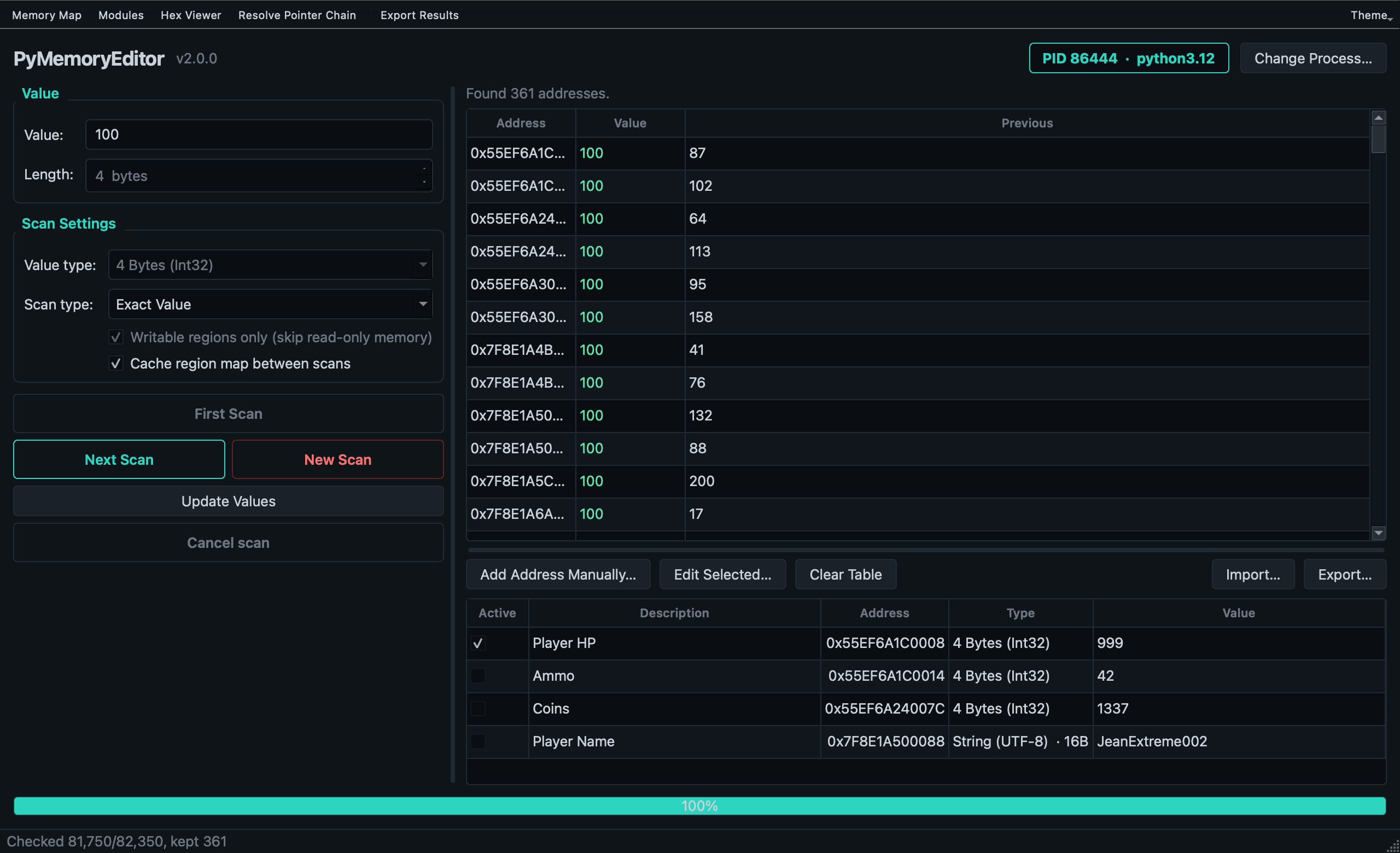
A Cheat Engine-style memory scanner, included for free with every install.
PyMemoryEditor isn't just a library — it also ships with a polished cross-platform GUI built on PySide6 (Qt for Python), so you can play with everything the library does without writing a single line of code. Launch it from any terminal:
$ pymemoryeditorThe app is a living demo of the library — it exercises every public surface (every ScanTypesEnum mode, every value type, scanning, refining, freezing values, the hex viewer, the memory map). If you're learning the API, it's the fastest way to see what's possible.
|
✨ What you get out of the box
|
📦 Install the app extra (adds PySide6): $ pip install "PyMemoryEditor[app]"Then launch the app by running
|
- Debugging & introspection — inspect live state without attaching a debugger.
- Observability tooling — sample variables in a running process for telemetry.
- Security & reverse-engineering research — on systems you own or are authorized to test.
- Personal game modding & speedrunning tools — the classic Cheat-Engine use case.
- Learning — the bundled app is a great teaching tool for how memory scanning works.
Note
Responsible use. PyMemoryEditor talks to other processes through OS-level APIs. Only point it at processes you own or have explicit permission to inspect.
PermissionError when opening another process — the OS is denying access.
This is the most common first hurdle:
- Windows: run your terminal as Administrator for protected targets.
- Linux: run as root, or relax
ptrace_scope(sudo sysctl kernel.yama.ptrace_scope=0). Opening your own process always works. - macOS: the Python binary must be signed with the
com.apple.security.cs.debuggerentitlement (or SIP off + root). Opening the current process always works — great for trying things out.
ProcessNotFoundError — the name didn't match. Names are case-sensitive by
default; try OpenProcess(process_name="chrome", exact_match=False, case_sensitive=False)
for a fuzzy match, or pass the pid= directly.
AmbiguousProcessNameError — more than one process matches. Pick one from the
listed PIDs and pass pid= instead.
A scan returns nothing on Windows — region enumeration needs
PROCESS_QUERY_INFORMATION, which the default permission already includes. If you
passed a custom permission= mask, make sure that flag is in it.
Reading an address gives garbage or raises OSError — the page may have been
freed between scan and read (normal during a live scan), or the value type / size
is wrong. Wrap one-off reads in try/except OSError and double-check the byte width.
Need more detail? The library logs to a standard logging logger named
"PyMemoryEditor" (silent by default). Turn it on to see exactly which pages
the library skips during a scan and why:
import logging

logging.basicConfig(level=logging.DEBUG)
logging.getLogger("PyMemoryEditor").setLevel(logging.DEBUG)
The bundled app exposes the same stream in its Log Console (Tools → Log Console).
Pull requests, bug reports and feature ideas are very welcome. Read
CONTRIBUTING.md for the development setup, test layout and the
small set of platform-specific quirks to be aware of.
If PyMemoryEditor helped your project, please ⭐ the repo — it's the easiest way to support the work and to help others discover the library.
Released under the MIT License — free for personal and commercial use.