

🌐 Company Site - Here
🤗 Hugging Face - Here
🛟 Help Center - Here
🐳 Docker Hub - Here
Fastest:
docker pull faceplugin/face-recognition-liveness-sdk:latest→ run → copy machine code → activate.
Local Linux: put runtime underlib/cpu/→./run.sh→ activate.
Docker Hub: no Drive download. Local: Google Drive →lib/cpu/— see Option B.
Jump: Quick Start · Start the API · SDK License · Setup on your own app · Try it
- Docker (recommended):
docker pull faceplugin/face-recognition-liveness-sdk:latestthendocker run— Option A - Or local: download CPU runtime into
lib/cpu/— Option B, then./run.sh— API on 8083 - Confirm it is running:
curl -s http://127.0.0.1:8083/api/health(no license needed yet) - Contact us with your machine code to obtain a license key, then activate with
POST /api/activate— SDK License - Try it: Postman, curl, or local Gradio demo
Docs: https://doc.faceplugin.com
FacePlugin Face Recognition SDK for Linux / Docker combines on-premise face recognition and passive face liveness (PAD) in one App. One wrapper (libFaceRecognitionSDK.so), one license, two model packs (far.fpk + fal.fpk). Your license unlocks Recognition only, Liveness only, or both.
It runs face detection (bounding box, landmarks, pose, attributes), ICAO-style face quality, template extraction, 1:1 matching, feature similarity, and passive presentation-attack detection — all on your server.
This repository is standalone. Pull from Docker Hub and run — no other FacePlugin repository is required.
All processing stays on your server. No biometric data is sent to FacePlugin cloud — built for banking, eKYC, and on-premise compliance workflows.
One repository for Linux SDK + Docker. Native libraries are linux/amd64; the Docker image runs on Linux, Windows, and macOS hosts via Docker (Apple Silicon uses amd64 emulation). This product is CPU-only. Requires LD_PRELOAD of the wrapper for liveness VFS hooks (./run.sh / Dockerfile set this).
This combined SDK is not the older single-product repos FaceRecognition-Docker (recognition only) or FaceLivenessDetection-Docker (liveness only).
Test with Postman, curl, or the local Gradio demo (demo.py) covering Detect, Quality, Match, and Liveness. Docs: https://doc.faceplugin.com.
| Feature | API |
|---|---|
| Face detection (bounding box, landmarks, pose, attributes) | POST /api/detect · sdk.detect |
| Face quality analysis (ICAO-style checks) | POST /api/quality · sdk.quality |
| Face template extraction for matching | POST /api/feature · sdk.feature |
| 1:1 face match (two images) | POST /api/match · sdk.match |
| Feature vector similarity scoring | POST /api/similarity · sdk.similarity |
| Face liveness (passive PAD) | POST /api/liveness · sdk.liveness |
| License capabilities | GET /api/licenseStatus · sdk.get_license_status |
| Health / machine code / activate | GET /api/health · GET /api/machinecode · POST /api/activate |
| Platform | Repository |
|---|---|
| Android (Recognition) | FaceRecognition-Android |
| iOS (Recognition) | FaceRecognition-iOS |
| React Native (Recognition) | FaceRecognition-React-Native |
| Flutter (Recognition) | FaceRecognition-Flutter |
| Ionic Capacitor (Recognition) | FaceRecognition-Ionic-Capacitor |
| Ionic Cordova (Recognition) | FaceRecognition-Ionic-Cordova |
| Windows (Recognition + Liveness) | FaceRecognitionSDK-Windows |
| Linux / Docker (Recognition + Liveness) | FaceRecognition-LivenessDetection-Docker (this repo) |
| Linux / Docker (Recognition) | FaceRecognition-Docker |
| Android (Liveness) | FaceLivenessDetection-Android |
| iOS (Liveness) | FaceLivenessDetection-iOS |
| Windows (Liveness) | FaceLivenessDetection-Windows |
| Linux / Docker (Liveness) | FaceLivenessDetection-Docker |
| Step | What you need |
|---|---|
| 1 | A Linux host or Docker (Desktop or Engine) |
| 2 | Docker Hub or Google Drive runtime in ./lib/cpu/ — see Start the API |
| 3 | Start without a license. Copy machine code from logs or GET /api/machinecode, send it to FacePlugin (contact), then activate with your license key |
You do not need a license to start the API once. Product endpoints unlock after you activate.
| Item | Minimum | Recommended |
|---|---|---|
| CPU | 2 cores | 4 cores |
| RAM | 4 GB | 8 GB |
| Disk | 4 GB | 8 GB |
| OS (Docker) | Linux + Docker Engine | Ubuntu 22.04 / 24.04 |
You can start without a license — the server prints your machine code on startup.
The API starts even if activation fails. Copy the machine code from the log and send it to FacePlugin.
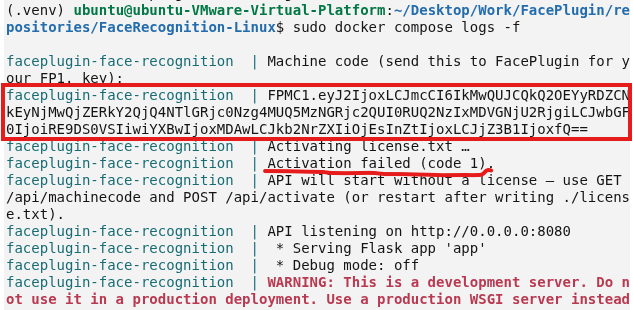
Runtime is already inside the image. No Google Drive step.
sudo docker pull faceplugin/face-recognition-liveness-sdk:latest
sudo docker run -d --name faceplugin-face-recognition-liveness-sdk \
  --shm-size=2gb --privileged \
  -p 8083:8083 \
  -v /etc/machine-id:/etc/machine-id:ro \
  faceplugin/face-recognition-liveness-sdk:latest
sudo docker logs -f faceplugin-face-recognition-liveness-sdk
# Look for the machine code line in the logs
On Docker Desktop (macOS/Windows) omit the /etc/machine-id volume.
To run multiple containers on one Linux host with a shared machine code / license, see the docs:
Requires the Google Drive runtime under lib/cpu/. Needs glibc 2.38+ (for example Ubuntu 24.04).
The ./lib/cpu/ tree is empty on GitHub because native binaries and model files are too large. This product is CPU-only.
FaceRecognition-LivenessDetection Linux runtime (Google Drive)
- Clone the repo (if you have not already):
git clone https://github.com/Faceplugin-ltd/FaceRecognition-LivenessDetection-Docker.git
cd FaceRecognition-LivenessDetection-Docker- Open the Google Drive folder above.
- Download all files in that folder.
- Put every file directly into
./lib/cpu/— not inside a nested subfolder.
FaceRecognition-LivenessDetection-Docker/
└── lib/
    └── cpu/
        ├── libFaceRecognitionSDK.so
        ├── libfar-eng.so
        ├── far.fpk
        ├── libfal-eng.so
        ├── fal.fpk
        └── ... (other runtimes from Drive)
Wrong layout: lib/cpu/SomeFolder/libFaceRecognitionSDK.so.
ls lib/cpu/libFaceRecognitionSDK.so
ls lib/cpu/libfar-eng.so
ls lib/cpu/far.fpk
ls lib/cpu/libfal-eng.so
ls lib/cpu/fal.fpkpip3 install -r requirements.txt
./run.shCopy the machine code from the terminal (or GET /api/machinecode), then activate with POST /api/activate or paste the license key when prompted.
Licenses are offline and bound to your machine code. Offline cryptography is built into the SDK — no OpenSSL install.
- Start the server (above) with Docker Hub or local
./run.sh. A license is not required for the first start. - Copy the machine code from container logs or
GET /api/machinecode. - Send that machine code to FacePlugin (contact). We will issue a license key for that code.
- Activate with the license key:
# Paste your license key into ./license.txt (overwrite the file).

# Detached Docker will not re-read license.txt on its own — POST the key:
curl -s -X POST http://127.0.0.1:8083/api/activate \
  -H 'Content-Type: text/plain' \
  --data-binary @license.txt
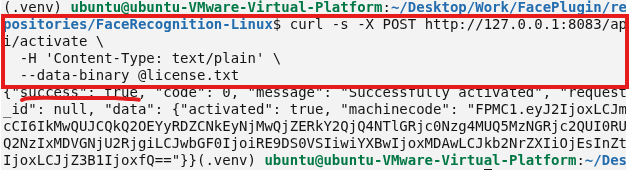
Use the machine code from the environment you will run in production. Docker and local host codes are different — if you run in Docker, send the Docker machine code.
After activation, GET /api/licenseStatus reports what the key unlocks. The Gradio demo shows the same summary as License: at the top of the page.
| Capability | Meaning |
|---|---|
| Recognition | Detect, quality, match, feature, similarity |
| Liveness | Passive face anti-spoofing (/api/liveness) |
Typical labels:
- Recognition + Liveness — full product (all tabs)
- Recognition only — Detect / Quality / Match; Liveness stays unavailable
- Liveness only — Liveness tab; Detect / Quality / Match stay unavailable
- Not licensed — machine code only until you activate
curl -s http://127.0.0.1:8083/api/licenseStatuscurl -s http://127.0.0.1:8083/api/healthImport postman/FaceRecognition-API.postman_collection.json.
Default base URL: http://127.0.0.1:8083
Routes are /api/* (no version segment in paths).
The Docker image is API/SDK server only (no Gradio). For a local FacePlugin Face Recognition + Liveness demo in the browser — Detect, Quality, Match, and Liveness — on the host (API must already be running on port 8083). The header shows License: from /api/licenseStatus. Tabs stay visible; unavailable capabilities show a note instead of results.
pip3 install -r requirements-demo.txt
DEMO_PORT=9003 API_BASE=http://127.0.0.1:8083 python3 demo.py
Open http://127.0.0.1:9003. Examples when present: assets/examples/samples/.
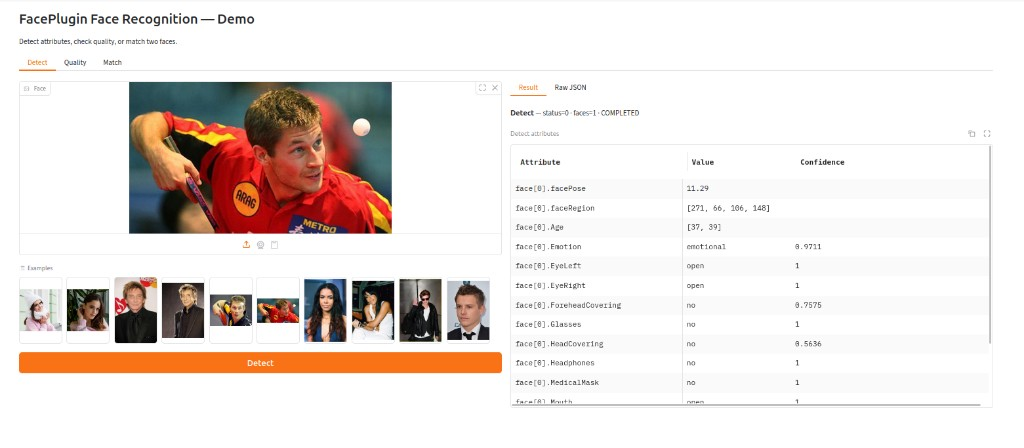
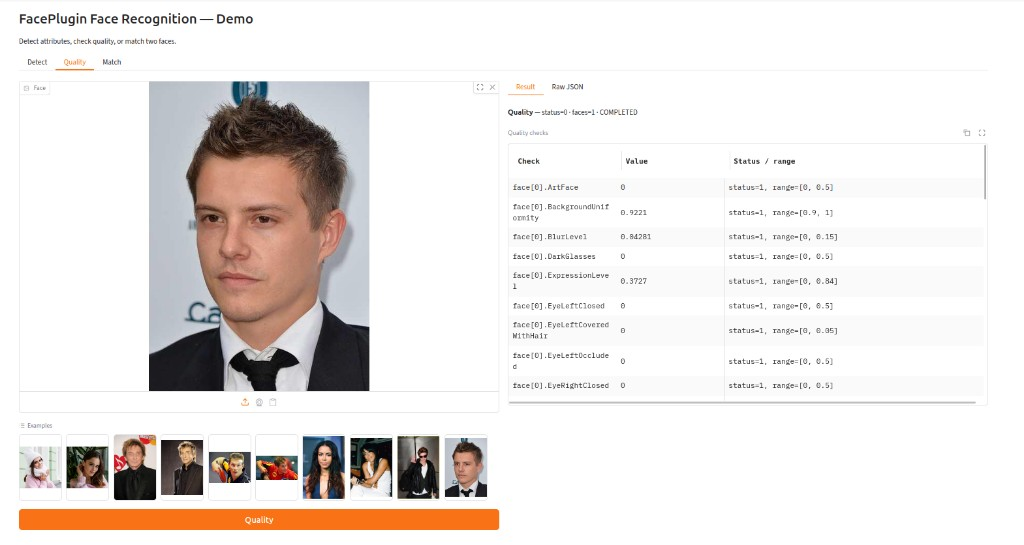
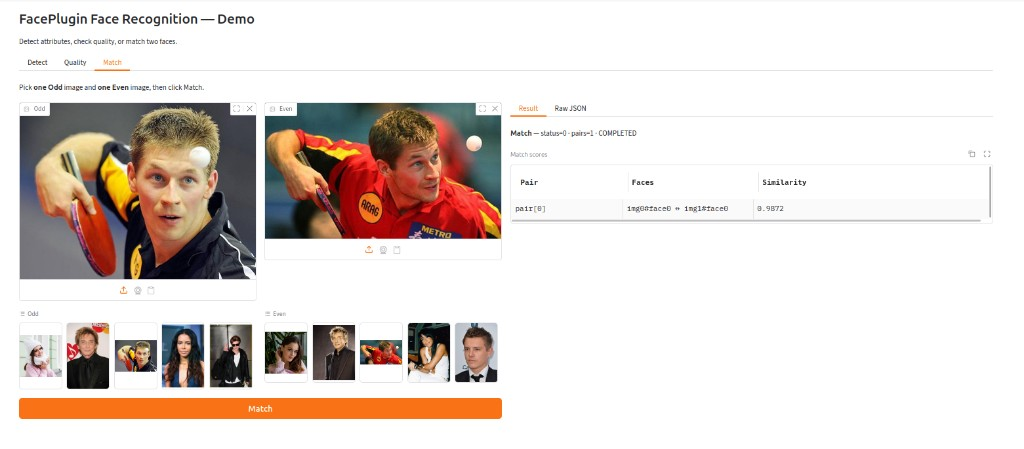
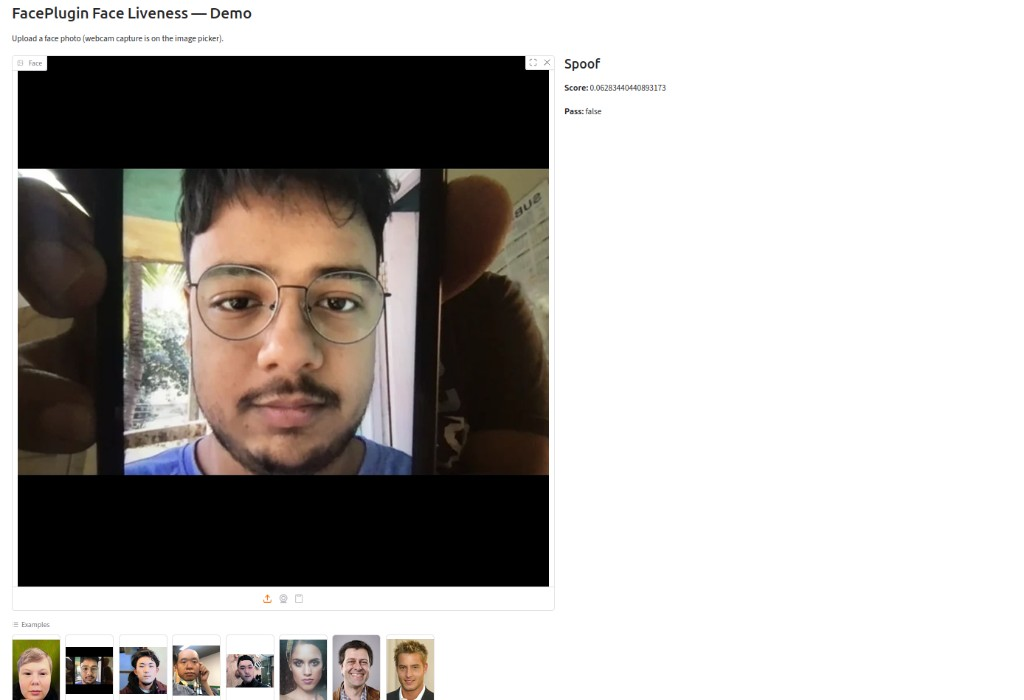
Tabs: Detect, Quality, Match, Liveness. Each recognition action has a Result table (attributes, quality checks, or match scores) and Raw JSON for integration. Detect / Quality / Liveness examples are under assets/examples/samples/ (odd/even faces plus real/fake liveness samples). Match is Odd vs Even: pick one image from each group, then Match.
Two ways to call the same engine. Full protocol: https://doc.faceplugin.com.
| Path | When to use |
|---|---|
HTTP (app.py) |
Any language. Keep this API running and POST images as JSON. |
sdk.py |
Python on the same Linux host as lib/cpu/ (or inside the container). No HTTP hop. |
HTTP (any language): start the API, then call /api/detect, /api/quality, /api/match, /api/feature, /api/similarity, /api/liveness. Images are base64. See Try it and Postman.
Python in-process: copy sdk.py + lib/cpu/ into your project (or import sdk from this repo). Call order: get_machine_code → activate → init_sdk → detect / quality / feature / match / similarity / liveness. Check get_license_status() for recognition vs liveness flags. Return code 0 means success. For native runs, set LD_LIBRARY_PATH and LD_PRELOAD the same way ./run.sh does.
You do not need Gradio (demo.py) in production — it is a host-only test UI.
Use the Python bindings in sdk.py. Return code 0 means success.
First, obtain the machine code for activation and request a license based on the machine code.
import sdk

machine_code = sdk.get_machine_code()
print("machineCode:", machine_code) # machine codeNext, activate the SDK with the path to your license file (license.txt containing your license key).
ret = sdk.activate("license.txt")If activation is successful, the return value will be 0. Otherwise, an error value will be returned.
After activation, call the initialization function of the SDK.
ret = sdk.init_sdk()If initialization is successful, the return value will be 0. Otherwise, an error value will be returned.
result = sdk.detect(base64_image, crop_image=False)result = sdk.quality(base64_image, crop_image=False)result = sdk.feature(base64_image)result = sdk.match(base64_image1, base64_image2, crop_image=False)result = sdk.similarity(feature1_b64, feature2_b64)result = sdk.liveness(base64_image)status = sdk.get_license_status()
# recognition / liveness flags, label, level 0|1|2HTTP endpoints: /api/health, /api/machinecode, /api/licenseStatus, /api/backend, /api/activate, /api/detect, /api/quality, /api/match, /api/feature, /api/similarity, /api/liveness.


