



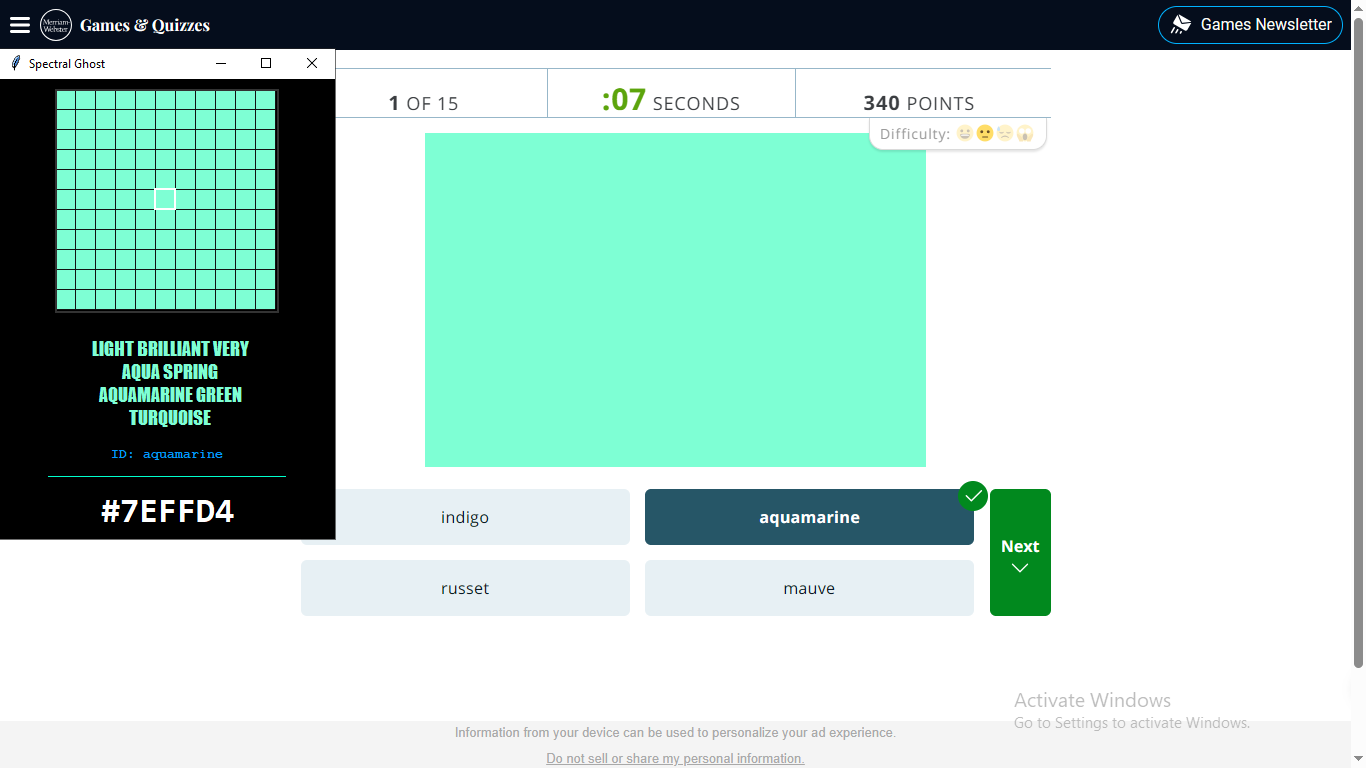
Spectral Ghost is a high-precision, low-latency spectral reconnaissance engine that acts as a digital "microscope" for creators, allowing real-time extraction of pixel genetic makeup across Windows, macOS, and Linux systems.
- 11×11 pixel sampling around cursor with 30ms refresh rate
- 10× pixel-perfect magnification using nearest-neighbor scaling
- Dynamic grid overlay for precise sub-pixel orientation
- Center-pixel isolation with high-contrast reticle targeting
- 9,284+ named colors from Michael Krzywinski's comprehensive database
- KDTree spatial search for microsecond color identification
- Euclidean distance metrics with confidence percentages
- Visual match indicators (Teal/Yellow/Pink) for immediate feedback
- Luminance-aware text outlining for maximum readability on any color
- Dynamic font scaling & text wrapping based on color name length
- Adjustable opacity (20-100%) for non-intrusive monitoring
- Compact mode toggle for minimal screen footprint
- Cross-platform clipboard integration for hex code copying
- Native Windows support with DPI awareness
- macOS compatibility with proper permission handling
- Linux support across major distributions
- Consistent performance across all operating systems
# Clone the repository
git clone https://github.com/DAPOWER99/spectral-ghost.git
cd spectral-ghost

# Create virtual environment
python -m venv venv

# Activate environment
# Windows:
.\venv\Scripts\activate
# macOS/Linux:
source venv/bin/activate

# Install dependencies
pip install -r requirements.txtpillow>=10.0.0
pyautogui>=0.9.54
numpy>=1.24.0
scipy>=1.10.0python spectral_ghost.pyNote: On macOS, you may need to grant Screen Recording permissions in System Preferences.
spectral-ghost/
├── spectral_ghost.py          # Main application (cross-platform)
├── requirements.txt           # Python dependencies
├── Data/
│   └── 9k-color.names.txt     # Color database (9,284 colors)
├── README.md                  # This documentation
└── LICENSE                    # MIT License
Mouse Position → 11×11 Screen Grab → Center Pixel Extraction → 10× Magnification
- Input: Sampled RGB pixel (r₁, g₁, b₁)
- Search: KDTree nearest-neighbor in 9,284-color database
- Distance: Euclidean calculation:
√((r₁-r₂)² + (g₁-g₂)² + (b₁-b₂)²) - Confidence: Percentage:
max(0, 100 - (distance / 2.55))
- Luminance Calculation:
L = 0.299R + 0.587G + 0.114B - Text Contrast: White outline if
L < 100, black otherwise - Font Scaling: 24pt (≤12 chars), 18pt (≤24 chars), 14pt (>24 chars)
| Button | Action | Description |
|---|---|---|
| FREEZE | Toggle sampling | Locks/unlocks current color analysis |
| MINIMAL | Toggle UI size | Switches between full (340×780) and compact (340×460) views |
| OPACITY - | Decrease opacity | Reduces window transparency (minimum 20%) |
| OPACITY + | Increase opacity | Increases window transparency (maximum 100%) |
| COPY HEX | Copy to clipboard | Copies #RRGGBB hex code to system clipboard |
| Component | Technology | Details |
|---|---|---|
| Language | Python 3.8+ | Compatible with all modern Python versions |
| UI Framework | Tkinter | Native cross-platform GUI toolkit |
| Graphics | PIL (Pillow) | Image processing and display |
| Screen Capture | PyAutoGUI | Cross-platform cursor and screen access |
| Math Engine | SciPy + NumPy | KDTree search and vector mathematics |
| Color Database | Michael Krzywinski | 9,284 named colors (CC0/public domain) |
| Refresh Rate | 30ms loop | ~33.3 Hz real-time updates |
| Sampling | 11×11 region | 121 pixels captured per frame |
| Display | 220×220 canvas | 10× pixel-perfect magnification |
| Color | Sample | Hex | Distance | Confidence | Meaning |
|---|---|---|---|---|---|
| Teal |  |
#00ffcc |
< 15 | > 94% | High-fidelity match |
| Yellow |  |
#ffcc00 |
15-50 | 80-94% | Approximated match |
| Pink |  |
#ff0055 |
≥ 50 | < 80% | Unique signature |
- DPI Aware: Automatically scales for high-resolution displays
- No permissions required: Works out of the box
- Recommended: Python 3.8+ installed from python.org
# Required permissions (first run):
# 1. System Preferences → Security & Privacy → Privacy
# 2. Select "Screen Recording"
# 3. Add Terminal or your IDE to allowed apps

# Optional: Install via Homebrew
brew install python-tk# Ubuntu/Debian dependencies
sudo apt-get install python3-tk python3-dev
# Fedora/RHEL
sudo dnf install python3-tkinter
# Arch Linux
sudo pacman -S tk- Extract color palettes from references
- Match brand colors across materials
- Check accessibility contrast ratios
- Capture inspiration from screenshots
- Verify UI implementation matches designs
- Debug color rendering issues
- Extract CSS variables from live sites
- Test color consistency across platforms
- Visualize color space relationships
- Study named color databases
- Demonstrate real-time algorithms
- Analyze digital color representations
This project is licensed under the MIT License - see the LICENSE file for details.
The color names database (Data/9k-color.names.txt) is based on Michael Krzywinski's Color Name Database and is provided under CC0 / Public Domain terms.
Contributions are welcome! Please feel free to submit a Pull Request.
- Fork the repository
- Create a feature branch (
git checkout -b feature/AmazingFeature) - Commit changes (
git commit -m 'Add AmazingFeature') - Push to branch (
git push origin feature/AmazingFeature) - Open a Pull Request
- Michael Krzywinski for the comprehensive color name database
- Python & Tkinter communities for cross-platform GUI foundations
- SciPy & NumPy teams for high-performance mathematical tools
- All contributors and testers for feedback and improvements
Found a bug or have a feature request? Please check:
- Issues for existing reports
- Troubleshooting section below
- Create a new issue with detailed information
macOS: "Screen Recording" permission denied
Solution: System Preferences → Security & Privacy → Privacy → Screen Recording
Add your terminal application (Terminal, iTerm2) to the allowed list.
Linux: Tkinter not found
Solution: Install python3-tk package:
sudo apt-get install python3-tk  # Ubuntu/Debian
sudo dnf install python3-tkinter # Fedora
Database file not found
Solution: Ensure Data/9k-color.names.txt exists in the same directory as spectral_ghost.py
Performance issues
Solution: Close other screen capture software
Reduce system transparency/effects
Update graphics drivers
- Color history palette with swatch storage
- Advanced color spaces (LAB, CMYK, XYZ conversion)
- Export formats (ASE, ACO, CSS, JSON)
- Batch processing for image color extraction
- Plugin system for custom color databases
- API mode for integration with other tools
- Screen capture may be blocked by security software
- High-DPI scaling varies by platform
- Requires color database file in Data/ directory
- 30ms minimum refresh rate (hardware dependent)
"See the colors between the pixels."
Platform Tested: Windows 10/11, macOS 12+, Ubuntu 22.04+, Fedora 38+
Last Updated: Version 1.0.0 (First Pre-Release)
Maintainer: DAPOWER99