
Morse code Encoder and Transmitter (through buzzer and LED)
Morse code is the oldest method used for wireless data transfer in an encrypted format. I have used a piezoelectric buzzer and an LED to transmit/output the encrypted message and simultaneously the message will be printed on the serial monitor. Arduino UNO (microcontroller) is used to encrypt messages.

- Software/Language: C++ (Arduino Framework)
- Hardware: Arduino Uno (or compatible microcontroller), Piezo Buzzer
- IDE: Arduino IDE

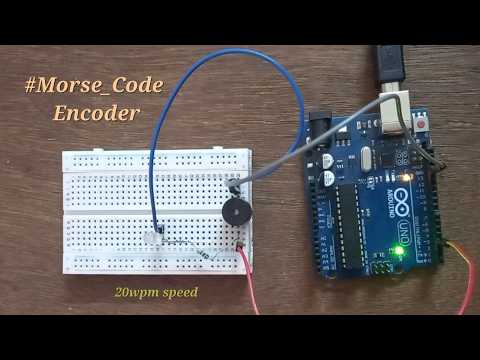
The system operates by receiving a text string via the Serial Monitor and processing it character by character.
The project strictly adheres to the standard International Morse Code timing rules. The base unit of time (unitTime) is set to 60 milliseconds, which corresponds to a transmission speed of approximately 20 Words Per Minute (WPM).
- Dit (·): 1 unit (60ms)
- Dah (—): 3 units (180ms)
- Intra-character space (between dits/dahs): 1 unit (60ms)
- Inter-character space (between letters): 3 units (180ms)
- Word space (between words): 7 units (420ms)
The hardware relies on the microcontroller's hardware timers to generate a square wave. The tone() function is used to drive a buzzer at 700Hz for the exact duration of a dit or dah, followed immediately by noTone() and delay() to enforce the required spacing between pulses.
A comprehensive switch-case structure serves as the lookup dictionary. It maps alphanumeric characters to their respective sequences of dit() and dah() function calls, keeping memory overhead low by avoiding complex data structures.
Message: Hi I am an ECE Engineer

Message: Just playing with Arduino UNO

The Logic Behind the Morse Code Encoder is given in the Arduino sketch (file with .ino extension)
Here is the simulation of my Arduino project on "Morse Code Encoder" in Wokwi simulator: https://wokwi.com/projects/419083685728047105
- Case Insensitivity: The
switchstatement uses case fall-throughs (e.g.,case 'A': case 'a':) to ensure that both uppercase and lowercase inputs are successfully translated without requiring additional string manipulation functions. - Word Boundaries: When a space (
' ') is detected in the input string, the code bypasses the character map and outputs a/to the serial monitor. It then applies a specific mathematical delay (unitTime*7-240) to maintain the strict 7-unit word gap while accounting for loop execution time. - Unmapped/Special Characters: If the user inputs a character not defined in the switch cases (like punctuation marks or symbols), the
switchstatement simply ignores it. No sound is produced, preventing the system from crashing or halting, though a visual space will still be printed to the monitor to indicate a skipped character.
- Replace
delay()with non-blocking timers (millis()) to allow for concurrent tasks. - Store the Morse dictionary in
PROGMEMto free up dynamic SRAM.
Happy Learning :)