


https://discord.com/invite/Wfr2ejBmY
Give your AI agents a memory. See it, search it, and maintain it, all in a beautiful WebUI on your own machine.
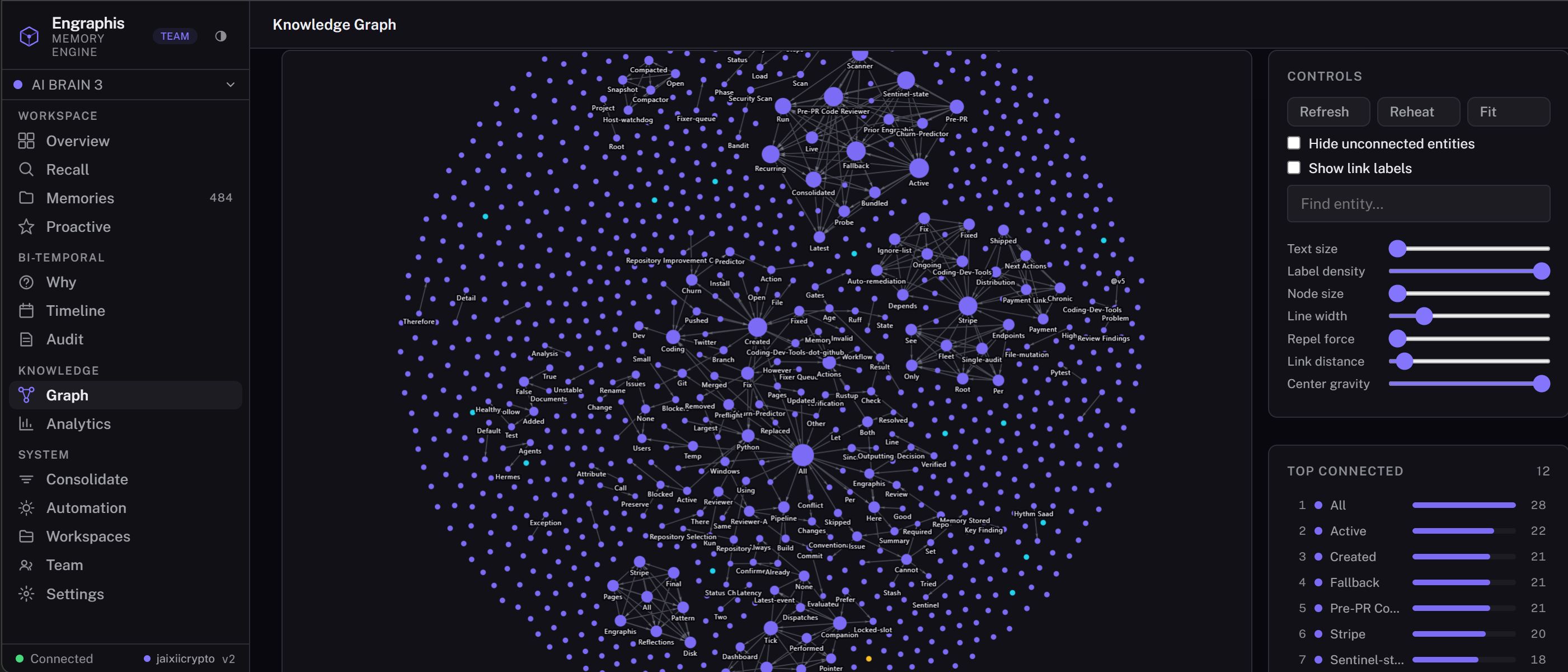
Knowledge Graph · run engraphis-dashboard to see it live
Grounded, not guessed. Memory with receipts. Local by default.
Open-core boundary: this repository contains the free local engine, dashboard, MCP server, and customer-side clients. Hosted sync, analytics, automation, and team services run on the official hosted service; their server implementations are not distributed here.
Support continued Engraphis development with Pro. Start a 3-day Pro trial or subscribe to Pro.
The dashboard Overview and Audit/Receipts views also show a receipt-backed estimate from
real context deliveries. It compares the host history or retrieved source baseline with the
context Engraphis actually emitted, keeps token counters and release versions separate, and
labels adaptive history reductions separately from packing savings. Receipts without estimator
metadata remain historical/unclassified. This measures estimated prompt-context reduction; it
does not measure provider billing. The /context-savings API and
engraphis_context_savings MCP tool aggregate the complete history across all visible workspaces
by default, or accept an explicit workspace plus optional from_ts, to_ts, and
release_version filters.
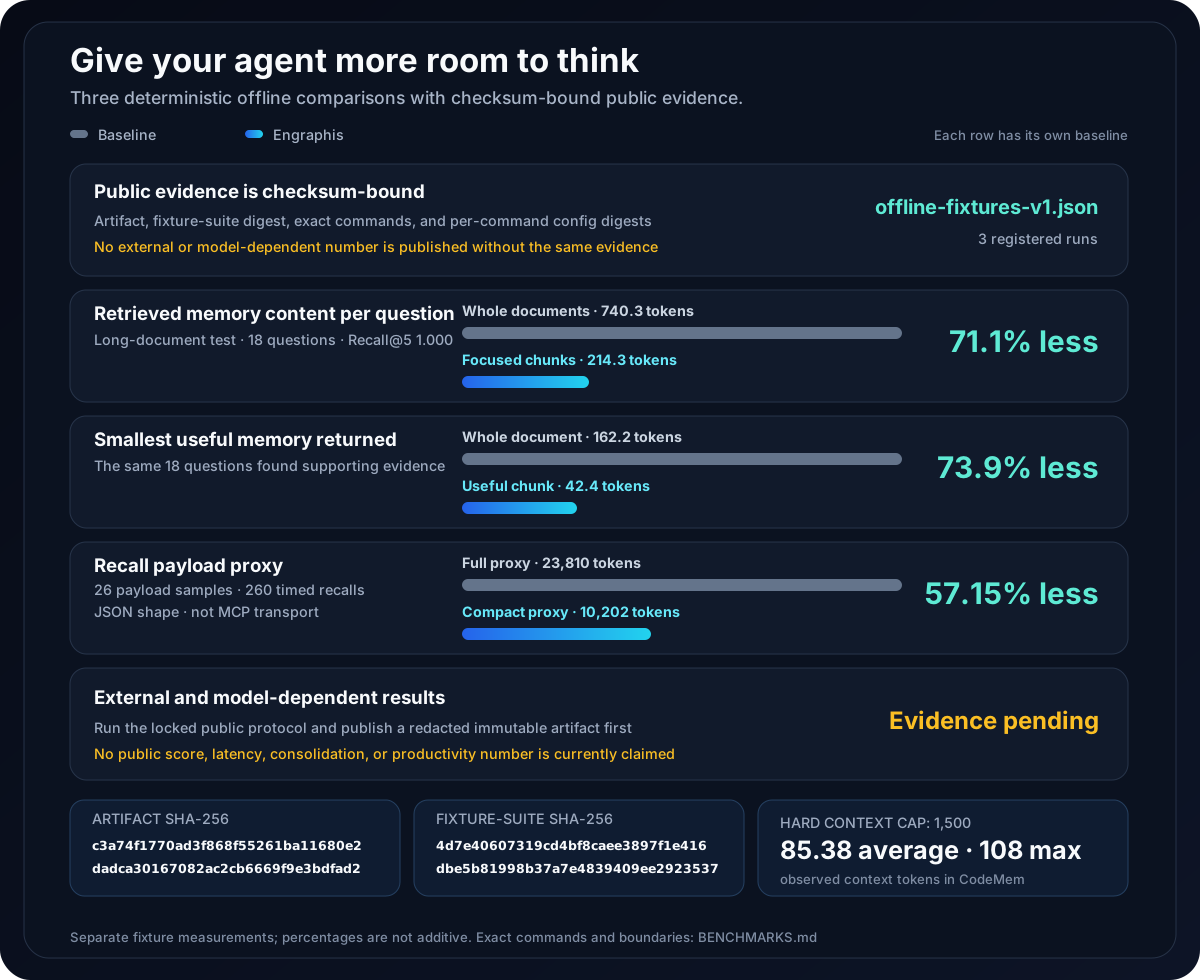
Less repeated history means more room for the task, tools, and useful evidence.
See benchmark details and reproduce the results
| Retrieval mode | Mean returned memory content | Recall@5 |
|---|---|---|
| Whole documents | 740.3 tokens | 1.000 |
| Engraphis structure-aware chunks | 214.3 tokens | 1.000 |
The chunked mode returns the relevant passage instead of the whole document: 526.0 fewer tokens
per question. Under the same model-context budget, that leaves roughly 526 tokens for task
instructions or other relevant evidence. This is evidence ID offline-chunking in the registered
artifact below.
The table below contains every exact token/context aggregate currently published here and keeps its counting boundary explicit.
| What is counted | Comparison | Measured reduction | Quality held constant |
|---|---|---|---|
| Retrieved top-5 memory content, averaged per question | Whole documents: 740.3 tokens → structure-aware chunks: 214.3 tokens | 526.0 fewer tokens per question (71.1% lower, about 3.5× smaller) | Recall@5 1.000 in both modes across 6 documents and 18 questions |
| Smallest returned memory that contains the reference evidence | Whole documents: 162.2 tokens → chunks: 42.4 tokens | 119.8 fewer tokens to evidence (73.9% lower, about 3.8× smaller) | The same 18 questions had a returned evidence-holding memory in both modes |
| Full versus compact recall payload proxy across one 26-question pass within a 260-timed-recall CodeMem run | Full proxy: 23,810 engraphis.regex.v1 tokens → compact proxy: 10,982 tokens |
12,828 proxy tokens avoided (53.88% lower) | 26 payload samples; 260 timed recalls; Recall@5, hit@5, and answer-token recall all 1.000 |
| Packed prompt-context usage in the same 26-question CodeMem sample pass | Hard budget: 1,500 tokens; observed mean: 85.38; observed maximum: 108 | A hard cap prevents a recall from exceeding its configured context budget | This is usage accounting, not a before/after savings comparison |
These values are evidence IDs offline-chunking and offline-performance in
offline-fixtures-v9.json,
SHA-256
455fc9d32a236e582a49aaaf9b84f30cae2573dc6ed982f4dd7dd845afcaf24c.
BENCHMARKS.md
records the matching suite digest, exact commands, and per-command config digests. External,
model-dependent, consolidation, productivity, and latency results remain unpublished until the
same evidence exists for them.
The compact payload shape avoids duplicating full memory bodies when the packed context and source list are enough. The evaluator tokenizes JSON-shaped full and compact payload proxies built from recall results; it does not serialize the MCP envelope or measure a transport response. The fixture therefore does not measure model-provider charges, end-to-end task time, or customer cost savings.
The measures are deliberately separate and must not be added together: chunking counts the
content of retrieved memory records before ContextPacker, whereas compact recall counts a
serialized JSON-shape payload proxy. “Tokens to evidence” is the size of the smallest
retrieved memory record holding the reference evidence; it is not latency or end-to-end answer
accuracy. Chunking creates more focused stored records, so this is a context-efficiency result,
not a storage-reduction claim.
Reproduce the registered quality and token/context measurements without a network connection or API key:
python -m eval.grounded
python -m eval.chunking_eval --dataset eval/datasets/longdoc.jsonl --k 5
python -m eval.performance --dataset eval/datasets/codemem.jsonl --k 5 --iterations 10 --json
These are small deterministic correctness and efficiency fixtures, not official LoCoMo /
LongMemEval QA scores or a third-party leaderboard result. Compact-response counts use the exact
engraphis.regex.v1 counter; the chunking evaluation uses its documented deterministic
normalized-character estimator. Chunking measures retrieved memory content, while compact recall
measures a serialized JSON-shape payload proxy, not an MCP transport response. See the registered
artifact and BENCHMARKS.md
for definitions, limitations, and canonical external-evaluation requirements.
The complete engraphis[all] install is the default way to use Engraphis: it includes the local
dashboard, Smart MCP server, documents, Cloud Sync client, and supported optional integrations.
Python 3.10+ is required.
pip install "engraphis[all]"
engraphis-dashboard
The dashboard opens at http://127.0.0.1:8700. Local memory needs no account or API key.
Use a smaller package only when you intentionally need a limited surface. The NumPy-only core continues to support Python 3.9+.
| Goal | Install | Start |
|---|---|---|
| Local dashboard and REST API | pip install "engraphis[server]" |
engraphis-dashboard |
| Coding-agent memory over Smart MCP | pip install "engraphis[mcp]" |
codex mcp add engraphis -- engraphis-mcp |
| Native SQLite vector acceleration | pip install "engraphis[vector]" |
Server entrypoints select it automatically |
| Offline Python library | pip install engraphis |
MemoryService.create("engraphis.db") |
For MCP clients other than Codex, configure a stdio server whose command is engraphis-mcp; see
the agent connection guide.
Use engraphis-update to upgrade the installation using its detected install method. Package
metadata does not record which extras were selected, so the updater defaults to the safe
superset engraphis[all] rather than silently dropping an optional surface. For a deliberate
selection, set ENGRAPHIS_UPDATE_EXTRAS to a comma-separated list (for example
server,mcp), or set it to none for the base package only.
Upgrading to 1.4:
engraphis-mcpnow exposes the nine-tool Smart gateway. Integrations that require the former 35 direct tool names should runengraphis-mcp-classic. The SQLite schema in the 1.4.0 release was version 9. Existing v7-to-v8 databases already containconfidenceandpinned_at/unpinned_at; v9 adds thememory_tombstonesrepository-scope column/table and performs a one-time entity-canonicalization repair, then migrates automatically on first open. A tombstone with a knownrepo_idis terminal only in that repository; legacy repo-less tombstones remain global. See the 1.4.0 release notes.
Upgrading to 1.5: schema 10 bounds legacy retention state and schema 11 backfills explicit approval only for eligible pre-review local memories. Pending and quarantined evidence remains gated. Existing 1.4.x databases migrate automatically when Engraphis 1.5 opens them; see the 1.5 release notes.
Upgrading to 1.6: existing 1.5 databases migrate automatically through schema 12, which classifies content-free erasure markers before sync: existing markers become local-only
never_export, while new secure erasures becomeremote_erasureonly for non-secretworkspace/reporecords already eligible for sharing. Schema 13 adds per-memory hybrid logical clocks for deterministic descriptive-state sync and durable, content-free proof that a memory crossed a sync boundary. Schema 14 adds the Obsidian collection and import manifests; schema 15 generalizes them to source-neutral local documents, preserves temporal source lineage across re-imports, binds adapters and target scopes, and retains only bounded, content-free per-job format/result metadata. The schema 16 migration persists each import job's optional session target and requires source lineage and job-item attachments to remain in that exact session. See the 1.6 release notes.
An agent should not have to reconstruct a project from scattered chat history on every task. Engraphis turns local project knowledge into scoped, time-aware memory; retrieves the evidence that supports the current question; and returns a bounded, attributable context packet.
The core task is continuity: retrieve the current, supported project decision without dragging the whole history into the next prompt. See measured token and context savings for the short version of how much less history an agent has to carry.
| Agent need | What Engraphis changes |
|---|---|
| Remember a project across sessions | Stores typed memory in a workspace → repo → session hierarchy and provides a last-session handoff. |
| Find support for the current task | Fuses vector, lexical, graph, and code-aware retrieval instead of relying on one search signal; fast can skip graph traversal for small or latency-sensitive vaults. |
| Know what is true now and what changed | Preserves bi-temporal history and supersession chains instead of silently overwriting a fact. |
| Avoid confident guesses | Returns cited evidence or explicitly abstains when support is too weak. |
| Avoid dragging the whole project into every prompt | Packs context to a configured hard budget and can return a compact MCP response. |
| Keep knowledge in the operator's control | Runs local-first and offline-capable, with scopes, audit records, and optional privacy-safe receipts. |
The Engraphis dashboard opens http://127.0.0.1:8700. Local memory needs no cloud account,
signup, or API key and stays in a SQLite file on your machine.
Ledger is the primary local interface for recall, memories, graph exploration, provenance, workspaces, and manual consolidation. Classic preserves the former full tool suite; both use the same local data. Switch in Manage → Settings → Interface (Ledger) or Settings → Appearance & Engine (Classic).
| Platform | How |
|---|---|
| Windows | Double-click Engraphis Dashboard on your Desktop or Start Menu (install: engraphis-dashboard --install-shortcuts) |
| macOS | Double-click Engraphis Dashboard.app on your Desktop (install: same command) |
| Linux | Desktop entry in Applications → Development (GNOME/KDE/etc.) |
| Docker | docker compose up: see docker-compose.yml for the one-command deployment |
| Any | engraphis-dashboard in a terminal |
In a source checkout, scripts/launch_dashboard.ps1 is only a Windows convenience wrapper. It
delegates configuration, startup health, browser opening, and process lifecycle to the same
engraphis-dashboard entrypoint rather than maintaining a second behavior path.
Inspect memories, supersession diffs, recall scores, timelines, links, consolidation, and audit records in the dashboard. The offline graph renderer is vendored, and the interface is keyboard- navigable with light and dark themes. Graph exploration offers a focused High quality view and an explicit worker-backed Every node view for complete entity projections up to 20,000 nodes and 200,000 relationships; see the graph performance profiles.
Engraphis gives agents durable, scoped, explainable project knowledge. The local engine combines
Ebbinghaus decay, bi-temporal facts, and hybrid vector/lexical/graph recall; it runs offline with
SQLite, local embeddings, and numpy only.
- Grounded and governed: deterministic conflict resolution, cited answers or abstention, explicit correction/promotion/forgetting, and a complete history.
- Agent-ready: MCP tools, hard-budget context packets, handoffs, and code-aware retrieval.
- Auditable: content-free receipt chains, provenance, and temporal/entity/code relationships.
- Practical: local file and code ingest, optional PDF/OCR/transcription, and SQLCipher at rest.
The memory engine, embeddings, conflict resolution, and recall stay local without an LLM. An explicitly configured provider adds structured extraction, cited synthesis, consolidation, and retention supervision. Configure it in Settings → Connect an LLM. The activity view records outcomes, never keys, prompts, or raw provider responses. See the LLM provider guide for setup and privacy choices.
Privacy boundary: text sent to an explicitly selected provider leaves the local process under that provider's terms. Use
ENGRAPHIS_RETENTION_SUPERVISOR=none(the default) and the offlinechunkextractor when ingestion must remain entirely local.
Choose and configure an external LLM with the LLM provider guide, including OpenAI, Anthropic, Google, OpenRouter, Ollama, Cohere Command, Command Code Provider, and other compatible endpoints. The guide also covers Codex subscription MCP connections.
pip install "engraphis[all]"        # self-hosted dashboard, MCP, code graph, documents, transcription, PostgreSQL, and Cloud Sync
pip install "engraphis[server]"     # dashboard + REST API
pip install "engraphis[mcp]"        # MCP server only
pip install "engraphis[documents]"  # PDF + image OCR bindings
pip install "engraphis[transcription]" # faster-whisper audio/video
pip install "engraphis[postgres]"   # PostgreSQL schema introspection
pip install "engraphis[code]"       # tree-sitter code graph indexing
pip install "engraphis[vector]"     # native sqlite-vec exact-KNN acceleration
pip install "engraphis[cloud-sync]" # Cloud Sync client crypto/runtime
pip install "engraphis[encryption]" # SQLCipher encryption-at-rest extra
pip install engraphis               # core library: numpy only, fully offline
The official Docker image includes the local Tesseract executable for image OCR. Outside
Docker, the documents extra installs its Python bindings; install Tesseract through your
operating system as well if you enable image OCR.
The NumPy-only core library supports Python 3.9+. Current patched releases of the WebUI
stack, MCP SDK, image parser, and Cloud Sync client require Python 3.10+, so use Python 3.10
or newer for the server, mcp, documents, cloud-sync, or all installation paths.
The default NumpyVectorIndex performs an exact full scan. There is no universal memory-count
cutoff because latency depends on vector size, hardware, filters, and the rest of the recall
pipeline. Measure your machine with python -m eval.vector_scale --backend numpy, then run
python -m eval.performance on a representative corpus. If exact scans miss your latency target,
install engraphis[vector], create the engine with vector_backend="sqlite-vec", and remeasure.
The stable sqlite-vec vec0 backend executes exact KNN in native code; it is acceleration, not a
claim of sublinear ANN scaling. See BENCHMARKS.md for the reproducible commands
and reporting limits.
Dashboard, REST, and MCP entrypoints default to ENGRAPHIS_VECTOR_BACKEND=auto: they use
sqlite-vec when the vector extra is installed and compatible, then safely fall back to NumPy.
Programmatic MemoryEngine.create() and MemoryService.create() retain the deterministic
numpy default unless a backend is requested explicitly.
Use python -m eval.vector_scale --backend sqlite-vec for an input-identical direct-search
comparison; setup/index-build time is explicitly excluded from the timed search envelope.
Persistent vectors fail closed unless the embedder can publish a durable, secret-free space
fingerprint. Sentence Transformers use the loaded Hub commit or a manifest of local artifacts;
when a remote model's immutable identity cannot be resolved, persistent vector recall remains
gated instead of mixing spaces. For programmatic OpenAI-compatible embeddings, construct
ApiEmbedder with an operator/provider space_version; without it the adapter remains usable for
ephemeral embedding only. Its base_url may be a provider root or a /v1 root and is normalized
to exactly one /v1/embeddings endpoint.
sqlcipher3-binary publishes CPython manylinux x86-64 wheels. On that target,
engraphis[encryption] installs the driver. The cross-platform all extra deliberately
omits it so all remains resolvable on macOS, Windows, Linux ARM, and musl; on those
targets, provision a compatible SQLCipher driver separately before enabling a database
key. The programmatic core remains plaintext unless a database key is configured. For a
fresh database, engraphis-init enables SQLCipher automatically when a compatible driver is
available, creates a private key sidecar, and can be overridden with --no-encryption.
Linux / macOS: if
pip installfails witherror: externally-managed-environment, your system Python is marked read-only (PEP 668). Install into a virtual environment instead. Runpython3 -m venv venv && source venv/bin/activate && pip install "engraphis[server]"Alternatively, use Docker (docker compose up).pipx install "engraphis[server]"also works.
First run downloads
all-MiniLM-L6-v2(~80 MB). Without it, the engine falls back to deterministic feature hashing so it always runs offline. That fallback captures lexical overlap, not meaning: recall and grounded MCP responses setdegraded_mode=trueandsemantic_support=false, and disable vector retrieval plus semantic-cosine evidence. Install a declared embedding model for semantic retrieval.
To require a model that is already local, set
ENGRAPHIS_EMBED_MODEL=local:/absolute/model/pathorlocal:<cached-model-id>. This path never downloads a model. If it is unavailable, Engraphis explicitly enters lexical degraded mode instead of presenting hash-vector scores as semantic.
pip install "engraphis[server]"
engraphis-dashboard                   # → http://127.0.0.1:8700
engraphis-dashboard --install-shortcuts   # → Desktop + Start Menu icons
Offline first run: the first launch downloads the
all-MiniLM-L6-v2embedding model (~80 MB), then runs fully offline. To stay offline-only, setENGRAPHIS_EMBED_MODEL=local:/absolute/model/path(never downloads; unknown local models enter lexical degraded mode instead of faking semantic scores). Extraction defaults toENGRAPHIS_EXTRACTOR=none(verbatim writes), the vector backend defaults toauto(native acceleration when installed, otherwise NumPy), and recall without a usable semantic space reportsdegraded_mode=truewith lexical/graph recall. Runengraphis-init --checkto verify the install, extras, and database writability.
docker compose up # → http://127.0.0.1:8700For Docker Compose persistence and loopback-port configuration, see the
Docker deployment guide.
engraphis-server and engraphis server are headless compatibility aliases
for this same v2 service, so every public surface has the same scoped recall and retention model.
For optional LAN exposure, token configuration, and HTTP MCP setup, see the Docker deployment guide.
Set ENGRAPHIS_API_TOKEN to require API authentication and ENGRAPHIS_DB_KEY to encrypt
the local database at rest. Hosted-plan credentials configure customer clients; they do not
install premium server implementations into this image. See docker-compose.yml for options.
pip install "engraphis[mcp]"
engraphis-init                     # writes ~/.engraphis/config.env + prints config snippets
claude mcp add engraphis -- engraphis-mcp
codex mcp add engraphis -- engraphis-mcp  # Codex subscription
Offline first run: the first tool call lazily loads the
all-MiniLM-L6-v2embedding model (~80 MB, same download as the dashboard), then memory runs fully offline with no API key. To stay offline-only, setENGRAPHIS_EMBED_MODEL=local:/absolute/model/path(never downloads); extraction defaults toENGRAPHIS_EXTRACTOR=none, the vector backendautofalls back to NumPy without thevectorextra, and recall without a usable semantic space reportsdegraded_mode=truewith lexical/graph recall. Runengraphis-init --checkto verify the install and database path before registering the server.
For Codex subscription setup and verification, see the agent connection guide and the LLM provider guide.
engraphis-mcp is zero-configuration Smart MCP: agents begin with nine compact tools for sessions,
prompt-ready recall, durable memory, governed record read/update, conflict review, action discovery,
and safe execution. For code graphs,
governance, audit, or other advanced work, the agent calls engraphis_discover_actions and then
the indicated read or action executor; no profile selection is required. The gateway validates
the discovered capability again before it runs it, and clients remain responsible for their
normal destructive-action approval boundary.
Existing clients that pin the historical 35 named tools can use
engraphis-mcp-classic (or engraphis-mcp-http --classic). The complete classic inventory,
including engraphis_check_update, is in the MCP tool reference.
For installation, configuration, lifecycle commands, and the local trust boundary, see the Pi extension guide.
integrations/commandcode/ ships a SessionStart hook that warms up a new
session with bounded, recalled context from the local Engraphis gateway. Fails
open on timeout and is installed via python scripts/install_cc_hook.py.
integrations/prime_agent/ ships a first-party Python package for
PrimeIntellect prime-agent
that exposes the same nine Smart MCP tools, with a PrimeAgentFleet of eight
named sub-agents (researcher, planner, coder, reviewer, tester,
documenter, monitor, integrator) sharing one engraphis-mcp stdio
subprocess. Install via pip install ./integrations/prime_agent and register
with python scripts/install_prime_agent.py. See the
prime-agent integration guide.
What the integration is. A PrimeAgentFleet is a thin Python layer
around the same engraphis-mcp Smart gateway every other host uses. At
runtime the fleet holds one shared EngraphisMcpClient, which owns one
engraphis-mcp subprocess over JSON-RPC stdio. Each of the eight named
sub-agents gets its own Engraphis session (started lazily on first tool use)
and its own default repo scope, so per-role memory is isolated while the
local gateway stays single-process. The eight sub-agent names
(researcher, planner, coder, reviewer, tester, documenter,
monitor, integrator) are the fixed default; pass agent_names=[...] to
PrimeAgentFleet(...) for a custom set. Concurrent tool calls serialize at
the JSON-RPC frame layer through an asyncio.Lock, so framework-level
parallelism (eight sub-agents reasoning at once) is preserved while the
underlying MCP transport remains one ordered stream. The only integration
surface is EngraphisPrimeAgent.register() in
integrations/prime_agent/src/engraphis_prime_agent/agent.py -- that is the
single adapter point to override if prime-agent's tool-registration API
differs from the assumed target.register_tool(name, fn, schema=...)
contract.
The design -- eight named sub-agents, one shared stdio subprocess,
per-agent session bootstrap, and ENGRAPHIS_*-only environment forwarding
to the gateway -- is recorded in ~/.commandcode/plans/prime-agent-integration.md
on the host where the integration was developed. When that host plan is not
available (other contributor machines, CI), the same design is summarized in
the PR description that introduced the integration and in the
prime-agent integration guide
("Architecture" and "Concurrency model" sections).
pip install "engraphis[code]"
engraphis-graph index -w acme -r api --root .
engraphis-graph search -w acme -r api "UserService"
# `query`/`explain` blend code search with your stored memories: query matches symbol
# and file NAMES (a full question sentence won't match anything), and explain's answer
# is drawn from memories recorded against the repo; both are empty on a fresh index.
engraphis-graph query -w acme -r api "UserService"
engraphis-graph explain -w acme -r api "why does deploy depend on approval?"
engraphis-graph path -w acme -r api UserService DatabasePool
engraphis-graph impact -w acme -r api --root . --git-range origin/main...HEAD
engraphis-graph prs -w acme -r api --base main --head HEAD
engraphis-graph export -w acme -r api -o engraphis-graph-out
engraphis-graph install-merge-driver --root .
The export contains graph.json, a self-contained graph.html, and GRAPH_REPORT.md.
Indexing supports Python, JavaScript, TypeScript, Go, Rust, Java, C#, C, C++, SQL, and
Terraform. Tree-sitter is used when available; the dependency-free regex backend remains a
functional fallback. Definitions, methods, calls, imports, ownership, variables,
inheritance/implementation, and docstrings/comments are indexed. Indexing is incremental by
content hash, honors .engraphisignore, and does not follow file symlinks outside the repository
root. Call edges are name-based and best-effort rather than type-resolved. The optional Git merge
driver validates bounded graph JSON and deterministically unions nodes and edges instead of
choosing one export side.
For a read-only recall and graph API that can be shared without exposing write operations:
pip install "engraphis[server]"
engraphis-graph-server                 # API at http://127.0.0.1:8720; schema at /openapi.json
A non-loopback bind fails closed unless ENGRAPHIS_GRAPH_TOKEN (or
ENGRAPHIS_API_TOKEN) is set. See the v3 architecture/design document.
from engraphis.service import MemoryService

mem = MemoryService.create("engraphis.db")
mem.remember("Auth migrated from JWT to PASETO.", workspace="acme", repo="api")
hit = mem.recall("why did we change auth?", workspace="acme", repo="api")
print(hit["context"])
The same MemoryService backs the dashboard and the MCP server. The package root also
intentionally exposes the low-level engine facade (MemoryEngine, create_memory_engine)
for advanced composition, while MemoryService remains the high-level service API.
New writes support session, repo, and workspace visibility. scope="user" is reserved and
rejected until records carry an immutable owner identity; it must not be treated as private
per-person memory. Historical user-scope rows remain workspace-bound for compatibility.
After an upgrade, stats() reports prompt-eligibility counts and active embedding-space
coverage. Zero-result recall identifies a review-gated scope instead of silently looking empty,
and engraphis-cli review list|approve provides a dry-run-first local bulk workflow. Embedding
model changes trigger a guarded rebuild; vector recall stays disabled until every stored vector
matches the new fingerprint. See recall recovery.
Agent hosts can avoid retrieval when their existing history already fits:
decision = mem.adaptive_context(
    "what should the agent do next?",
    current_history,
    workspace="acme",
    repo="api",
    max_context_tokens=8_192,
    retrieval_token_budget=1_024,
)
prompt_context = decision["context"]
The decision is history_bypass when the history fits, retrieval when compact evidence is
strong, and history_fallback when weak retrieval should widen back to recent raw history.
For an agent prompt, prefer engraphis_recall_context: it returns one hard-budget packed
context plus compact sources, deterministic usage accounting (budget_tokens, context_tokens,
source_tokens, saved_tokens, savings_ratio, packed_count, omitted_count, and
token_counter), and optional diagnostics. Accounting is exact for the named counter; inject the
reader's tokenizer when reader-model token parity is required. engraphis_recall remains the compatible full-recall
surface; use response_mode="compact" when the packed context is enough and full memory bodies
would duplicate it. For advanced query-planning configuration, see the
architecture guide.
For bi-temporal reads, valid_at selects what was true at a Unix timestamp and known_at selects
what Engraphis had learned then. as_of remains a compatibility alias for valid_at; supplying
both is allowed only when they match.
For a mutable claim, pass a stable subject_key and optional claim_kind, such as
subject_key="api.rate_limit", claim_kind="configured_value". Offline conflict resolution
deterministically adds, reinforces, relates, or supersedes records while preserving temporal
history; it does not need an LLM. Matching claim identities let it supersede substantially
reworded mutable facts. Without them, the dependency-free lexical embedder cannot reliably infer
that a paraphrase is a contradiction, so keep both records or use an explicit correct operation.
Engraphis separates automatic write resolution from explicit human governance:
| Operation | Use it when | What happens to history |
|---|---|---|
remember |
Adding or restating one fact | Adds, reinforces, safely supersedes, or relates an uncertain neighbor |
correct |
Replacing one known-wrong memory | Closes the old validity window and links the replacement |
promote |
A narrow learning now applies more broadly | Writes a wider-scope successor and closes/links the source instead of editing scope in place |
merge |
Combining two or more overlapping memories | Retires every source and creates one memory that supersedes all of them |
retire |
Removing a memory from live recall | Bi-temporally closes it; the audit/history record remains |
consolidate |
Distilling recurring episodic memories automatically | Creates linked semantic digests; source episodes remain live |
Manual N→1 merge is available through MemoryService.merge() and POST /api/merge:
a = mem.remember("Deploys happen Friday at 3pm.", workspace="acme")
b = mem.remember("We deploy Fridays around 15:00.", workspace="acme")

merged = mem.merge(
    [a["id"], b["id"]],
    "Deploys ship every Friday at approximately 15:00.",
    workspace="acme",
    reason="deduplicate the deployment schedule",
)
print(merged["compaction"])
retire is intentionally not deletion: it preserves temporal history, FTS, and vector
evidence for historical reads. If a credential was captured, new writes are blocked before
storage; for a legacy leak use the explicitly destructive MemoryService.secure_erase() or
POST /api/secure-erase/engraphis_secure_erase. That flow removes the one memory and local
FTS/vector-index and derived graph/link rows, runs SQLite secure-delete, WAL checkpoint, and
VACUUM, and scans recognised local SQLite recovery backups. It cannot erase exports, filesystem
snapshots, remote peers, unknown backups, or information a running/compromised agent already
read; rotate the credential. See secure-erasure limits. forget
remains a deprecated compatibility alias for retire.
All sources must belong to the named workspace. The result inherits the strictest source sensitivity, remains untrusted if any source was untrusted, and stays pinned if any source was pinned. The full multi-predecessor chain remains visible through inspection, Why, and Timeline.
The core engine, local dashboard, MCP server, and manual consolidation are Apache-2.0 and free. Pro and Team are services that provide optional access to the official hosted service; its control-plane, billing, relay, compute, and Team identity modules live in a private repository. They do not limit the local core. See hosted plans, licensing, and Cloud Sync for service boundaries, lifecycle, and pricing.
Subscribe to Pro to support the project and add hosted services.
Compare hosted plans when you are ready to evaluate the service boundary and billing options.
| Free (available now) | Pro: $10/mo or $100/yr | Team: $20/seat/mo or $200/seat/yr | |
|---|---|---|---|
| Dashboard WebUI (with built-in inspector) | ✓ | ✓ | ✓ |
| Memory engine + Smart MCP (Classic 35-tool compatibility) | ✓ | ✓ | ✓ |
| Version-chain diffs, offline knowledge graph | ✓ | ✓ | ✓ |
| Manual local consolidation (dry-run by default) | ✓ | ✓ | ✓ |
| Local workspace export (portable v2 JSON: memories, source manifests, graph/code evidence, sessions, audit, and receipts) | ✓ | ✓ | ✓ |
| Hosted Cloud Sync | ✓ | ✓ | |
| Hosted Analytics | ✓ | ✓ | |
| Hosted Auto Consolidation + retention policy | ✓ | ✓ | |
| Hosted Auto Dreaming + managed proposals | ✓ | ✓ | |
| Priority support | ✓ | ✓ | |
| Hosted multi-user dashboard: invitations, logins, roles, seat management | ✓ | ||
| Hosted Team audit log + CSV export | ✓ | ||
| 72-hour pending invitations (resend/revoke) | ✓ | ||
| Scoped, expiring per-user agent and sync tokens | ✓ |
Engraphis exposes a zero-configuration Smart MCP gateway plus a 35-tool Classic compatibility server across memory, recall, code graphs, governance, sessions, and privacy-safe audit receipts. The focused MCP tool reference is the source for the full inventory and parameters.
Memory, entity, and code relationships live in one local graph. Engraphis also provides content-free operation receipts for inspectable audit evidence. See the architecture, MCP tool reference, and security policy for the data model, tools, and guarantees.
Cloud Sync is an optional hosted Pro/Team service. The public package includes the customer client and deterministic merge implementation; hosted relay and account operations are separate. See Cloud Sync for setup, encryption, merge behavior, and the local folder exchange.
The public package ships the same sync client as a console script and CLI verb:
engraphis-sync (installed entry point), engraphis sync ..., and
python -m scripts.sync --status for local-only state without network activity. See
Cloud Sync for
flags, encryption, merge behavior, and the local folder exchange.
Engraphis is local-first and binds to loopback by default. Read the security policy before remote deployment or integrating external resources; it covers supported versions, data protections, threat model, and vulnerability reporting.
Set ENGRAPHIS_DB_KEY (or ENGRAPHIS_DB_KEY_FILE) and install the extra:
pip install "engraphis[encryption]"The entire main memory database file is transparently encrypted with AES-256 via SQLCipher; full-text search, the graph, and every query keep working unchanged. Customer authentication and managed-service state use their respective deployment protections. When a key is set for the main database, Engraphis fails closed with an error rather than silently falling back to plaintext. Generate a strong key:
python -c "import secrets; print(secrets.token_hex(32))"When using ENGRAPHIS_DB_KEY_FILE, provision a regular secret file readable only by the
service identity. Engraphis rejects links, reparse points, hard links, malformed text, and
oversized key files rather than following an unexpected filesystem object.
An existing plaintext database cannot be opened with a key: migrate it (dump → import into a fresh keyed DB). See
.env.examplefor all encryption options.
The dependency-free universal core scans Markdown, plain text, RST, HTML, JSON/JSONL, CSV/TSV, configuration/XML text, source code, RTF, DOCX/ODT, XLSX/ODS, PPTX/ODP, and EPUB into the normal v2 memory path. Installed local resource adapters add PDF text, image OCR, and explicitly local-model audio/video transcription. Start with a zero-write preview, then confirm the same source collection explicitly:
engraphis import documents /path/to/collection --workspace acme --dry-run
engraphis import documents /path/to/collection --workspace acme --repo product --yes
The CLI never downloads an embedding model during import. Use a model that is already cached,
set ENGRAPHIS_EMBED_MODEL=local:/absolute/model/path, or explicitly set
ENGRAPHIS_EMBED_MODEL to an empty value to use dependency-free deterministic hashing in
lexical degraded mode.
The dashboard’s Import local documents flow offers the same preview, target scope, source label, conflict policy, cancellation, and resumable progress. Re-imports are idempotent, preserve temporal history, and report source removals without hard-deleting memories. Obsidian remains the rich Markdown adapter for frontmatter, aliases, wikilinks, and attachment references:
engraphis import obsidian /path/to/vault --workspace acme --dry-runSee the document import guide for supported formats, source safety, resume and conflict behavior, optional adapters, and limitations; see the Obsidian adapter guide for Markdown-specific behavior.
Manual consolidation is free, local, and dry-run by default; use the dashboard, SDK, CLI, or MCP. Hosted Pro and Team automation is optional managed compute that produces reviewable proposals rather than silently changing local data. See hosted plans, licensing, and the MCP tool reference for scope and use.
Values come from the process environment. Engraphis also loads the owner-private
~/.engraphis/config.env; ENGRAPHIS_ENV_FILE can select another absolute owner-private regular
file. It never searches the working directory for .env, and explicit process variables win.
| Env Var | Default | Description |
|---|---|---|
ENGRAPHIS_ENV_FILE |
~/.engraphis/config.env |
Optional trusted config leaf selected before trusted values load. Its bounded dependency-free parser performs no interpolation. An explicit value must be an absolute path to an owner-private regular file; arbitrary working-directory .env files are ignored. |
ENGRAPHIS_DB_PATH |
Source: <repo>/engraphis.db; installed: platform user-data directory |
SQLite database file. Installed defaults are %LOCALAPPDATA%\engraphis\engraphis.db (Windows), ~/Library/Application Support/engraphis/engraphis.db (macOS), and $XDG_DATA_HOME/engraphis/engraphis.db or ~/.local/share/engraphis/engraphis.db (Linux). The environment variable overrides every default; a relative value is resolved from the trusted ~/.engraphis/config.env directory so launch CWD cannot select a different workspace database. |
ENGRAPHIS_SQLITE_DURABILITY |
durable |
Writable file databases use WAL and FULL commit synchronization. Explicit balanced selects NORMAL, which can lose recent acknowledged writes after OS/power failure. Effective settings appear in diagnostics; see SQLite durability. |
ENGRAPHIS_HOST |
127.0.0.1 |
Server bind address |
ENGRAPHIS_PORT |
8700 |
Dashboard port. A platform-injected $PORT (Railway/Fly/Heroku) takes precedence over this value for the dashboard bind; Compose pins both to ENGRAPHIS_COMPOSE_PORT so the mapping stays in sync |
ENGRAPHIS_SERVICE_MODE |
customer |
The public package supports only customer; hosted vendor, relay, compute, and worker roles are not distributed here |
ENGRAPHIS_API_TOKEN |
Not set | Optional bearer credential for this single-user local customer node; never reuse a hosted credential |
ENGRAPHIS_CORS_ORIGINS |
loopback on ENGRAPHIS_PORT |
Comma-separated REST CORS allow-list; defaults to 127.0.0.1 and localhost on the configured port |
ENGRAPHIS_INDEX_ROOTS |
Working, home, and temporary directories | Optional path-separator-delimited absolute-path allow-list that replaces the default roots accepted by local code indexing |
ENGRAPHIS_HTTP_INDEX_ROOT |
First ENGRAPHIS_INDEX_ROOTS entry, or current directory |
Single root for dashboard and REST POST /api/code/index; submitted paths resolve beneath it. An explicit root (or fallback entry) must be absolute; an explicit HTTP root is included in the engine-approved set. MCP and CLI indexing continue to use ENGRAPHIS_INDEX_ROOTS. |
ENGRAPHIS_DB_KEY |
Not set | Encrypt the database at rest (SQLCipher). Or use ENGRAPHIS_DB_KEY_FILE |
ENGRAPHIS_EMBED_MODEL |
sentence-transformers/all-MiniLM-L6-v2 |
sentence-transformers model |
ENGRAPHIS_EMBED_REVISION |
Not set | Optional immutable lowercase 40-hex Hugging Face commit for the embedding model. Loaded Hub commits or local artifact manifests identify persistent vector spaces; unresolved mutable identities keep vector recall fail-closed. |
ENGRAPHIS_RERANK_MODEL |
Not set | Optional sentence-transformers cross-encoder reranker |
ENGRAPHIS_RERANK_REVISION |
Not set | Optional immutable lowercase 40-hex Hugging Face commit for the reranker |
ENGRAPHIS_REQUIRE_IMMUTABLE_MODELS |
false |
When enabled, require a 40-hex commit before loading remote embedding models, rerankers, or chunk tokenizers; local: selectors and filesystem paths remain permitted |
ENGRAPHIS_REQUIRE_EXACT_BACKENDS |
false |
When enabled, dashboard and standalone MCP startup fails if a configured optional backend is unavailable instead of silently falling back |
ENGRAPHIS_EXTRACTOR |
none |
none = verbatim; chunk = offline structure-aware chunks; llm = free-form LLM facts; llm_structured = schema-validated facts + graph metadata |
ENGRAPHIS_CHUNK_TOKENIZER_MODEL |
Not set | Optional Hugging Face tokenizer used to enforce chunk budgets with the downstream reader's real tokenization; requires the optional transformers package |
ENGRAPHIS_CHUNK_TOKENIZER_REVISION |
Not set | Optional immutable tokenizer/model revision recorded in the chunk-counter identity; pin this for reproducible benchmark artifacts |
ENGRAPHIS_GRAPH_EXTRACTOR |
regex |
regex = offline heuristic NER; none = disable heuristic text extraction (validated llm_structured metadata still feeds the graph) |
ENGRAPHIS_RETENTION_SUPERVISOR |
none |
none = deterministic only; llm = sends a bounded excerpt to the configured provider for advisory ephemeral/normal/critical classification |
ENGRAPHIS_ALLOW_AUTOMATIC_CRITICAL_RETENTION |
false |
Opt in only when an LLM supervisor may automatically assign the long-lived critical class; explicit user-selected critical retention is unaffected |
ENGRAPHIS_WHISPER_MODEL |
Not set | Enables local faster-whisper audio/video transcription |
ENGRAPHIS_POSTGRES_DSN |
Not set | CLI-only PostgreSQL source; used for the connection and never stored |
ENGRAPHIS_POSTGRES_CONNECT_TIMEOUT |
10 |
PostgreSQL introspection connection timeout in seconds (bounded to 1--120) |
ENGRAPHIS_POSTGRES_STATEMENT_TIMEOUT_MS |
30000 |
Per-introspection PostgreSQL statement timeout in milliseconds (bounded to 1--300000) |
ENGRAPHIS_GRAPH_TOKEN |
Not set | Bearer token for engraphis-graph-server; required off-loopback |
ENGRAPHIS_GRAPH_HOST / ENGRAPHIS_GRAPH_PORT |
127.0.0.1 / 8720 |
Read-only graph/recall server bind address |
ENGRAPHIS_LLM_PROVIDER |
openai |
openai | anthropic | google | openrouter | custom |
ENGRAPHIS_LLM_MODEL |
gpt-4o-mini |
Model name (provider-specific) |
ENGRAPHIS_LLM_API_KEY |
Not set | API key for chat/synthesis, llm / llm_structured extraction, and structured consolidation |
ENGRAPHIS_LLM_BASE_URL |
Not set | Base URL for openrouter / custom OpenAI-compatible endpoints |
ENGRAPHIS_LLM_AUTO_EXTRACT |
0 |
Opt in to switching the running engine to llm_structured after a successful live connection test; the dashboard's extraction Off button persists 0, and its On button restores 1 |
ENGRAPHIS_FORWARDED_ALLOW_IPS |
(none) | Proxies trusted for forwarded client/TLS headers (* only when the service is reachable exclusively through that proxy) |
ENGRAPHIS_LOCAL_TRUSTED_PEERS |
(none) | Exact peers/CIDRs treated as local without forwarding headers; use only for trusted Docker/LAN peers, never public deployments |
ENGRAPHIS_UPDATE_CACHE |
86400 |
Update-check cache TTL in seconds, bounded to 1..31622400; this is never a cache-file path |
ENGRAPHIS_UPDATE_CHECK |
Off | Opt-in release reminder surfaced in the dashboard, server startup log, and MCP. Update checks run only when this is set to an affirmative value; 0 keeps them off. |
ENGRAPHIS_UPDATE_URL |
Not set | Overrides the release-check source URL; the outbound client accepts HTTPS and rejects private/reserved destinations. |
ENGRAPHIS_CLOUD_CONTROL_URL |
hosted default | Official entitlement, organization, and credential control API. A saved rotating credential stays bound to the control endpoint recorded for its family; reconnect to change it. |
ENGRAPHIS_CLOUD_COMPUTE_URL |
hosted default | Official Analytics and managed-automation API. A saved rotating credential stays bound to its recorded compute endpoint; reconnect to change it. |
ENGRAPHIS_CLOUD_ORGANIZATION_ID |
Not set | Hosted organization bound to this customer session |
ENGRAPHIS_CLOUD_REFRESH_CREDENTIAL |
Not set | Bootstrap-only rotating hosted credential; after first use the owner-only cloud session replacement takes precedence |
ENGRAPHIS_CLOUD_TOKEN_SUBJECT |
member |
Subject fixed during hosted bootstrap (device or member); set explicitly with an environment-only refresh credential |
ENGRAPHIS_CLOUD_ACCESS_TOKEN |
Not set | Optional short-lived access token for ephemeral jobs |
ENGRAPHIS_MANAGED_COMPUTE_CONSENT |
(unset) | Deny-only operator override: 0 pauses readable managed processing. A truthy value cannot grant approval. Each workspace requires explicit confirmation in Manage → Settings; encrypted sync is separate |
The optional cross-encoder reranker is model- and hardware-dependent. Treat its quality and latency as deployment-specific until a versioned model identity, exact configuration, and reproducible evaluation artifact are available for the comparison being reported.
See .env.example for the full variable inventory. Supply those values through the process
environment or the trusted config file above; copying it to an arbitrary ./.env does not make
Engraphis load it.
Ablation fixture:
python -m eval.ablationis an offline deterministic check that printsrecall@5comparisons for vector-only and hybrid retrieval, multi-hop graph arms, and retrieval policies, plus ordinary-recall age and semantic-confidence checks. It does not produce MRR, hit@5, or ms/query results. Usepython -m eval.reinforcementfor retention trajectories, and register evidence before quoting any benchmark results.
engraphis/
├── engraphis/
│   ├── core/                # v2 engine: interfaces, store, recall, scoring, schema, sync
│   ├── backends/            # pluggable embedder / vector index / reranker / codegraph / sync transports / encryption
│   ├── factory.py           # outer v2 composition root; selects and injects concrete backends
│   ├── service.py           # validated MemoryService facade
│   ├── mcp_server.py        # Smart MCP gateway + 35-tool Classic compatibility server
│   ├── dashboard_app.py     # dashboard WebUI (FastAPI)
│   ├── dashboard_assets/    # primary Ledger interface + graph engine
│   ├── classic_assets/      # selectable full operator dashboard backup
│   ├── read_only_api.py     # token-protected recall/repository-graph HTTP surface
│   ├── hosted_client.py     # hosted URLs, plan labels, and endpoint validation only
│   ├── licensing.py         # compatibility facade for hosted presentation metadata
│   ├── cloud_session.py     # rotating hosted customer-session client
│   ├── cloud_features.py    # consented managed-feature protocol client
│   ├── config.py / app.py   # env settings / REST server
│   └── static/              # compatibility dashboard asset paths
├── eval/                    # offline retrieval eval harness + datasets
├── tests/                   # offline-first pytest suite and release/security contracts
├── scripts/                 # dashboard, server, graph, CLI, connect, update, consolidation, sync
├── docs/                    # product, API, hosting, sync, and provider guides
├── Dockerfile / docker-compose.yml
└── pyproject.toml
New capability belongs in the v2 path (engraphis/core/, engraphis/backends/, and
MemoryService) behind the interfaces in core/interfaces.py. Algorithm modules in core/
remain backend-agnostic; engraphis/factory.py is the outer composition root used by
engraphis.create_memory_engine() and the compatibility MemoryEngine.create() entry point, then
injects the selected collaborators into core/engine.py. The flat-namespace v1 server under
engraphis/app.py, routes/, stores/, and engines/ remains a
compatibility/reference surface; engraphis-dashboard, the MCP server, and the Python quickstart
above use v2.
Apache-2.0. See LICENSE and NOTICE. "Engraphis" is a trademark of the
Engraphis project; the license does not grant trademark rights. Code already distributed
under Apache-2.0 keeps that grant; later releases cannot retroactively withdraw it. The
official hosted control plane, its production credentials and records, managed operations,
support, and future separately delivered commercial modules are outside the public source
grant. See docs/LICENSING.md for the complete boundary.
The current source uses schema 18 for durable, content-free vector-index repair and atomic memory-command receipts. Upgrades use the existing verified-backup migration path. The rework execution register records the current findings, compatibility decisions, acceptance evidence, remaining work and recovery procedure. See the reliability program for exact implementation, validation, migration and release boundaries. Managed processing now requires explicit workspace approval in Settings. Existing installations start with readable uploads paused until confirmed; connecting an account does not grant approval.
For setup diagnostics use engraphis-init --check --json. New configurations get an
owner-private local API token. Existing configs are preserved. Record selected install
capabilities with engraphis-init --extras server,mcp or --extras none; future updates
preserve that choice. ENGRAPHIS_UPDATE_EXTRAS remains an explicit override.