





Take the pose from a picture, pick whose, look at it from another angle or closer in, and get the skeleton your image model follows.
poseorbit finds every person in a picture, lets you choose one (or everyone), turns the whole-body pose (hands and face included) in 3D, frames it (from a face close-up to room around the figure), and draws the skeleton in the style a pose-conditioned model was trained on. It is a small Python package: CPU only, no torch, usable as a library, a command, or an HTTP server.
from PIL import Image
from poseorbit import Camera, Detector, Framing, pose

result = pose(Detector(), Image.open("group.png"), size=(832, 1216),
              person=1, camera=Camera(yaw=40, pitch=10),
              framing=Framing(zoom=2, x=0.5, y=0.35), style="openpose")
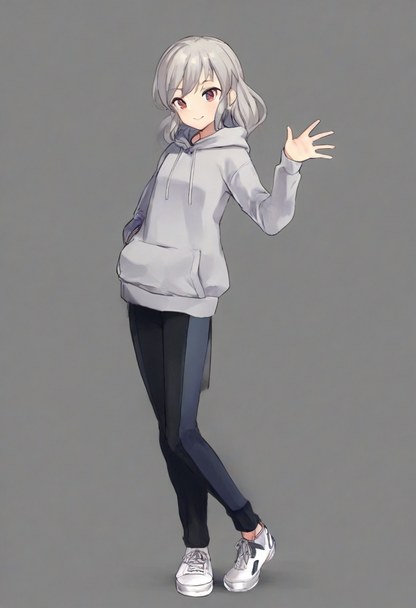
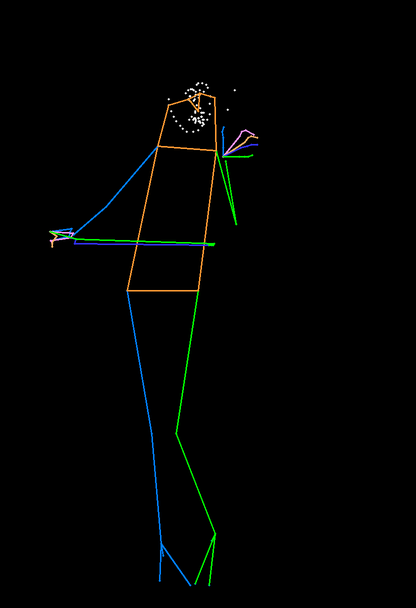
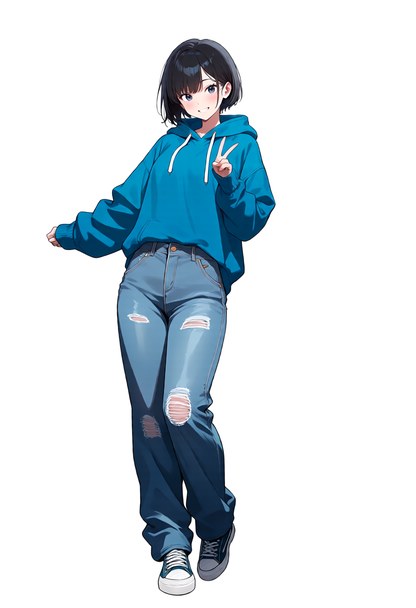
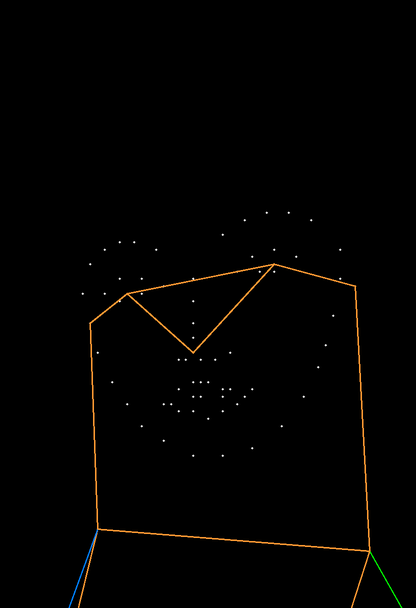
result.skeleton.save("skeleton.png") # feed this to your ControlNet or pose adapterOne reference, two skeletons, two pictures generated from them:
| Reference | Turned: Camera(yaw=-30) |
Generated | Close-up: Framing(zoom=5) on the face |
Generated |
|---|---|---|---|---|
 |
 |
 |
 |
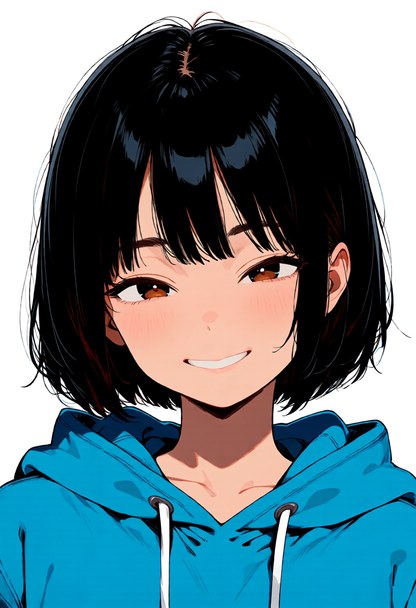 |
All pictures were generated for this README. The reference: Illustrious XL
2.0, "1girl, solo, full body, standing, waving, one hand raised, head tilt,
grey hoodie, black pants, white sneakers, simple background", seed 13. The
other two: Anima Base 1.0 with Anima-Control-Pose (dwpose style), 832×1216,
30 steps, CFG 5, "1girl, solo, short black hair, blue oversized hoodie, loose
jeans, sneakers, front view, looking at viewer, smile, simple background"
plus "full body" or "portrait, face focus, close-up", seed 43 each (picked
from four and three). The skeleton sets the figure, the prompt everything
else. Note that Anima and Anima-Control-Pose are under CircleStone Labs'
non-commercial licence (pictures made with them are not restricted);
poseorbit itself does not use or include them.
Documentation: https://33rd-kk.github.io/poseorbit/ (guide, Python API, HTTP API, command line).
flowchart LR
  A[picture] --> B["find people<br/>YOLOX"]
  B --> C["133 keypoints<br/>DWPose"]
  B --> D["depth<br/>RTMW3D"]
  C --> E[choose a person<br/>or everyone]
  D --> E
  E --> F["turn<br/>yaw / pitch"]
  F --> G["fit onto the<br/>output canvas"]
  G --> H["frame<br/>zoom / centre"]
  H --> I["draw<br/>dwpose / openpose"]
One person detector feeds two keypoint models on the same boxes: DWPose gives x and y, RTMW3D (only when a turn is asked for) gives depth. The camera is orthographic and orbits the middle of the drawn people's hips. The turned pose is letterboxed onto the output's canvas, framed like a cropped photo, and drawn on black.
Turning a pose in 3D for ControlNet is not new (see related projects). poseorbit's choices are different:
- Depth for all 133 whole-body points, from one picture. x and y come from DWPose (RTMW-DW-x-l) and depth from RTMW3D-x, run on the same person boxes. Hands and face turn with the body instead of staying flat or being dropped, and the front view is pixel-identical to plain 2D detection.
- Choose a person in a group. Everyone found comes back left to right with a box, so index 1 is the same person on every call. Draw one of them or all of them, turned together around a shared centre so the group keeps its layout.
- Drawn for the model that will read it.
dwposeis rtmlib's COCO-WholeBody drawing (thin lines, hands and face), the usual input of DWPose-trained adapters.openposeis the thick, body-only drawing xinsir's OpenPose ControlNet for SDXL was trained on, line width growing with the canvas as its model card specifies. - Framing, not just turning. Zoom from ×0.5 to ×6 around any point of the output canvas: a face or upper-body close-up from a full-body reference, or a smaller figure with room around it. The answer says how many body joints are left in the frame, so a client can warn when a body-only skeleton has little to follow.
- What you preview is what is followed. The whole mapping (turn, letterbox, framing) is specified below, so a browser viewer can show exactly what will be drawn. Latentry's three.js view is tested against it to within 0.05 px.
- No framework attached. No ComfyUI or web UI required, no torch, no
GPU: a library,
python -m poseorbit draw, orpython -m poseorbit serveansweringPOST /api/pose. A generation server can embed the same handler (poseorbit.api.handle) so both speak one API. - Guard rails from measurement. Turning is held to ±90° yaw and ±45° pitch, where single-picture depth is still mostly right. Detections with fewer than 8 of 17 body joints seen are not offered as people (a blank canvas otherwise "finds" one).
Generated with and without the skeleton, same seed, 832×1216. The score is PCK@0.1 of the re-detected output against the skeleton: 1.0 means every point landed within 10% of the diagonal of where the skeleton put it.
| Model | Pose | Without | With |
|---|---|---|---|
Illustrious XL 2.0 + xinsir OpenPose ControlNet (openpose) |
walking, front | 0.76 | 0.94 |
| same | standing, front | 0.47 | 0.76 |
| same | walking, turned yaw 45° / yaw −60° pitch 15° | — | 0.94 / 0.88 |
Anima Base 1.0 + Anima-Control-Pose (dwpose) |
walking, front | 0.06 | 0.71 |
| same | walking, turned yaw 45° | — | 0.94 |
Framed, scored on the body and face points left in the frame (the prompt says "upper body" or "portrait, close-up" in both runs):
| Model | Framing | Without | With |
|---|---|---|---|
| Illustrious XL 2.0 + xinsir ControlNet | upper body, ×2 | 0.02 | 1.00 |
| same | face, ×5 (7 body joints left) | 0.48 | 0.99 |
| Anima Base 1.0 + Anima-Control-Pose | upper body ×2 / face ×5 | 0.93 / 0.97 | 0.93 / 0.99 |
Anima already centres a close-up by itself, so its score barely moves; with the skeleton the head's tilt and turn follow the reference. Detection takes about 0.7 s for one person on a desktop CPU, all three models together.
Python 3.10 or newer.
pip install poseorbit
pip install "poseorbit[server]"     # with the HTTP server
The latest main, before it is released:
pip install "poseorbit @ git+https://github.com/33rd-kk/poseorbit".
The model files (about 700 MB, all Apache-2.0) download from Hugging Face on
first use into ~/.cache/poseorbit, or the weights_dir you give Detector.
from pathlib import Path
from PIL import Image
from poseorbit import ALL_PEOPLE, Camera, Detector, Framing, pose

detector = Detector(weights_dir=Path("weights"))   # load once, reuse; thread-safe
picture = Image.open("reference.png")

people = detector.detect(picture)                  # everyone, left to right
print([p.bbox for p in people])                    # boxes in the picture's pixels

result = pose(detector, picture, size=(832, 1216), person=ALL_PEOPLE,
              camera=Camera(yaw=-30), style="dwpose")
result.skeleton            # PIL image, 832x1216, on black
result.joints_in_frame # body joints left inside the canvasimport torch
from diffusers import ControlNetModel, StableDiffusionXLControlNetPipeline
controlnet = ControlNetModel.from_pretrained("xinsir/controlnet-openpose-sdxl-1.0", torch_dtype=torch.float16)
pipe = StableDiffusionXLControlNetPipeline.from_pretrained(
"stabilityai/stable-diffusion-xl-base-1.0", controlnet=controlnet, torch_dtype=torch.float16
).to("cuda")
skeleton = pose(detector, picture, size=(832, 1216), camera=Camera(yaw=45), style="openpose").skeleton
image = pipe("1girl, full body", image=skeleton, width=832, height=1216).images[0]python -m poseorbit draw ref.png skeleton.png --size 832x1216 --person -1 --yaw 40 --style openpose
python -m poseorbit draw ref.png face.png --size 832x1216 --zoom 5 --centre 0.62,0.2python -m poseorbit serve --port 7870 # set POSEORBIT_TOKEN to require a Bearer tokencurl -s localhost:7870/api/pose -H 'Content-Type: application/json' -d '{
"image_base64": "<base64 PNG or JPEG>", "width": 832, "height": 1216,
"person": 0, "want_3d": true,
"camera": { "yaw": 30, "pitch": 10, "framing": { "zoom": 2, "x": 0.5, "y": 0.35 } },
"style": "openpose" }'{ "skeleton_base64": "…png…", "width": 832, "height": 1216, "person": 0,
"camera": { "yaw": 30, "pitch": 10, "framing": { "zoom": 2, "x": 0.5, "y": 0.35 } },
"style": "openpose", "limits": { "yaw": 90, "pitch": 45, "zoom": [0.5, 6] },
"joints_in_frame": 13,
"people": [ { "bbox": [0.31, 0.2, 0.8, 1.0],
"points_3d": [[0.61, 0.24, -0.03], "…"], "scores": [0.92, "…"] } ] }Everything but image_base64 is optional. person is an index into
people (left to right), -1 for everyone, or absent for the most
confident. want_3d adds each person's 133 points as [x, y, z] in units of
the picture's width, for a 3D viewer. Out-of-range angles and zoom are
clamped; a picture with nobody in it, or a person index past the end, gets a
400 with a detail message. Server and API are 127.0.0.1-only by default.
| Name | What it is |
|---|---|
Detector(weights_dir=None, device="cpu") |
Loads the models on first use. detect(image, depth=False) -> list[Person], left to right; raises NoPersonError. |
pose(detector, image, size, person=None, camera=None, style="dwpose", depth=False, framing=None) -> PoseResult |
Detect, choose, turn, frame and draw in one call. |
Camera(yaw=0, pitch=0) |
Degrees. +yaw swings the camera to the viewer's right, +pitch raises it. Clamped to MAX_YAW (90) / MAX_PITCH (45). |
Framing(zoom=1, x=0.5, y=0.5) |
The canvas point (x, y) (fractions) goes to the middle, scaled by zoom (MIN_ZOOM 0.5 to MAX_ZOOM 6). |
PoseResult |
skeleton (PIL image), people, person, camera and framing as used, joints_in_frame. |
Person |
keypoints (133×2), scores (133), depth (133 or None), bbox, visible (body joints seen), points_3d. |
render(keypoints, scores, size, style) |
Draw (N, 133, 2) keypoints on a black size canvas. |
letterbox(skeleton, size) |
Fit a skeleton drawn at another size onto size, uniformly scaled and centred. |
poseorbit.api.handle(detector, body, default_style) |
The /api/pose handler without a web framework, to embed in another server. |
| Style | Drawing | For |
|---|---|---|
dwpose |
rtmlib's COCO-WholeBody: thin coloured lines, body, feet, hands and face | DWPose-trained adapters, such as Anima-Control-Pose |
openpose |
18 OpenPose body points, thick translucent limbs scaled with the canvas | OpenPose ControlNets, such as xinsir/controlnet-openpose-sdxl-1.0 |
x right, y down, depth away from the viewer, all in the picture's pixels
(the API scales them by the picture's width). The camera at (yaw, pitch)
stands at (sin yaw · cos pitch, −sin pitch, −cos yaw · cos pitch) from the
centre (the middle of the drawn people's hips). In a y-up, z-toward-viewer
frame such as three.js that is (sin yaw · cos pitch, sin pitch, cos yaw · cos pitch).
The turned picture is letterboxed onto the output canvas, then framed:
canvas point (x, y) (fractions) goes to the middle and everything scales
by zoom around it. Framing never moves the point the camera orbits.
- Depth is estimated from a single picture: past a side view, which limb is in front gets unreliable. That is why the camera is limited.
- Chosen from a group, a person is drawn where they stand in the picture, letterboxed onto the output. A small figure gives a small skeleton, which models follow loosely; zoom in on them.
- Some models do not tell front from back by the skeleton alone. Anima, for
one, often draws a strongly turned figure from behind. What helps: turn
away from the side the figure already shows (look at
Person.depth: the nearer shoulder is the smaller value), keep the turn moderate, and put "front view" in the prompt and "from behind" in the negative. - Animals and non-human figures are not detected.
Other ways to get a turned or posed skeleton, each with its own strengths:
- 3D Openpose Editor: a browser 3D mannequin editor for Stable Diffusion web UI, with hand editing and depth, normal and canny maps.
- ComfyUI-Magos-Nodes: a DWPose skeleton editor for ComfyUI with NLF-based 3D, an orbit view and animated cameras for video.
- ComfyUI-Fisher-Pose: a posable MakeHuman mannequin and camera moves for Qwen-Image editing.
- RTMW / RTMW3D and rtmlib: the models and the runtime poseorbit is built on.
Latentry, a local web UI for diffusion backends, uses poseorbit for its pose slot and its 3D pose view.
pip install -e ".[test,server]"
pytest                             # geometry and API checks; no model download
python scripts/make_banner.py # redraws docs/assets/banner-*.pngReport vulnerabilities privately through GitHub's reporting; see SECURITY.md.
Apache-2.0. See LICENSE, and NOTICE for the third-party
work poseorbit builds on (rtmlib; the OpenPose drawing from xinsir's model
card and controlnet_aux). The model files (OpenMMLab's YOLOX, RTMW and
RTMW3D, Apache-2.0) are downloaded, not shipped. Models you condition with
the skeletons keep their own licences. The example pictures in
docs/assets were generated by the author for this README.