Summary
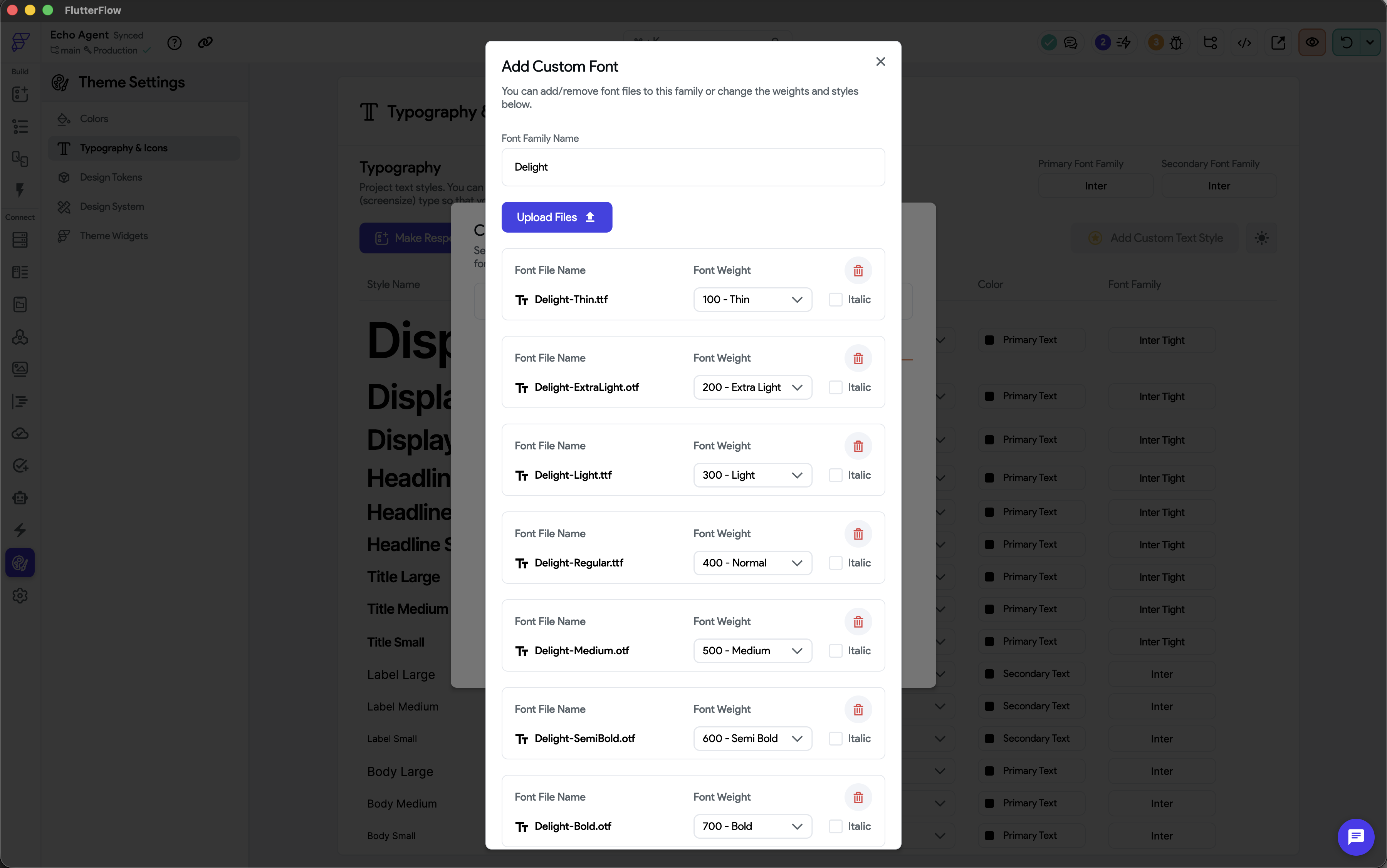
The Add Custom Font modal (Theme Settings → Typography & Icons → Add Custom Font) is not a scrollable column. When a custom font family has more than ~4 weights, the list of font files overflows the modal, and the Add button at the bottom of the modal is hidden below the viewport. There is no way to scroll the modal, so the font cannot be added.
Screenshot
Steps to Reproduce
- Open a project and go to Theme Settings → Typography & Icons.
- Click Add Custom Font.
- Upload a font family that contains more than ~4 weights. (In the screenshot below, the Delight family has 7 weights: Thin, Extra Light, Light, Regular, Medium, Semi Bold, Bold.)
- Observe that the modal's font file list extends below the visible area, and the Add / Cancel buttons are not visible or reachable.
Expected
The list of font files inside the modal should be scrollable, or the modal itself should be scrollable, so the action buttons remain accessible regardless of how many font files are loaded.
Actual
The list and the action buttons are clipped off the bottom of the viewport. There is no scroll handle and the page behind the modal cannot be scrolled while the modal is open. The user is effectively stuck — they cannot save or cancel the modal without resizing the browser window.
Environment
- FlutterFlow Mac app (occurs in both latest production and beta)
- FlutterFlow web app: any (reproduced inlatest Chrome mac desktop viewport)


Summary
The Add Custom Font modal (
Theme Settings → Typography & Icons → Add Custom Font) is not a scrollable column. When a custom font family has more than ~4 weights, the list of font files overflows the modal, and the Add button at the bottom of the modal is hidden below the viewport. There is no way to scroll the modal, so the font cannot be added.Screenshot
Steps to Reproduce
Expected
The list of font files inside the modal should be scrollable, or the modal itself should be scrollable, so the action buttons remain accessible regardless of how many font files are loaded.
Actual
The list and the action buttons are clipped off the bottom of the viewport. There is no scroll handle and the page behind the modal cannot be scrolled while the modal is open. The user is effectively stuck — they cannot save or cancel the modal without resizing the browser window.
Environment